2,200 chars · 3–5 hashtags · Pick as many as you like. Each gets its own post, written to that platform’s limit and habits, in one request.
LengthStandard
Let’s write a post!
Type a few lines about what you want to say, or paste a blog post, product page or press release to turn into posts. Add your brand, link and audience under Details.
Drop your file herePDF, DOCX or TXT
Generated posts
Your posts will appear herePick the platforms, a format and a tone, describe the post, then press Generate. Each platform gets its own editable card with a live character count.
Checking your limit...
Ctrl + Enter
Guest access
Free AI post and caption writer
Free AI Social Media Post Generator and Caption Generator
Write what you want to say in a line or two and pick your platforms. You get a separate post for each one, written to fit that platform’s character limit, with opening lines to choose from and hashtags you can add with a click. You don’t need an account.
PriceFree. As a guest you can write 15 drafts a day from briefs of up to 400 words. A free account gives 40 drafts a day and 1,000-word briefs, and Pro gives 400 a day and 3,000 words. Only your brief counts toward the words, never the posts.
PlatformsX (Twitter), Instagram, Facebook, LinkedIn, TikTok, YouTube, Threads, Pinterest, Reddit, and WhatsApp or Telegram. Pick one, a few, or all ten.
FormatsA post, a thread or carousel, or a short video script with scenes and timings.
What else comes backThree opening lines to choose from, hashtag sets you add with a click, a title for YouTube, Pinterest and Reddit, YouTube tags, alt text for Instagram and Pinterest, and a suggested Reddit flair.
Languages64 languages, or it writes in the language of your brief.
Your textWe don’t keep your brief. It’s used to write the posts and then it’s gone. Your posts and settings stay in your own browser.
Three steps. Most briefs come back in two to six seconds, and a request for all ten platforms takes about ten.
1
Write the brief
Say what the post is about in plain words. “We open a second shop on Saturday, first 50 customers get a free coffee” is plenty. Put in every name, date, price and link you want in the post, because the tool won’t make them up for you. You can also upload notes or a press release as .docx, .pdf or .txt.
2
Pick platforms, format and goal
Choose the platforms, then a post, a thread or carousel, or a video script. Set the tone (eight to choose from), the goal (seven) and the length. Under Details you can add your brand, audience, link, call to action, words to include and words to avoid. They’re kept for next time.
3
Check, tweak and copy
Each platform gets its own card with a live character count. Click a hook to swap the opening line, click hashtags to add or remove them, and edit any line in place. Then copy one card, copy them all, or download the set as Word, PDF or plain text.
One brief, four posts: a real run, printed as it came back
We typed this brief in as a guest on 1 October 2026, with the Friendly tone, the Announce goal, Standard length and a link under Details. It came back in 4.0 seconds. Everything on the right is unedited, character counts included.
Your brief
Our bakery, Crumb & Co in Lahore, opens a second branch on MM Alam Road on Saturday 12 October. Opening day: the first 50 customers get a free cinnamon roll. Croissants are Rs 350. Open 8am to 10pm.
Details: link crumbandco.pk. Platforms: Instagram, X, LinkedIn, Facebook.
Instagram hooks offered: Ready for a sweet surprise on Lahore’s MM Alam Road? / Imagine biting into a warm cinnamon roll, free for the first 50 guests. / On 12 Oct, our ovens fire up at a brand-new spot.
Posts returned
Instagram 426 / 2,200
Ready for a sweet surprise on Lahore’s MM Alam Road?
Crumb & Co is opening its second bakery on MM Alam Road this Saturday, 12 October. We’ll be serving croissants at Rs 350 and the first 50 customers will receive a free cinnamon roll.
Come early, enjoy the aromas from 8 am to 10 pm, and discover your new favourite treat.
Visit us and follow the link in bio for details.
#Bakery #Lahore #Foodie #CinnamonRoll #CrumbAndCo
X (Twitter) 226 / 280
Who’s craving a free cinnamon roll this Saturday?
Crumb & Co opens a second bakery on MM Alam Road, Lahore, on 12 Oct. First 50 guests get a free cinnamon roll, croissants are Rs 350. Open 8 am-10 pm.
https://crumbandco.pk
LinkedIn 404 / 3,000
Looking for a fresh bakery spot in Lahore?
Crumb & Co announces the opening of our second branch on MM Alam Road, launching Saturday 12 October. We’ll be serving croissants at Rs 350 and the first 50 customers will enjoy a complimentary cinnamon roll.
Hours: 8 am – 10 pm.
Learn more: https://crumbandco.pk
Will you be among the first to taste our new offerings?
#Croissant #CinnamonRoll #MMAlamRoad
Facebook 365 / 63,206
Crumb & Co is expanding in Lahore!
We’re opening a second bakery on MM Alam Road this Saturday, 12 October. The first 50 customers will receive a free cinnamon roll, and our croissants are priced at Rs 350.
We’ll be open from 8 am to 10 pm. Come early and be part of the celebration.
Check out more details here: https://crumbandco.pk
Who’s planning to stop by?
What went right: every fact made it into every post, the four openings are different, Instagram says “link in bio” while the others print the link, and nobody claims the shop is already open. What we’d change: Instagram added “discover your new favourite treat”, which the brief never said, and LinkedIn mixes “Crumb & Co announces” with “our”. Both take a few seconds to fix, which is why every card is editable.
Three more real runs
Also typed in as a guest on 1 October 2026 and printed without edits.
Job post, hashtags and hooks off
We are hiring a junior frontend developer in Karachi. React and TypeScript. Hybrid, 3 days in the office. Salary PKR 180,000 to 250,000 a month. Apply by 20 October at careers.example.com/frontend.
Settings: LinkedIn and X, Professional tone, Recruit goal, hooks off, hashtags off.
Posts returned
LinkedIn 305 / 3,000
Join our team as a Junior Frontend Developer in Karachi.
Work with React and TypeScript on real projects.
Hybrid schedule: three days in the office, two remote.
Salary PKR 180,000-250,000 per month.
Apply by 20 October at careers.example.com/frontend.
What excites you about building user interfaces?
X (Twitter) 166 / 280
Hiring: Junior Frontend Developer in Karachi. React + TypeScript. Hybrid (3 office days). Salary PKR 180,000-250,000/mo. Apply by 20 Oct: careers.example.com/frontend
No hashtags and no hook buttons, as asked. The salary range, the deadline and the link are all there. One thing to check: LinkedIn says “two remote”, but the brief only said three days in the office. If your week has six working days, fix that line.
TikTok video script
How to make cold brew coffee at home: 100 g coarse ground coffee to 1 litre of cold water, steep 16 hours in the fridge, strain through a paper filter, dilute 1:1 with water or milk.
Settings: TikTok and YouTube, Video script, Casual tone, Educate goal.
TikTok script returned
Hook
Ready for the smoothest coffee ever?
0-3s [Gather ingredients] Grab 100 grams of coarse coffee and a litre of cold water.
3-6s [Mix coffee & water] Stir them together in a big jar or pitcher.
6-12s [Refrigerate 16h] Seal it up and let it steep in the fridge for sixteen hours.
12-15s [Strain coffee] After the wait, strain through a paper filter.
15-20s [Dilute 1:1] Mix the concentrate with equal parts water or milk.
20-25s [Enjoy!] Sip your cold brew and feel the chill.
Closing line: Try it tonight and tag your brew!
Caption: Quick cold brew at home—no fancy gear needed. Got questions? Drop them below! #coffee #coldbrew #homebrew #coffeetips #DIY
Every step and number from the brief is in the script: 100 g, 1 litre, 16 hours, the paper filter and 1:1. That’s 72 spoken words, which the card estimates at about 29 seconds. The hook (“the smoothest coffee ever”) is a claim you might want to tone down.
Tagalog brief
Ang aming tindahan na Tindahan ni Aling Nena sa Quezon City ay may bagong sari-sari delivery tuwing Sabado. Libre ang delivery para sa order na higit sa ₱500. Mag-order sa Messenger.
Settings: Facebook and Instagram, Friendly tone, Sell goal, language detected from the brief.
Facebook post returned
Facebook 271 / 63,206
Kailangan mo ng grocery at pang-araw-araw na gamit ngayong Sabado?
May bagong sari-sari delivery ang Tindahan ni Aling Nena tuwing Sabado sa Quezon City. Libre ang delivery para sa order na higit sa ₱500.
Mag-order sa Messenger at ihanda ang listahan mo para sa Sabado!
The post stayed in Tagalog with the ₱500 minimum, Saturday, Quezon City and Messenger all kept. The Instagram card from the same run came with Tagalog hashtags such as #LibrengDelivery and #SabadoDelivery.
One brief, a different post for every platform
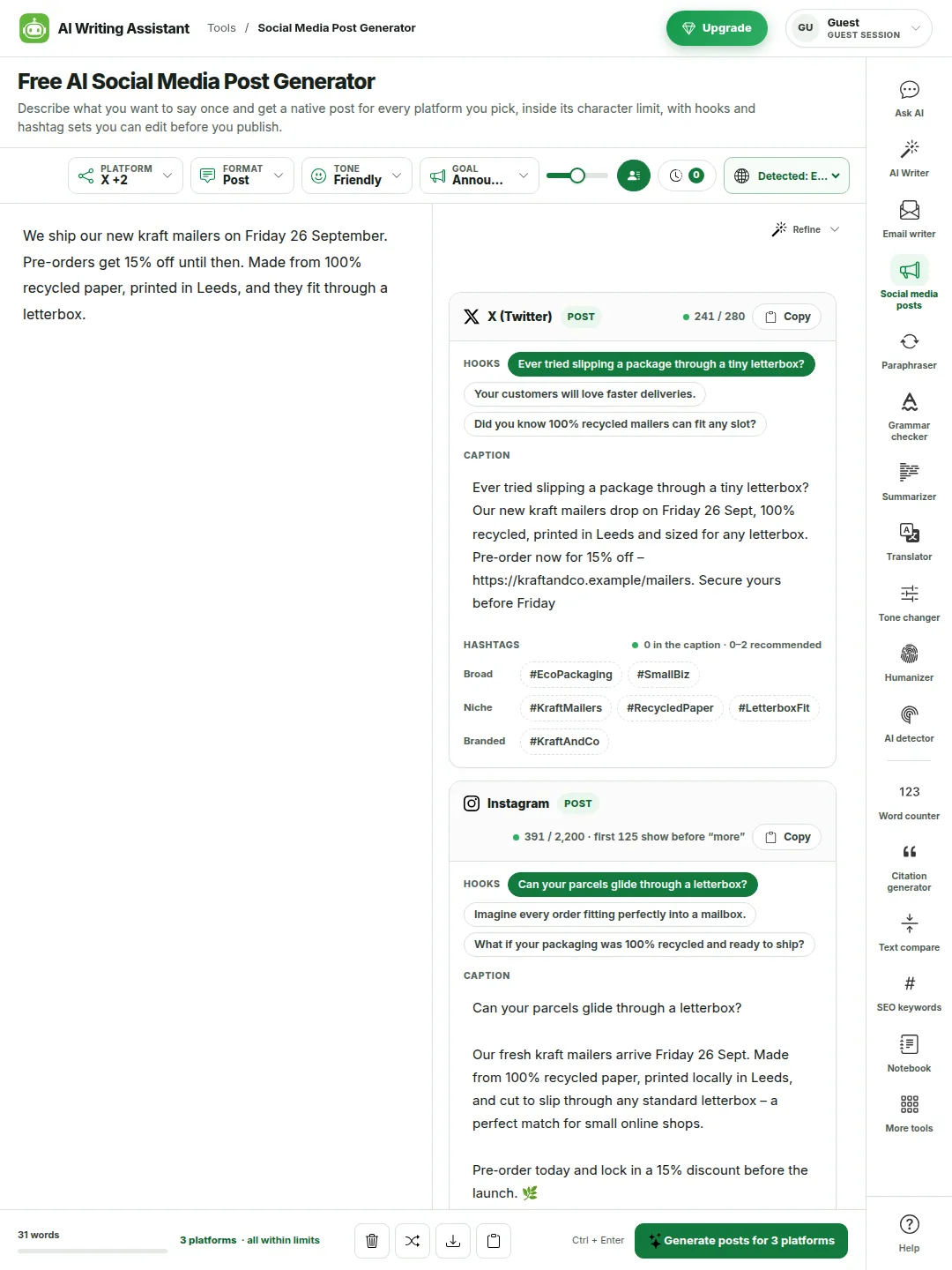
The tool doesn’t paste one caption everywhere. Each platform gets the length, layout, hashtags and call to action that fit it, from the same facts.
Pick platforms one by one, or choose all ten at once.
Every card shows the platform, the format and a character count against that platform’s limit. It turns amber near the limit and red over it.
Instagram and TikTok say “link in bio” because captions there can’t carry a working link. X, LinkedIn and Facebook print the link.
Two platforms never open on the same line. If the model repeats itself, the tool swaps in one of that card’s other hooks.
One brief, three platforms, from an earlier run. The counts are the tool’s own and nothing was edited.
A free AI caption generator for Instagram and TikTok
If all you need is an Instagram caption, pick Instagram and nothing else. The same goes for a TikTok caption or a Facebook post. A caption from this tool has a short opening line, a few lines of detail, a clear next step and a block of hashtags at the end. Emoji are light by default, and you can turn them off or up under Details.
The opening line comes first
Instagram shows about 125 characters before “more”, and TikTok shows even less. So the caption starts with the line that matters, and you get two other openings to try.
No filler words
The tool leaves out “Exciting news!”, “game-changer”, “level up” and the rest. If the model slips in praise you never gave, like “buttery” or “award-winning”, it’s taken out before you see the card.
Hashtags at the end
Hashtags sit on their own line under the caption, so they don’t break up what people read. Three to five on Instagram is the usual advice now, and that’s what you get.
Ten platforms, each with its own rules
A caption that works on Instagram is too long for X and too salesy for Reddit. Here’s what the tool writes for each one.
X (Twitter)
280 characters, and a link counts as 23. One idea per post, hashtags only if they help. Threads come as numbered posts.
Tweet and thread generator
Instagram
2,200 characters, but only about 125 show before “more”. Three to five hashtags at the end, plus alt text for your image.
Instagram caption generator
Facebook
Long posts are allowed, though about 477 characters show before “See more”. Written like you’re talking to your community, with few or no hashtags.
Facebook post generator
LinkedIn
3,000 characters, and about 210 show before “see more”. Short lines, one clear point, a question at the end and three to five hashtags.
LinkedIn post generator
TikTok
A short caption that adds to the video rather than repeating it, three to six hashtags, or a full video script.
TikTok caption and script generator
YouTube
A title of up to 100 characters, a description of up to 5,000 and a tag list under 500, each returned on its own.
YouTube title and description generator
Threads
500 characters and one topic tag at most. Written to start replies.
Threads post generator
Pinterest
A Pin title of up to 100 characters and a 500-character description written for Pinterest search, plus alt text.
Pin description generator
Reddit
A plain title of up to 300 characters, a first-person body, no hashtags and a suggested flair.
Reddit post writer
WhatsApp / Telegram
A broadcast or channel message of up to 4,096 characters, easy to read on a phone, with no hashtags.
Broadcast message writer
Social media character limits the posts are written to
These are the numbers each card is counted against. On X and Threads, and for every title, a post that comes back over the limit is sent back and written again before you see it. On the other platforms you’ll see the counter turn red, and you can trim it.
Platform
Limit
Shown before “more”
Hashtags
Also returned
X (Twitter)
280 characters (25,000 with Premium). A link counts as 23
All of it
0 to 2
Thread of up to 25 posts, video script
Instagram
2,200 characters
About 125 characters
Up to 30, 3 to 5 suggested
Alt text, carousel slides, Reels script
Facebook
63,206 characters
About 477 characters
0 to 3
Carousel cards, video script
LinkedIn
3,000 characters
About 210 characters
3 to 5
Document carousel slides, video script
TikTok
4,000 characters
About 100 characters
3 to 6
Photo carousel slides, video script
YouTube
Title 100, description 5,000, tags 500
About the first 157 characters of the description
Up to 15, 3 to 5 suggested
Title, tag list, Shorts script
Threads
500 characters
All of it
One topic tag
Thread of up to 20 posts, video script
Pinterest
Title 100, description 500
About 50 characters of the description
Up to 20, 2 to 5 suggested
Pin title, alt text, video script
Reddit
Title 300, body 40,000
The title
None
Suggested flair
WhatsApp / Telegram
4,096 characters
The first screen
None
Nothing extra
The limits are the ones the platforms publish. “Shown before more” is roughly what a phone shows, and it moves a little with screen size and app version.
Threads, carousels and video scripts
The same brief can come back as a numbered X thread, a set of carousel slides or a short video script. You pick the format once and each platform gets the version it supports.
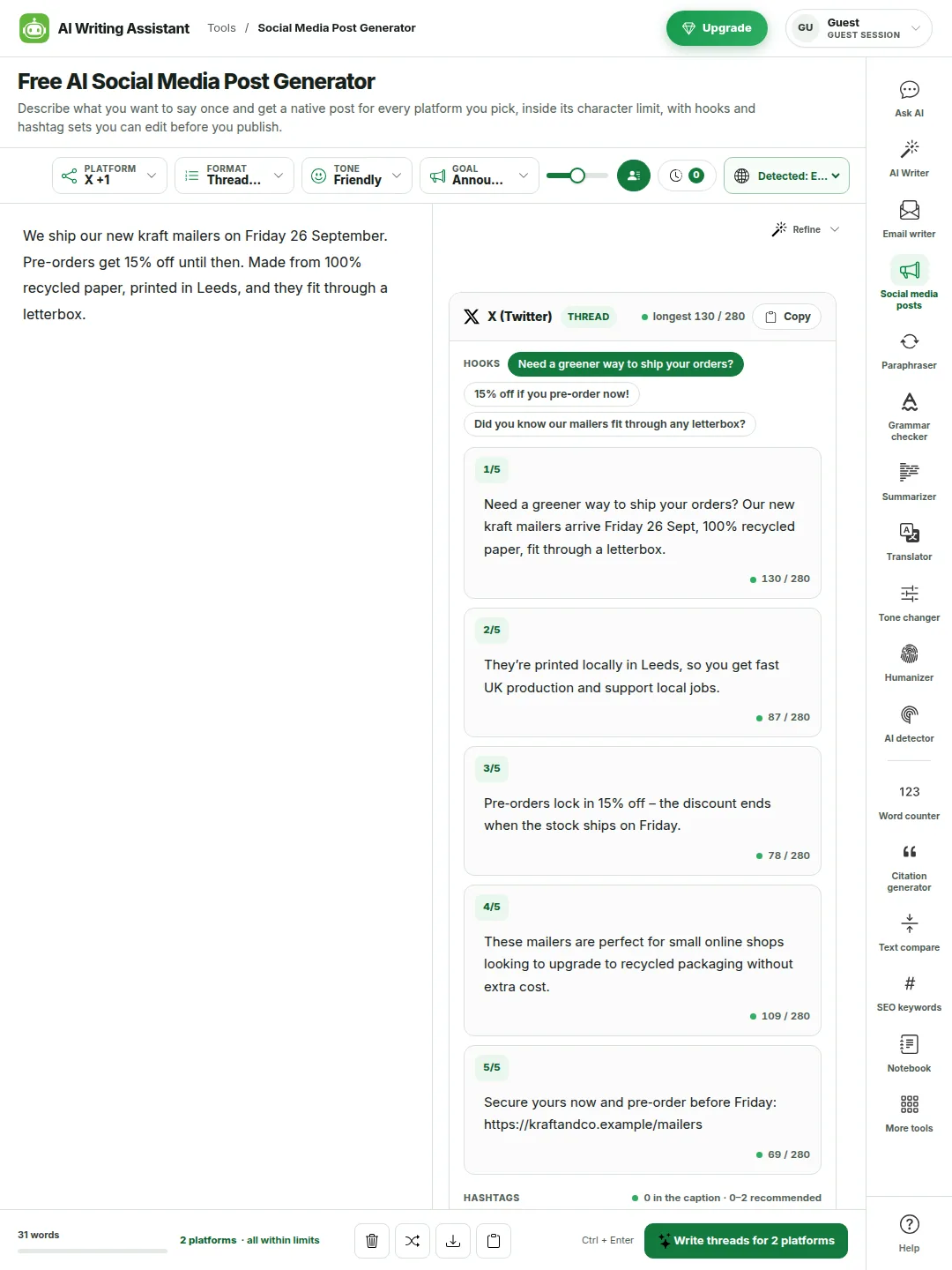
Thread on X and Threads. Each post is numbered and inside the limit, and the first one works on its own.
Carousel on Instagram, LinkedIn, Facebook and TikTok. Every slide gets a short title and a few lines, plus a caption to post it with.
Video script for TikTok, Reels, Shorts and YouTube. You get a spoken hook, scenes with timings, on-screen text, the voice line and a closing line. The card adds up the spoken words and tells you roughly how many seconds it runs.
Reddit and WhatsApp have no thread or video format, so they get a normal post and the card says so.
Thread format on X: five numbered posts, every one inside the limit.
Post, thread or script: what each format gives you
Format
What you get
Platforms
Post
The usual post for that platform. A caption with hashtags on Instagram and TikTok, a title and description on YouTube and Pinterest, a title and body on Reddit, a message on WhatsApp.
All ten
Thread or carousel
A numbered thread on X and Threads. Carousel slides with a caption on Instagram, LinkedIn, Facebook and TikTok.
X and Threads (thread). Instagram, LinkedIn, Facebook and TikTok (carousel). The rest get a post
Video script
A spoken hook, five to eight scenes with timings, on-screen text and voice lines, a closing line and the caption to post with.
Every platform except Reddit and WhatsApp
Hashtags, hooks and quick fixes
How the hashtag generator picks its sets
Each card comes with three sets: broad tags, niche tags and tags made from your brand or business name. Click a tag to add it to the caption and click again to take it off. The counter shows how many you have against that platform’s maximum. We don’t show hashtag search numbers, because there’s no free source for them that we trust.
Why you get three hooks
The hook is the first line, and on most platforms it’s the only line people see before they decide to read on. You get three that try different things, often a question, a plain statement and a number. Click one and it becomes the first line. The rest of the post stays as it was. Hooks that claim things your brief never said, like “the best in town”, are dropped.
The Refine menu
Not quite right? Refine rewrites the whole set the way you ask: Shorter, Punchier hook, More casual, More professional, End with a question, Fewer hashtags, More hashtags or Different angle. Regenerate gives you a fresh take on the same brief.
Your own words, kept
Every name, date, price, time and link in your brief has to appear in the set, or the draft is sent back. Words you list under “Words to avoid” are checked the same way, and words to include are worked in where they fit.
What it won’t do for you
Promise reach. Whether a post spreads depends on your account, the timing, the picture or video and your audience. No tool can promise that, and this one doesn’t try.
Know facts you didn’t give it. If you want “2,000 customers” or a discount in the post, put it in the brief. It won’t invent numbers, reviews, awards or deadlines.
Catch every bit of praise. It takes out the common ones, but a line like “discover your new favourite treat” can still get through. Read each card once before you post.
Post for you. It writes the posts. You copy them and publish them yourself.
The cards are meant to be edited. Changing two or three words is usually what makes a post sound like you rather than a template.
How much you can write for free
The five writing tools (AI Writer, Email Writer, this one, Headline Generator and AI Content Generator) share one daily count of drafts. Only the words in your brief count, never the posts that come back.
Plan
Words per brief
Drafts a day
Words a day across the site
Guest (no account)
400
15
2,500
Free account
1,000
40
6,000
Pro
3,000
400
No daily word cap
Every platform, format, tone and goal is open on every plan. Pro also removes the ads. See pricing for the full list.
Tips for a better post
Give it the facts
The posts can only be as specific as your brief. Dates, prices, places, names and the link all belong in it. “New menu on Friday” makes a vague post. “Five new dishes from Friday 3 Oct, mains from Rs 900” makes a useful one.
One message per post
If you have two announcements, write two briefs. A post that tries to say three things usually gets none of them read.
Set Details once
Brand, audience, link and call to action are kept between posts, so every card ends the same way without you typing it again.
Match the room
Use a casual tone for Instagram and TikTok and a professional one for LinkedIn. Each card already adjusts to its platform, but the tone you pick sets the starting point.
Put the search words in
For YouTube and Pinterest, add the words people would type under “Keywords to include”. The title and the first lines of the description are where they count.
Read it out loud
Before you post, read the card once as yourself. If a line sounds like something you’d never say, change it or click Refine.
Questions people ask
What is an AI social media post generator?
It’s a tool that turns a short description of what you want to say into finished posts. This one knows each platform’s character limit, how much shows before “more”, how many hashtags are normal there and which extra parts it needs, like a YouTube title or Instagram alt text. It returns each post in that shape.
Is this social media post generator free?
Yes. You can use every platform, format, tone and goal without an account. Guests get 15 drafts a day from briefs of up to 400 words. A free account gives 40 a day and 1,000 words, and Pro gives 400 a day and 3,000 words. The pricing page has the details.
Is there a free AI caption generator for Instagram?
This is one. Pick Instagram as the only platform, write a line or two about the post and you get a caption with a short opening line, a few lines of detail, a next step, “link in bio” if you gave a link, three to five hashtags and alt text for your image. TikTok and Facebook captions work the same way.
Which platforms does it write for?
X (Twitter), Instagram, Facebook, LinkedIn, TikTok, YouTube, Threads, Pinterest, Reddit, and WhatsApp or Telegram broadcasts. You can pick one, several or all ten in one request.
Does it keep to each platform’s character limit?
Yes. Each card is counted against its platform’s limit, such as 280 on X (a link counts as 23), 2,200 on Instagram, 3,000 on LinkedIn and 500 on Threads. On X and Threads, and for titles, a post over the limit is written again before you see it. Elsewhere the counter turns amber near the limit and red over it.
Can it write one post for several platforms at once?
Yes. Pick as many platforms as you like and one request gives you one card per platform. They aren’t copies. The X post says one thing in 280 characters, the LinkedIn post is written to earn its “see more”, and the Reddit post drops the sales voice. The facts from your brief are the same in all of them.
Can it write an X thread or an Instagram carousel?
Yes. Choose Thread / carousel. X and Threads get a numbered thread with every post inside the limit. Instagram, LinkedIn, Facebook and TikTok get carousel slides, each with a short title and a few lines, plus the caption.
Can it write TikTok, Reels and YouTube Shorts scripts?
Yes. Choose Video script. You get a spoken hook, scenes with timings, the text on screen and the voice line, a closing line and the caption to post with. The card adds up the spoken words and estimates how many seconds the video runs.
How many hashtags should I use?
It depends on the platform. Three to five is the usual advice on Instagram and LinkedIn, three to six on TikTok, none to two on X, one topic tag on Threads and none on Reddit or WhatsApp. The tool follows those numbers and shows your count against them.
Does it show hashtag search volumes?
No. There’s no free and reliable source for hashtag volumes, so we don’t print numbers we can’t back up. The broad, niche and branded sets are suggestions you can pick from.
What are hooks, and why are there three?
A hook is the first line of a post. On most platforms it’s all people see before they decide to read on. You get three different openings for each card. Click one and it replaces the first line without changing the rest.
Will my post go viral?
Nobody can promise that. The tool writes the way posts that travel tend to read: a clear first line, one idea, hashtags that fit and nothing that sounds like an ad. Whether it spreads depends on your account, your timing, your picture or video and your audience.
Does it make things up?
It’s told not to, and it checks. Every number, date, price and link in your brief has to appear in the set. Common praise you never gave, like “award-winning” or “buttery”, is removed, and hooks that claim to be “the best” are dropped. A stray line can still get through, so read each card before you post.
Can it write in Tagalog, Urdu or other languages?
Yes. It writes in 64 languages, or it follows the language of your brief. Hashtags come in the language of the post. The character limits are the same in every language.
What happens to what I type?
Your brief and details are sent once to write the posts, and we don’t keep them as text afterwards. Your posts, platform choices and details are saved in your own browser so they’re there when you come back. The privacy policy has the details.
The rest of the toolkit
Every tool here works the same way, so the tone you pick for a post behaves the same in the email writer or the paraphraser. Run a caption through the grammar checker before it goes out, or count it with the word counter.

 Upgrade