
 Upgrade

Paste the message
Type or paste whatever you have — the blunt version, the angry version, the one that is technically fine but reads coldly. No sign-up.
Let’s set the tone!
Paste an email, chat message, review reply or announcement — or upload a Word, PDF or text file. Select any word to keep it exactly as written.
Paste a message, pick a tone and press Change tone. This free AI tone changer rewrites it to sound more professional, friendlier, more confident or more diplomatic, for the person who will read it. Then it shows what moved: the message is named before and after, and formality, warmth and directness are each scored from 1 to 5, so you can check that a firm no is still a no before you send it.
Last updated 30 September 2026 by the AI Writing Assistant team.
Three steps, and the third is the one that separates this from every other tone rewriter.
Type or paste whatever you have — the blunt version, the angry version, the one that is technically fine but reads coldly. No sign-up.
Eight audiences from Colleague to Client to Friend, and eight situations from Request to Apology to Disagreement. A disagreement with your manager and a disagreement with a customer are not the same writing problem.
Pick a tone and an intensity. The result comes back with changed words highlighted and a tone analysis showing what moved — so you can confirm the message still says what you meant it to say.
A quick update to a manager, typed the way people type on a phone. Professional tone, Balanced intensity, audience Manager, situation Follow-up. Run on 30 September 2026 and printed unedited.
hey, the report isnt done yet cause the data from sales came in late. ill have it to you by thursday, probably afternoon. if you need something before that let me know and ill send what i have.
Hey, the report isn’t complete yet because the sales data arrived late. I expect to have it to you by Thursday afternoon. If you need anything beforehand, please let me know and I’ll send what I have.
The tone check recorded formality 1 → 4, warmth 3 → 3 and directness 2 → 4. Two things are worth changing by hand before sending.
Capitals, apostrophes and punctuation, “cause” to “because”, and the vague “came in late” to “arrived late”. The offer to send what you have survived, and the tone stayed warm rather than stiff.
It still opens with “Hey,”. Many managers will not mind, but for a first message or a senior reader, change it to “Hi” plus their name.
“Probably afternoon” became “by Thursday afternoon”. The hedge is gone, so it now reads as a promise. If afternoon is only a guess, put “probably” back or run it again at Subtle.
Tone labels are useless without a situation attached. Five are free: Professional, Friendly, Confident, Casual and Concise. Empathetic, Persuasive, Diplomatic and Custom come with Pro, and so does the Strong setting.
Polished and clear, never stiff. The default for anything work-related that is not delicate.
Warm, approachable and positive. Best when the relationship matters more than the transaction.
Direct and assured without arrogance. Removes the hedging that makes a good decision sound uncertain.
Relaxed and conversational. For people you actually know.
Acknowledges the other person’s position before making yours. The right tone for bad news you cannot avoid delivering.
Makes the case rather than stating it. Use where you are asking, not telling.
Tactful while keeping boundaries intact — the hardest tone to write by hand and the one people most often need.
Cuts repetition and keeps every fact. Length is a tone signal too.
Describe the voice you want in your own words.
Three intensities sit alongside — Subtle, Balanced and Strong — because “more professional” is a dial, not a switch.
Most tools in this category hand back a rewrite and ask you to trust it. This one reports the shift, so you can check that a refusal is still a refusal.
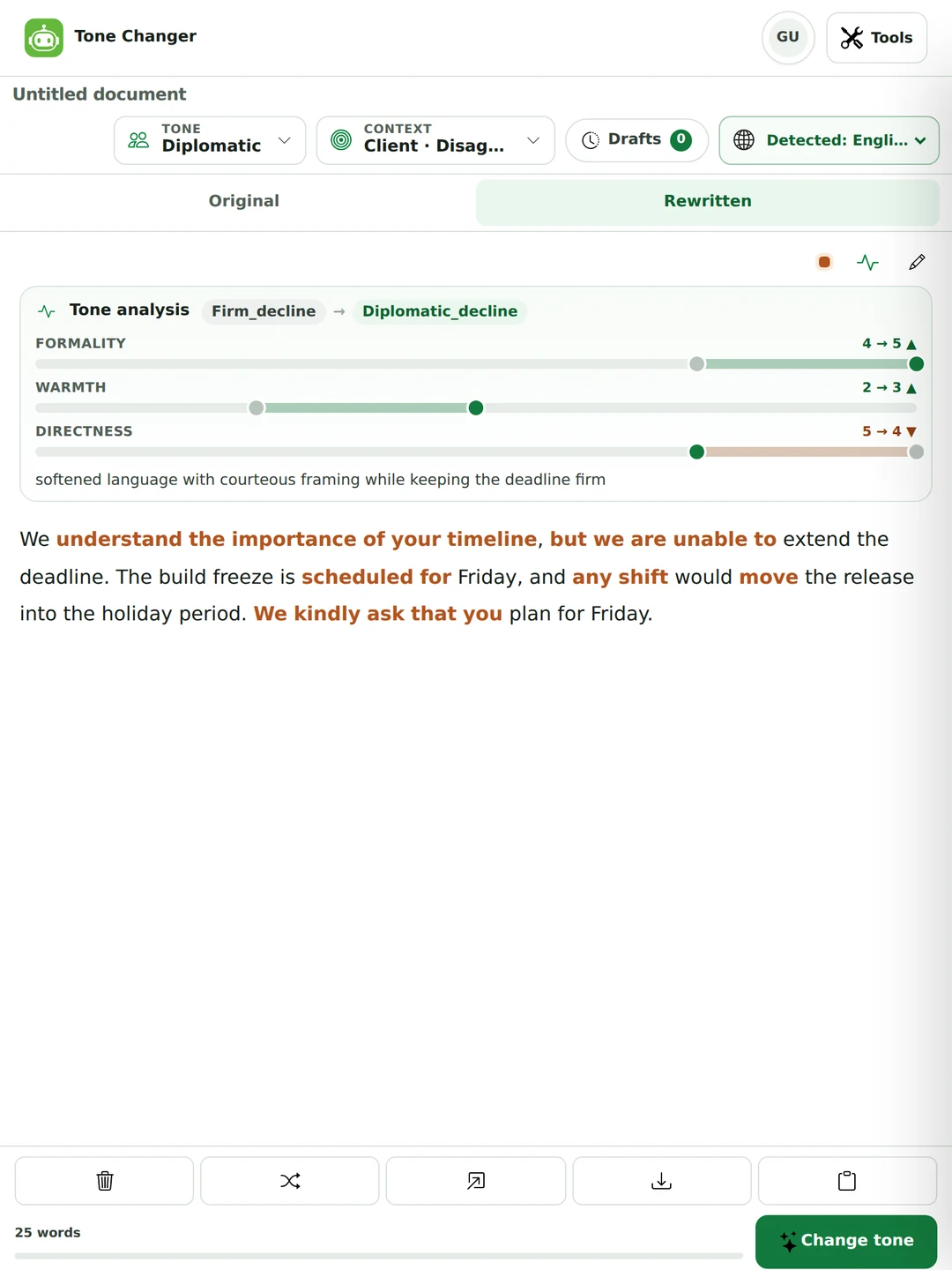
You do not need a separate tone checker to find out how a message reads. Every run reports on your original as well as the rewrite, so the first half of the analysis is a tone check of what you wrote.
A short label for the original, such as “casual informal” or “direct blunt”. If the label is not what you meant, that is the thing to fix, whichever tone you pick.
Formality, warmth and directness, each from 1 to 5, before and after. A refund refusal we ran started at warmth 1 and directness 5: accurate, and exactly why it read as cold.
Changed words are highlighted in the result, so you can see whether the tone moved through small word choices or through a rewrite of the sentence that carries your decision.
It works as an email tone checker too: paste the email, set the audience, and read the before scores. There is no check-only button, so a run always produces a rewrite, and the words count toward your allowance.
Almost no tone tool asks. Sixty-four combinations of audience and situation sit behind one button, because “professional” means something different to your manager and to a customer.
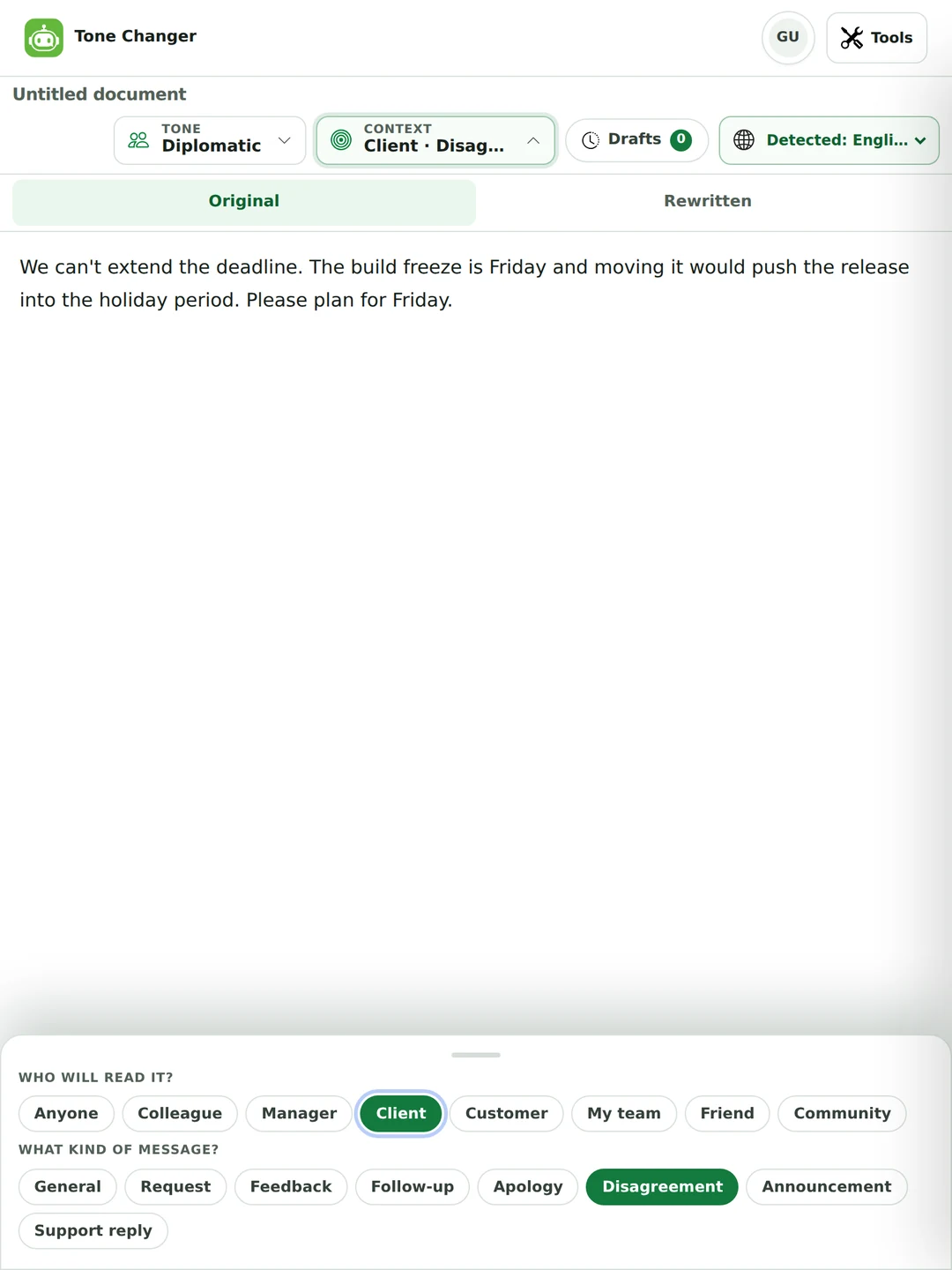
Diplomatic tone at Strong intensity, audience Client, situation Disagreement. Unedited.
We can't extend the deadline. The build freeze is Friday and moving it would push the release into the holiday period. Please plan for Friday.
We understand the importance of your timeline, but we are unable to extend the deadline. The build freeze is scheduled for Friday, and any shift would move the release into the holiday period. We kindly ask that you plan for Friday.
The analysis recorded formality 4 → 5, warmth 2 → 3 and directness 5 → 4. That last number is the one worth watching: directness dropped, which is what “diplomatic” means. What did not happen is the thing to check for — we are unable to extend the deadline is still an unambiguous no. Had it come back as “we will see what we can do”, the tone change would have quietly rewritten the decision.
Every tool in this category treats tone as a mood you select. It is not — whether you want to change the tone of a message by hand or with a tool, these are the levers being pulled, and naming them lets you check the result.
The tone analysis measures three of these directly as formality, warmth and directness. That is why it can show you a number rather than an adjective.
The category uses them interchangeably — one competitor even has an FAQ asking whether its tool is a “voice and tone changer” and never separates them. They are not the same and confusing them is how writing gets flattened.
It stays constant across everything you write. Your vocabulary, your habits of thought, the jokes you make and do not make. You should not want a tool to change this, and if the output no longer sounds like you, that is what went wrong.
It varies by message, reader and situation — warm here, firm there. The same person writes a condolence and a chase-up in completely different tones, and both are still theirs. This is what a tone changer should touch.
Frozen, formal, consultative, casual, intimate. Register is set largely by the relationship and the setting rather than by choice — you do not get to be casual in a legal filing however friendly you feel.
Serial commas, heading case, whether you write “email” or “e-mail”. A style guide decides these. They carry almost no tone on their own, which is why fixing style does not fix a message that reads coldly.
Half the pages in this category state outright that tone changes never touch meaning. That is not true, and it is least true in exactly the messages people reach for a tone changer to write.
“We can’t do that” softened far enough becomes “that may be difficult for us at this stage”. The reader now believes there is a negotiation. You have not declined; you have opened a door.
Warmth is often added as forward-looking language. “We are looking into it” becomes “we will get this resolved for you” — which is a promise you did not make.
“Send it by Friday” politely rendered as “it would be great to have this by Friday if possible” is no longer a deadline. Nobody will treat it as one.
Turning an apology passive — “mistakes were made” — reads as evasive, and turning a neutral report active can assign blame the original did not.
Confident tone strips hedges. If the hedge was doing real work — you genuinely are not sure — the rewrite has made a claim on your behalf.
Read the analysis label. If it says decline in and decline out, the speech act survived. Then read the result asking one question: could someone reply as though I agreed to something?
Both run on 30 September 2026. Neither is a disaster, and both would go out wrong if nobody read them first.
Before: “I think maybe we could possibly consider moving the launch to March, if that works for everyone, but I’m not totally sure it’s the right call.”
After: “We are planning to move the launch to March, assuming it works for everyone, though final confirmation is pending.”
Four hedges were fair game. But “planning to move” tells the team something has been decided, when the original was asking a question. Confident is right only if you have actually decided.
Before: “We can’t refund you because the 30-day window closed on 2 September. The terms were on the checkout page.”
After: “We understand your request for a refund. However, the 30-day window closed on September 2, and the applicable terms were provided on the checkout page.”
The facts are all there, but the refusal itself is gone: the customer has to work out the answer. Add “so we are unable to refund this order” back in. The date also changed format. (Quoted with ordinary hyphens and spaces; the output used a non-breaking hyphen and space.)
We did not find a tool that warns about this, and it is the most common way a polite rewrite fails: the reader finishes the message and does not know what you decided.
It means different amounts of directness in different places. None of the tone tools we read mention it, and it is why a message that reads as crisp in Amsterdam reads as rude in Tokyo.
Dutch and German business writing treats saying the thing plainly as respect for the reader’s time. Much of East Asia treats the same sentence as abrupt. Neither is unprofessional at home.
Some conventions put the request in the first line; others build to it. Moving it is a bigger tone change than any adjective, and it is the one most likely to be misread across a border.
In Spanish, German, French, Japanese and Korean the formality choice is built into the pronouns and verb forms. If you are writing in one of those, set it with the translator rather than hoping an English tone label carries.
Opening pleasantries are expected in some business cultures and read as padding in others. The same two sentences are either courteous or a waste of the reader’s morning.
This is what the audience selector is for. If you know your reader’s norms, trust that over the adjective on the button.
Match the formality of the message you received. It is the most reliable rule in cross-cultural correspondence and it requires knowing nothing about the culture.

The rule underneath all four: if the plain version is the honest version, changing the tone is only making it easier for you to send, not easier for them to read.
The most common reason anyone opens a tone changer is that they have written something they know is too sharp. That is a good instinct. Here is what to do with it.
The furious draft is genuinely useful — it contains what you actually think, which the polite version often loses. Write it, then do not send it.
An hour is usually enough. A tone changer will make an angry message sendable in four seconds, and sendable is not the same as wise. The delay is doing different work from the rewrite.
Anger usually marks a real point. Diplomatic or Professional at Balanced keeps the point and drops the heat — check the analysis to confirm the point survived.
If you are genuinely unhappy, a friendly rewrite is a lie the reader can feel. Diplomatic is honest about the disagreement. Friendly pretends there is not one.
Chase a late invoice without souring a relationship, give feedback that lands, or decline something without the reply arriving as a negotiation.
Write to a lecturer or an administrator when you are not sure how formal to be, and see what the register change actually did to your sentences.

The complaint, the boundary, the reply you have rewritten six times. Say the thing without the version that ends the friendship.

A tool that rewrites a message in a different tone — more professional, friendlier, more diplomatic — without you retyping it. This one also reports what the change did, naming the message before and after and measuring the shift in formality, warmth and directness.
Yes, and there is no sign-up. You can change the tone of up to 300 words per run as a guest, 600 with a free account and 3,000 on Pro, which also removes the ads. Five tones and the Subtle and Balanced settings are free. Empathetic, Persuasive, Diplomatic, Custom and Strong come with Pro. The audience and situation settings and the tone check work on every plan.
Paste it, choose Professional, and set the audience to the person reading it: Manager, Client or Customer each get a different kind of professional. Balanced intensity fixes spelling, shortcuts and tone without making it stiff. Then read the result for two things: a greeting that is still too casual, and a hedge like “probably” that was dropped and turned an estimate into a promise.
Yes. Every run scores your original message for formality, warmth and directness from 1 to 5 and gives it a short label such as “direct blunt”, next to the same scores for the rewrite. There is no check-only button, so a run always produces a rewrite as well.
Up to 300 words per run as a guest, 600 with a free account and 3,000 on Pro. The counter under the editor shows your words against your limit. For a longer document, change the tone section by section.
Yes. Leave the language on auto-detect or choose from 73 language options, and the rewrite stays in the language you wrote in. In languages with formal and informal “you”, such as Spanish, German or French, check that the result uses the one you want.
Paste the message, say who will read it and what kind of message it is, pick a tone and an intensity, then run it. The result comes back with changed words highlighted and a tone analysis you can read before you send.
It can, and most tools in this category tell you it cannot. Softening a refusal far enough turns it into a maybe; adding warmth can turn “we are looking into it” into a promise. That is exactly why the analysis names the message on both sides — if it went in as a decline and came out as a decline, the meaning held.
Voice is who you are and stays constant across everything you write. Tone is how you sound in one particular message and changes with the reader and the situation. A tone changer should move the second and leave the first alone — if the result no longer sounds like you, that is the failure.
Register is the formality band a situation demands — you cannot be casual in a legal filing however friendly you feel. Tone is the attitude you take inside that band. Two messages can share a register and read completely differently.
It labels the message before and after — for example firm decline to diplomatic decline — and scores three things on a five-point scale: formality, warmth and directness. A short line explains in plain words what it did. It is a tone checker and a rewriter in the same pass.
Yes — email is what most people bring here. Choose Professional tone, and set the audience to Client, Manager or Customer so the result matches who is reading it. Professional means something different to your manager and to a customer, which is why the audience selector exists.
Yes. Professional at Balanced, or at Strong on Pro, works as a formal tone converter and a casual to professional converter in one: contractions go, hedges firm up and the register lifts. Watch the directness score if the message contains a decision — formality and clarity are not the same thing.
Write the angry version first, wait an hour, then rewrite it as Diplomatic rather than Friendly. Diplomatic is honest about the disagreement; Friendly pretends there is not one, and the reader can usually tell. Check the analysis to confirm your actual point survived the rewrite.
Mostly, if you use Subtle or Balanced. Strong intensity is where personal phrasing gets sanded off. The highlighted changes are there so you can put back the two or three words that were doing the work — usually that is all it takes.
Yes. Feedback to your team and feedback to your manager need different amounts of hedging because the power relationship differs. Eight audiences and eight situations combine to sixty-four contexts, and the rewrite follows both.
A genuine apology, bad news that cannot be softened, and anything for HR, legal or a formal record. In all of those the plain version is the honest one, and diplomatic phrasing reads as evasion when it is quoted back later.
Names, figures and prices are kept: Protect names & numbers is on by default, and a result that drops a number is rejected and rewritten. The format around them can still change. In our test runs, “14 October” came back as “October 14”. If exact wording matters, select it in your message and press Keep, and check dates before you send.
It is sent in order to produce the rewrite and is not stored as text afterwards. Your work is saved in your own browser. See the privacy policy for the detail.
Write the message from scratch in the email writer, check the grammar once the tone is right, or set formality grammatically in another language with the translator. One plan covers all of them.