
 Upgrade
 Drop your file to count it
Paste, type, or drop in a file
Type straight into the editor or paste a draft. You can also drop in a .docx, .pdf or .txt file. It’s opened and read in your browser, not uploaded. Everything you write is kept locally so the page survives a refresh.
Let’s count!
Start typing, paste your text, or upload a Word, PDF or text file. Every count updates live and nothing leaves your browser.
Paste or type and the counts update as you go: words, characters with and without spaces, sentences, paragraphs, lines, syllables, reading time, speaking time and pages. It is a word counter first, with keyword density, six readability formulas and 35 platform limits behind the tabs. If characters are the number you are actually working to, the character counter is built around them. Everything runs in your browser. Your text is never sent anywhere, so there’s no sign-up and nothing to wait for.
The part of this page worth your time is further down: what a “word” actually means to a counter, and why two tools give different numbers for the same document.
An online word counter should be instant and should not ask you to sign in. This one is both.
Type straight into the editor or paste a draft. You can also drop in a .docx, .pdf or .txt file. It’s opened and read in your browser, not uploaded. Everything you write is kept locally so the page survives a refresh.
Words and characters update on every keystroke. Select part of the text and the counts follow your selection, which is the fastest way to check one paragraph inside a long document.
Overview for the eight headline counts and a writing goal. Keywords for word and phrase frequency. Readability for six formulas and a sentence-length chart. Limits to see your text against 35 real targets.
One page instead of five tabs of different single-purpose sites.
Words, characters with spaces, characters without spaces, sentences, paragraphs, lines, syllables and unique words. The report adds letters, digits, punctuation and capitals. You get both figures at once, because forms and platforms disagree about which one they mean.
Reading time defaults to 238 words per minute, the peer-reviewed average for adult silent reading of non-fiction, and you can switch it to 150, 300 or 450. Speaking time runs at 130 wpm. Most tools pick a number and never tell you what it was.
An online word frequency counter that handles two- and three-word phrases, not only single words, with density percentages and a toggle for the 172 common words most people want hidden. Export the whole table as CSV.
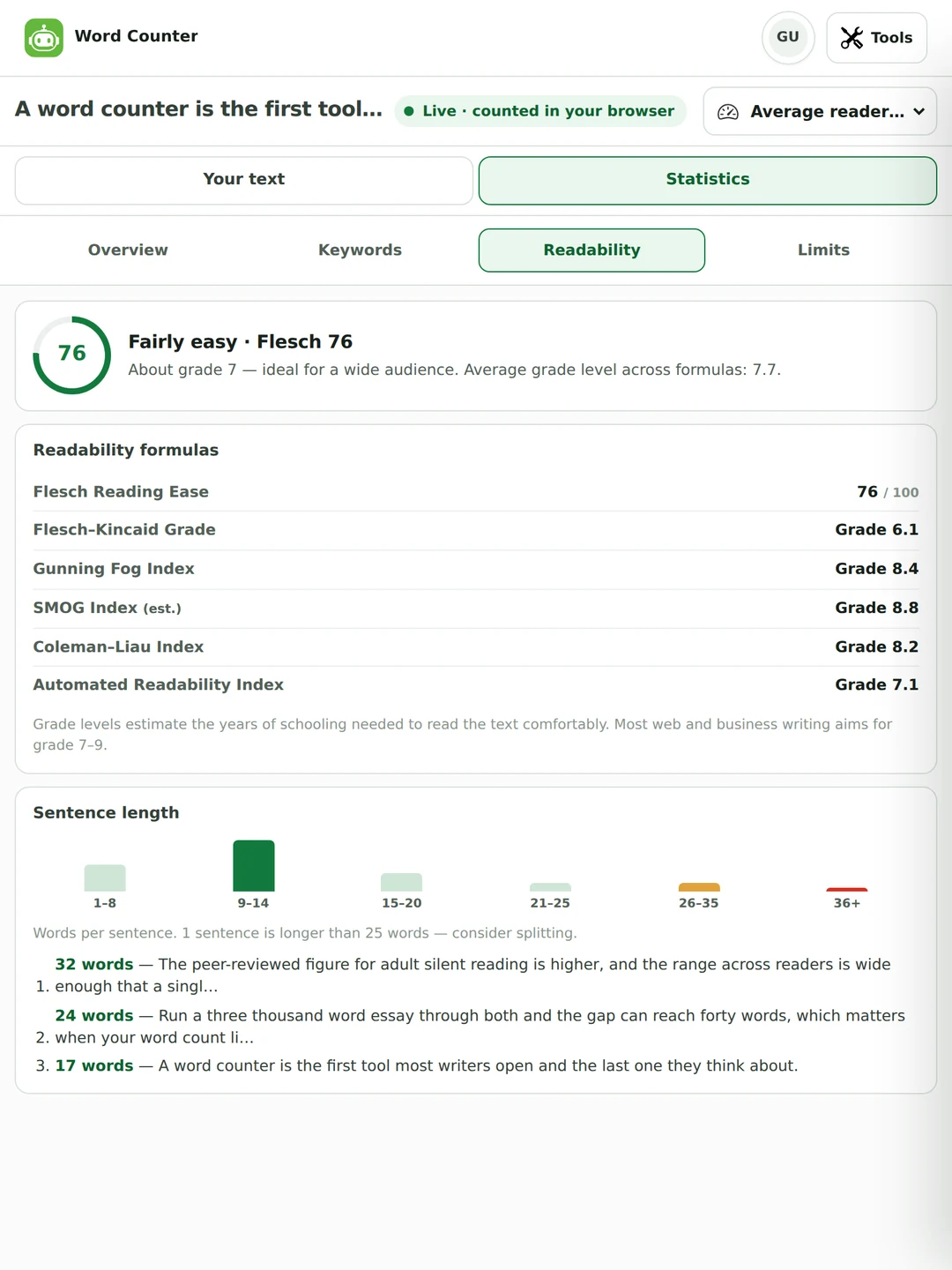
Flesch Reading Ease, Flesch–Kincaid, Gunning Fog, SMOG, Coleman–Liau and the Automated Readability Index, with a sentence-length histogram and your longest sentences listed so you know which ones to split.
Social posts, SEO fields, SMS, chat apps and document targets, each with a progress bar and how much you have left. Set your own goal in words or characters and watch the bar fill.
Change case five ways, strip double spaces, remove or join line breaks, trim whitespace, with undo and redo. Copy the text back out or download the full report as .txt, or the keyword table as .csv.
Same counting rules, the same browser-only arithmetic, and free with no sign-up. Each one answers a question the tiles above can only hint at.
Counts sentences properly, so Dr., e.g., U.S. and 3.5 don’t end one. Then it lists every sentence with its length, flags the long ones, and shows you the words you keep starting with. Open the sentence counter →
Every word and every two to five-word phrase with its count and density, the 172-word stop list out in the open where you can edit it, and every sentence a word appears in. Open the word frequency counter →
Four totals that disagree and are all correct, the invisible characters that arrive with pasted text and quietly eat a character limit, and what a message costs in SMS segments. Open the symbol counter →
A real screen from this word counter, unedited. Everything you see updated as the text was typed.
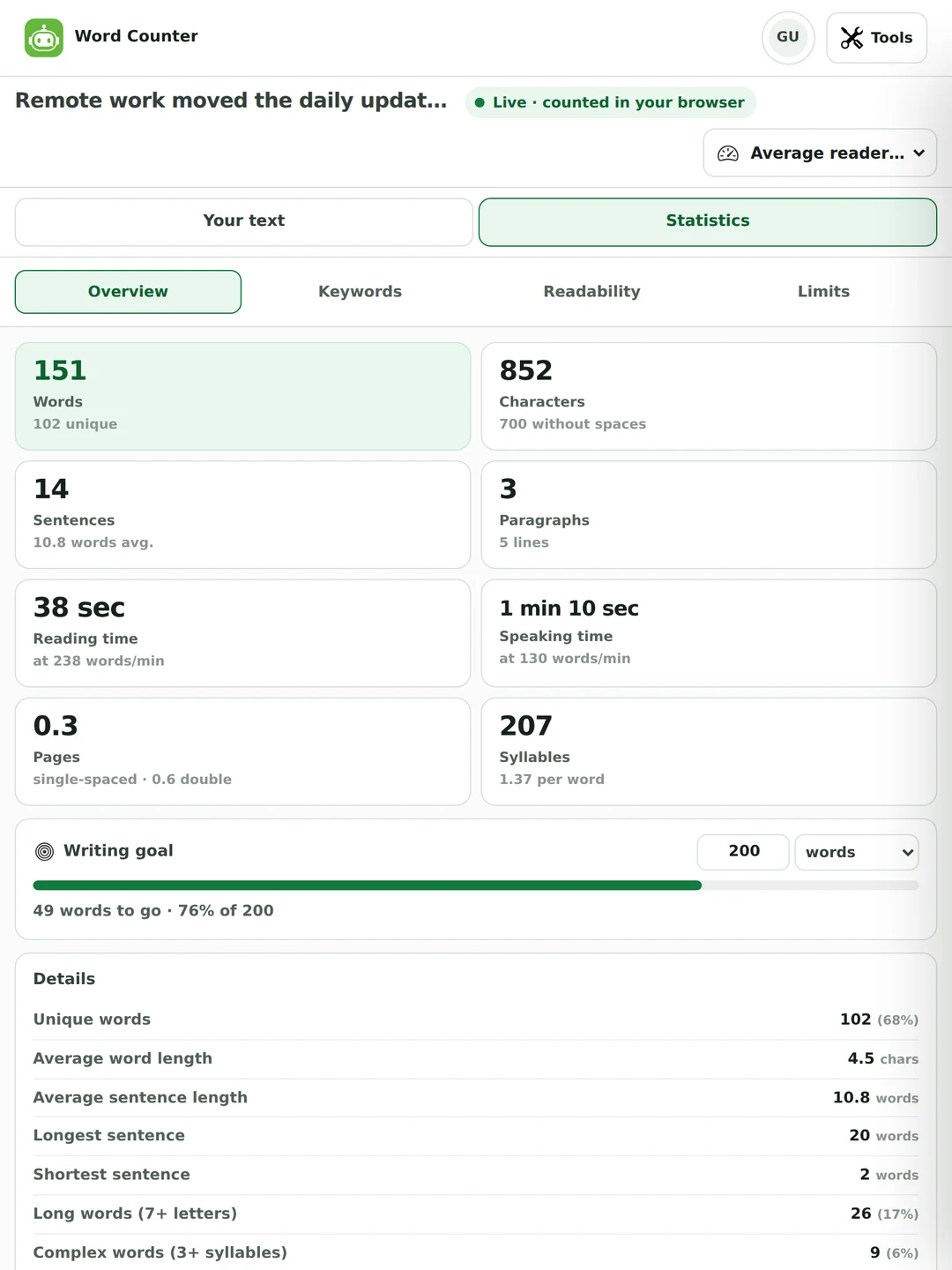
Word count tells you how much you wrote. This tells you whether anyone can read it.
Of the 26 word counter and character counter pages we read while building this one, five define a word at all, and they contradict each other. So here are our exact rules, with worked examples you can paste in and check.
| You type | It counts | Why |
|---|---|---|
well-known | 1 word | A hyphen inside a word does not split it. Neither does an apostrophe, a full stop, an underscore or an @. |
state-of-the-art | 1 word | Same rule, however many hyphens. |
don’t · it’s | 1 word each | Straight and curly apostrophes both. |
I ate 3 apples | 4 words | Standalone numbers count as words. |
user@example.com | 1 word | An email address is one word. |
https://example.com/page | 1 word | So is a URL, however long. |
COVID-19 | 1 word | Letters and digits joined by a hyphen stay together. |
naïve café | 2 words | Accented and non-Latin letters are letters. The rule is Unicode-aware, not A–Z. |
a—b | 2 words | An em dash does separate. A hyphen does not. That is the line. |
$1,200 | 2 words | The comma splits it. We would rather tell you this than pretend it does not happen. |
你好世界 | 4 words | Chinese, Japanese and Korean have no spaces between words, so there is no way to count them without making a decision. Ours is one character, one word. See below. |
A word is a run of letters or numbers, which may contain an apostrophe, hyphen, full stop, underscore or @ inside it, and must begin and end with a letter or number. URLs and email addresses count as one. Each CJK character counts as one.
Because a word count is a measurement, and a measurement without a stated method is just a number. If yours has to match a specific system, like a submission portal, a client’s CMS or your supervisor’s copy of Word, you now know exactly where ours will differ and by how much.
In this counter, yes. “Well-known” is one word and “state-of-the-art” is one word. Microsoft Word counts them the same way.
One of the 26 pages we read explains this. It is the question behind most complaints about word count tools, and the answer is not that one of them is broken.
If a hard limit is being enforced on you, count in the system that enforces it and treat every other number as an estimate. That is true of this one too.
Almost every word counter prints a reading time. Very few say what speed they assumed, and the common default is measurably too slow.
The most thorough review of the evidence is Brysbaert’s 2019 meta-analysis in the Journal of Memory and Language. It covers 190 studies and more than 18,000 participants, and it puts average adult silent reading of English non-fiction at 238 words per minute, and fiction at 260. That is our default.
Of the 26 pages we checked, six state their reading speed at all. Those six use 200, 200, 200, 238, 250 and 250. The de-facto standard of 200 wpm is roughly 16% below the peer-reviewed average, which makes most published reading-time estimates too long.
Most adults fall between 175 and 300 wpm on non-fiction. That is why the speed is a control on this page and not a hidden constant. Pick the reader you’re actually writing for. Read aloud, the same research puts the average at 183 wpm.
Speaking time here uses 130 wpm, the common presentation figure. We will be straight with you: unlike the reading number, we have not found a peer-reviewed source for it, and you should treat it as a working convention.
There is no authoritative answer, and any tool that gives you one number without saying what font it assumed is guessing on your behalf.
The Pages tile assumes 500 words single-spaced and 250 double-spaced. That is a reasonable stand-in for a 12pt serif face on A4 or US Letter with one-inch margins, which is roughly the shape of a standard submitted essay.
No standards body publishes a words-per-page figure. The familiar “250 words a page” is inherited from typewriters: monospaced Courier at 12pt, about 60 characters across and 25 lines down.
The Limits tab checks your text against 35 targets at once. Below is a reference set we re-checked against each platform’s own documentation on 26 August 2026. It’s useful whether or not you use the panel.
| Where | Limit | Checked against |
|---|---|---|
| X (Twitter) post | 280 characters | help.x.com |
| X Premium post | 25,000 characters | help.x.com |
| Bluesky post | 300 graphemes (3,000 bytes) | Bluesky post lexicon |
| Instagram caption | 2,200 characters | Meta Graph API reference |
| TikTok caption | 2,200 UTF-16 runes | TikTok Content Posting API |
| YouTube title | 100 characters | YouTube Help |
| YouTube description | 5,000 characters | YouTube Help |
| Google Ads headline | 30 characters | Google Ads Help |
| Google Ads description | 90 characters | Google Ads Help |
| SMS, single message | 160 (GSM-7) or 70 (Unicode) | Twilio |
Google documentation says it plainly: there is no limit on how long a title element can be. The title link is truncated in search results to fit the device width. Truncation is measured in pixels, not characters. That’s why a title full of capital Ws cuts off far sooner than one full of lowercase i’s. The 55, 60 and 70-character figures printed by SEO counters everywhere are conventions, not rules.
Same source, same wording: there is no limit on how long a meta description can be, and the snippet is truncated as needed to fit the device. The 150, 155, 160 and 300-character figures in circulation do not even agree with each other. Use them as targets if they help you write tightly. Do not treat them as a wall.
Two things the panel does not do for you. UCAS changed for 2026 entry: the personal statement is now three questions sharing a single 4,000 character budget with a 350 character minimum on each, so set the goal to 4,000 characters and count the whole statement rather than one box. And several platforms publish no figure at all in their own documentation, so treat any limit quoted for them, here or anywhere, as observed rather than official.
Most tools that claim keyword density just group words by how many times they appear. That is a filter, not an analysis. If frequency is what you came for rather than a total, the word frequency counter gives you the whole list, phrases up to five words, and every sentence a word appears in.
Switch between single words, two-word phrases and three-word phrases. Two of the 26 pages we read offer genuine phrase analysis. It is the difference between knowing you used “word” a lot and knowing you used “word counter” four times.
A list of 172 stopwords, like the, and and of, is hidden by default so the top of the list is words you chose rather than words English requires. One tick brings them back when you want the raw distribution.
Every row shows its count and its share of the document. The find box counts whole-word matches for any term you type and shows its percentage, which is the fastest way to answer “have I said this too often?”. Export all three levels as CSV.
Worth saying plainly: keyword density is not a ranking factor and there is no target percentage to hit. It is useful as a repetition check while editing. If a phrase is genuinely overused, the paraphrasing tool is next door.

The counts are the same. What changes is which one you should be watching. For sentence-by-sentence work there is a sentence counter, and for characters, emoji and SMS segments a symbol counter.
For an essay, the number to watch is words, against your stated limit. Most departments apply a tolerance of around ten per cent either way, but there’s no national rule. It’s set per course, so check your module handbook rather than the internet. Set the goal to your limit and the bar does the rest.
UCAS is now three questions sharing 4,000 characters, with 350 minimum on each, so switch the goal to characters and count the whole statement. The Common App personal essay is counted in words, between 250 and 650. Cover letters run to a page, usually 300–400 words.
Here characters are what matter, and the Limits tab shows you 35 of them at once instead of you pasting into a composer to find out. Bluesky counts graphemes, TikTok counts UTF-16 runes, Google Ads counts CJK characters double. The differences are real.
Reading time is the number editors ask for, and it is only meaningful with a stated speed. For anything to be read aloud, use the speaking figure and then read it aloud anyway. For a script, a stopwatch beats any estimate.
Word count against a brief, phrase frequency to check repetition, and the reminder that Google publishes no character limit for titles or meta descriptions. Write to fit the pixel width, not to a folklore number.
Counts work for any Latin-script language, and each Chinese, Japanese or Korean character counts as one word here. Readability formulas assume English syllable rules, so treat those scores as meaningless outside English.
Same tool, three different numbers to care about.
Word limits, character limits on application forms, and the sentence-length chart when a supervisor says the writing is dense. Nothing you paste is uploaded, which matters when the document is unpublished work.

Character counts against 35 platform targets, phrase frequency for repetition, and reading time with a speed you can defend when someone asks where the number came from.

A daily word goal with a progress bar, page estimates for a manuscript, and case and whitespace tools so you are not opening a second tab to tidy up pasted text.
The questions people actually search for about counting words and characters.
Yes. It is free, with no sign-up and nothing held back for a paid plan. Every tab, including keywords, readability and limits, is open to everyone, because the counting happens in your browser and costs us nothing to run.
Paste your text into the box above and read the number. The counter in the header updates as you type. To count the number of words in a document, drop a .docx, .pdf or .txt file onto the editor instead and the text is extracted in your browser. Select part of the text and the counts follow your selection.
Because counters split text differently and include different parts of a document. Google Docs documents that its count excludes headers, footers and footnotes; Word does not publish what it includes. Hyphenated words, numbers, URLs and symbols are all handled differently between tools. Our exact rules are in the table above. If a limit is being enforced, count in the system enforcing it.
One, in this tool. Well-known is a single word and so is state-of-the-art. This is genuinely contested. Of the five competing pages that publish a definition, three agree with us and two count hyphenated words as two. On a hyphenation-heavy essay that difference alone can be dozens of words.
Both, side by side, always. The Characters tile shows the total and the count without spaces underneath, because forms and platforms disagree about which they mean and you should not have to guess.
A symbol count is a character count. “Symbol” is how it is usually said in several European languages. The Characters tile above is that number. If you need more than the total, the symbol counter is the page for it: it reports four totals that disagree and are all correct, and finds the invisible characters that arrive with pasted text.
Yes. Characters with and without spaces sit on the overview beside the word count, and the downloadable report breaks the total into letters, digits, punctuation, spaces and capitals. If characters are what you came for rather than words, the character counter is built around them: it checks your text against 35 platform limits at once and shows where each one would cut it off.
Yes. Sentence and paragraph counts sit next to words and characters on the overview, with average sentence length underneath. A sentence ends at a full stop, question mark, exclamation mark, ellipsis or their CJK equivalents, or at a line break. A stop after Dr. or 3.5 doesn’t end one. To work through your sentences one by one rather than read a total, use the sentence counter.
238 words per minute by default. That’s the peer-reviewed average for adult silent reading of English non-fiction (Brysbaert, 2019). You can switch it to 150, 300 or 450. Most tools assume 200 and do not tell you; that is about 16% below the research figure, which makes their estimates run long.
There is no authoritative answer. This tool estimates 500 words single-spaced and 250 double-spaced, which suits a 12pt serif face with one-inch margins. Your real page depends on font, spacing, margins, paragraph breaks and headings, and can differ by around 20% either way. If a page count is being marked, format the document properly and read the number from there.
About four minutes and twelve seconds at 238 words per minute. At 200 wpm it is five minutes; at 300 wpm, three and a third. The spread is the point. Reading speed varies so much between people that any single figure is a guide rather than a measurement.
Yes, and set the writing goal to your limit so the bar shows how much you have left. Word limits are usually enforced with a tolerance of about ten per cent either way, but that is a departmental convention rather than a national rule. Your module handbook is the authority, not a website.
Yes. The keywords view handles single words, two-word phrases and three-word phrases, each with a count and a density percentage, and hides 172 common words by default. For the whole list, phrases up to five words, an editable stop word list and every sentence a word appears in, the word frequency counter is the deeper page. Keyword density isn’t a ranking factor, so treat it as a repetition check.
No. All the counting runs in your browser and there is no server call carrying your text. Files you drop in are parsed locally too. Your draft is saved in your own browser storage so a refresh does not lose it, and clearing your browser data removes it.
Yes: .docx, .pdf and .txt. Old .doc files are not supported, so save as .docx first. A scanned PDF with no text layer will come through empty, because there is nothing to extract without OCR.
It counts them, with a caveat worth knowing. Those languages do not put spaces between words, so a word count is a segmentation decision rather than a measurement. This tool counts each Chinese, Japanese or Korean character as one word. Character counts are exact; readability scores assume English syllable rules and should be ignored.
Six: Flesch Reading Ease, Flesch–Kincaid Grade, Gunning Fog, SMOG, Coleman–Liau and the Automated Readability Index, plus a sentence-length histogram and your longest sentences. They rarely agree exactly, which is why showing all six is more honest than picking one.
No. Google documentation states there is no limit on how long a title element can be, and none for a meta description either. Both are truncated in search results to fit the device width, measured in pixels rather than characters. The 55, 60 and 70-character figures are useful writing targets and nothing more.
Counting tells you how much you wrote. These change what it says.
Your recent work is kept in Drafts, and plan allowances for the AI tools are on the pricing page. The word counter itself has none.