
 Upgrade

Add your text
Paste it or upload a file. An article, a report, an email thread or your own notes all work.
Let’s summarize!
Paste an article, report, email thread or notes — or upload a Word, PDF or text file. Long documents are welcome.
Paste your text or upload a file, pick a style and a length, and press Summarize. You get a short paragraph, a list of key points, or the most important sentences quoted word for word from your text. It’s free and you don’t need an account.
Last updated 30 September 2026.
Paste it or upload a file. An article, a report, an email thread or your own notes all work.
Paragraph for a short read, Key points for a list, Key sentences to keep the author’s exact words. Then Short or Medium.
Read the summary against your text. In Key sentences mode the chosen lines are highlighted in the original, so you can see what was left out.
We ran a short news article through the tool as a guest on 30 September 2026, in Paragraph style at Medium with the TL;DR line on. The article is made up for testing. Nothing in the summary was changed.
The town council of Riverton voted on Tuesday to keep the public library open until 9 p.m. on weekdays, starting in January. The library currently closes at 6 p.m., which council members said makes it hard for students and people who work day shifts to use it.
The change will cost about $48,000 a year, mostly for two extra part-time staff. The money will come from the town's reserve fund for the first year. After that, the council plans to review visitor numbers before deciding whether to make the longer hours permanent.
Not everyone agreed. Two of the seven council members voted against the plan. One said the reserve fund should be kept for repairs to the library's roof, which is more than 30 years old. The other asked for a six-month trial instead of a full year.
Head librarian Maria Santos said evening visits had grown since the library started a homework club last spring, and that the room is often full by 5 p.m. She added that the library will also open two hours earlier on Saturdays, at 8 a.m., using volunteers rather than paid staff.
Residents can share their views at a public meeting on 12 November.
TL;DR Riverton’s council approved extending library weekday hours to 9 p.m. starting January, despite some opposition and a $48,000 annual cost.
The town will keep the library open until 9 p.m. on weekdays from January, funded by the reserve for the first year, with a review of usage before deciding on permanence. Two part-time staff will be added, and Saturday opening will shift to 8 a.m. using volunteers. Head librarian Maria Santos notes rising evening traffic and crowding by 5 p.m. Opposition came from two councilors—one citing roof-repair needs for the reserve fund and another preferring a six-month trial. Residents may comment at a public meeting on 12 November.
Key points style at Short, from the same guest session on 30 September 2026.
The town council of Riverton voted on Tuesday to keep the public library open until 9 p.m. on weekdays, starting in January. The library currently closes at 6 p.m., which council members said makes it hard for students and people who work day shifts to use it.
The change will cost about $48,000 a year, mostly for two extra part-time staff. The money will come from the town's reserve fund for the first year. After that, the council plans to review visitor numbers before deciding whether to make the longer hours permanent.
Not everyone agreed. Two of the seven council members voted against the plan. One said the reserve fund should be kept for repairs to the library's roof, which is more than 30 years old. The other asked for a six-month trial instead of a full year.
Head librarian Maria Santos said evening visits had grown since the library started a homework club last spring, and that the room is often full by 5 p.m. She added that the library will also open two hours earlier on Saturdays, at 8 a.m., using volunteers rather than paid staff.
Residents can share their views at a public meeting on 12 November.
• The Riverton council approved extending weekday library hours to 9 p.m. from January, funded by a $48,000 first-year reserve allocation and subject to a post-year visitor-count review.
• Two councilors opposed, citing roof-repair needs and preferring a six-month trial.
• Librarian Maria Santos reported rising evening demand and added an earlier 8 a.m. Saturday opening staffed by volunteers.
• Residents may voice opinions at a public meeting on 12 November.
Four points, and every number is right. It left out the two extra part-time staff and the 6 p.m. closing time. For a handout or a slide, this is usually the style you want.
This style doesn’t write anything new. It picks the most important sentences from your text, copies them exactly, and highlights them in the original.
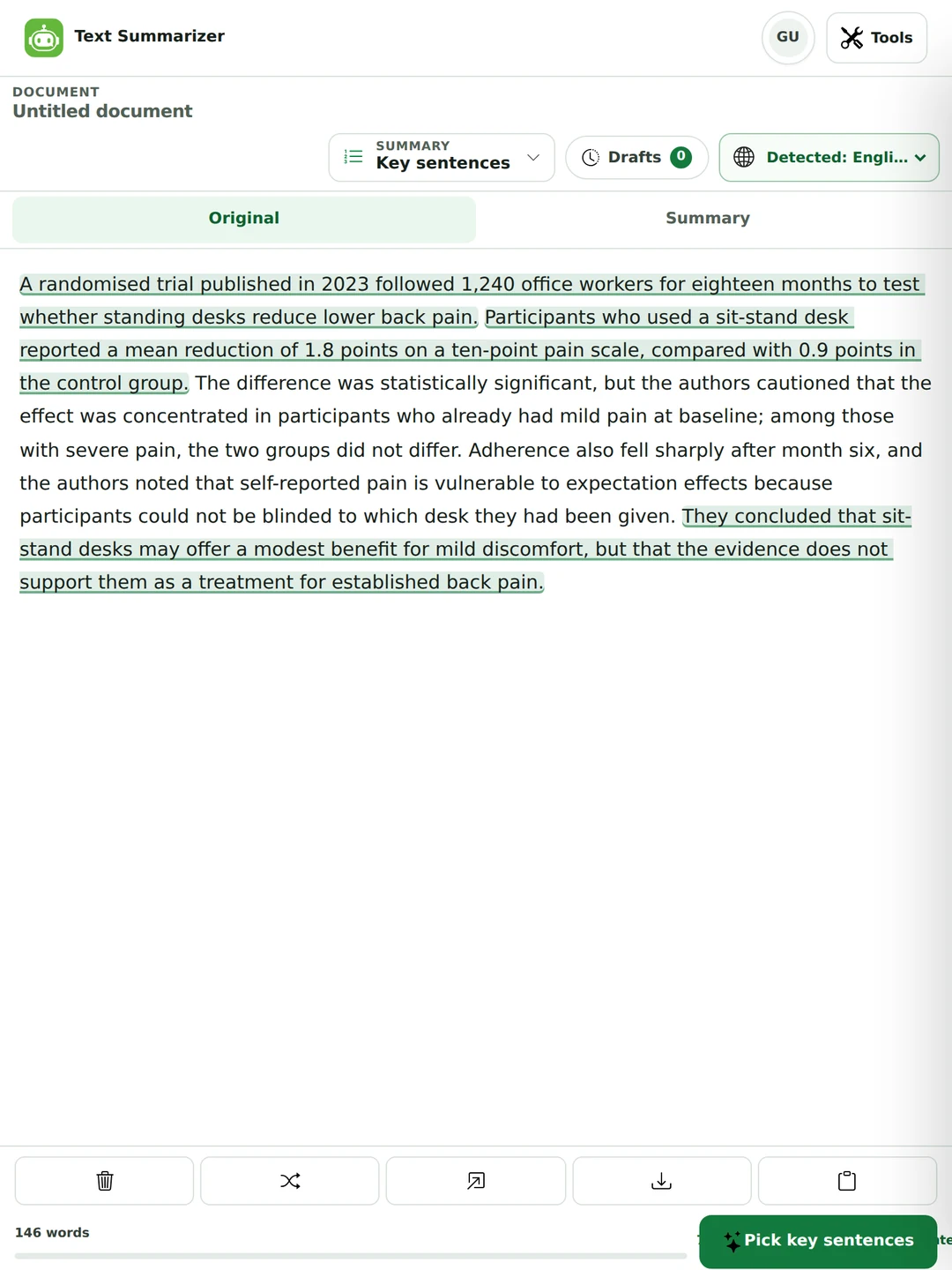
Key sentences quotes. Paragraph, Key points and Custom rewrite. Each can go wrong in its own way.
It can’t invent anything, because every sentence is from the source. But it can mislead by leaving out the sentence that qualifies the others.
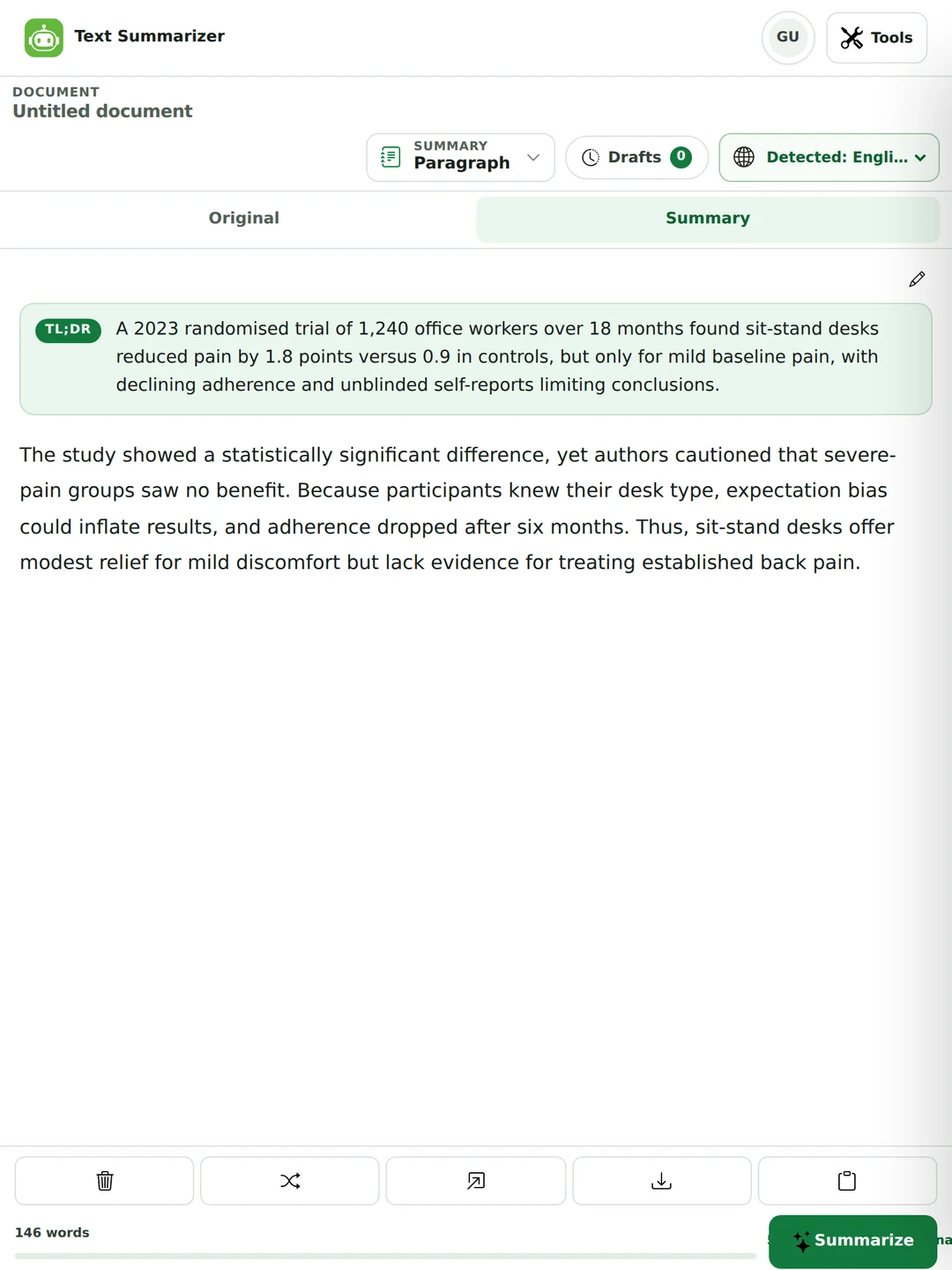
It reads better and can pack more in. But a rewrite can drop a “may” and turn “may suggest” into “shows”, so check it.
A randomised trial published in 2023 followed 1,240 office workers for eighteen months to test whether standing desks reduce lower back pain.
Participants who used a sit-stand desk reported a mean reduction of 1.8 points on a ten-point pain scale, compared with 0.9 points in the control group.
They concluded that sit-stand desks may offer a modest benefit for mild discomfort, but that the evidence does not support them as a treatment for established back pain.
The study showed a statistically significant difference, yet authors cautioned that severe-pain groups saw no benefit. Because participants knew their desk type, expectation bias could inflate results, and adherence dropped after six months. Thus, sit-stand desks offer modest relief for mild discomfort but lack evidence for treating established back pain.
Two earlier runs over the same 142-word study summary, which we wrote for testing. The quoted version is longer and still misses the caveats: the pain drop only held for people with mild pain, and fewer people kept using the desks after six months. The rewritten one is shorter and, this time, keeps them. Use both when it matters.
Paragraph style writes new sentences that carry the whole text. Turn on the TL;DR line and you get the one-sentence version on top.
Pick the language from the menu or leave it on Auto detect. The summary comes back in the same language. Here’s a Tagalog notice summarized with Filipino / Tagalog selected, at Short with the TL;DR line on.
Simula sa susunod na buwan, bubuksan ng aming barangay ang isang libreng tutorial center para sa mga batang nasa elementarya. Bukas ito tuwing Lunes hanggang Biyernes, mula alas-tres hanggang alas-singko ng hapon. Mga boluntaryong guro at estudyante sa kolehiyo ang magtuturo ng pagbasa, matematika at Ingles.
Ayon sa kapitan ng barangay, maraming magulang ang humiling nito dahil wala silang oras na tumulong sa takdang-aralin ng kanilang mga anak. Hindi kailangang magbayad, pero kailangang magparehistro muna sa barangay hall bago ang ika-15 ng buwan.
May limitasyon lang: tatlumpung bata lang ang kayang tanggapin sa unang buwan. Kung marami ang magpaparehistro, uunahin ang mga batang nasa Grade 1 hanggang Grade 3.
TL;DR Magbubukas sa susunod na buwan ang libreng tutorial center para sa elementarya, ngunit 30 bata lamang ang tatanggapin.
Bukas ito Lunes–Biyernes, alas-3–5 ng hapon, at magtuturo ang mga boluntaryo ng pagbasa, matematika at Ingles. Magparehistro sa barangay hall bago ika-15; uunahin ang Grade 1–3 kung lalampas sa kapasidad.
It kept the days, the hours, the subjects, the sign-up deadline and the limit of 30 children. It dropped why parents asked for the center. The Tagalog summarizer page has more.
A summary is a short version of a text, in your own words, that keeps its main points and leaves out the detail. Here’s how to write one by hand, which is also how to check one a tool wrote.
It depends on what it’s for. These are good starting points.
| What you’re summarizing | Length | Why |
|---|---|---|
| A paragraph you want tighter | 60–80% | Any shorter and you’re replacing it, not shortening it. To keep every point, use Shorten in the paraphraser. |
| An article, for someone who won’t read it | 15–25% | Room for the main claim, the evidence and the main caveat. |
| A report, for a decision | 5–10% | The reader wants the recommendation, not the reasoning. |
| A research paper, for a literature review | 3–8% | Question, method, finding, limitation. |
| Anything, as a TL;DR | One sentence | The one thing you’d say if you only had one line. |
In the tool, Short aims for about a third of your text and Medium for about half. For a much tighter summary, run the result through again, or use the TL;DR line.
People often ask for “summarize this in 3 sentences”. Here’s how to get close.
It takes a minute and catches most problems.
Summarize to decide what needs your attention. Read in full anything you’ll sign, quote or act on.
Decide which papers deserve a full read. Use Key sentences when you want the author’s exact words in your notes.

Turn a long report or email thread into something a colleague can act on.
Lecture notes, a policy, a manual or a long article. It runs in your browser, so there’s nothing to install.

A tool that turns a long text into a short one that keeps the main points. This one gives you a paragraph, a list of key points, or the key sentences quoted from your text.
Yes, and you don’t need an account. Paragraph, Key points and Key sentences are free at Short and Medium length. Custom style and the Long length come with Pro. The pricing page has the details.
Up to 700 words a run as a guest, 1,500 with a free account and 7,000 on Pro. For a longer document, summarize it a section at a time.
Yes. Upload a PDF, Word, TXT or Markdown file up to 25 MB and the text is read from it. Very long files work better a chapter or section at a time.
Yes. Copy the article text and paste it in. Paragraph at Medium is a good start, or Key points if you want a list.
A short version of a text, in your own words, that keeps its main points and leaves out the detail.
Read it all, find the main point, list the few facts that support it, write it in your own words, keep any limits the text states, then check it against the original and cite it.
Use Key sentences at Short, which picks about three sentences, or the TL;DR line for one. For an exact count in new words, Custom style (Pro) takes that as an instruction.
A written summary can. The usual slip is a hedge that goes missing, so “may help” becomes “helps”. Key sentences can’t do that, because it only quotes. Check numbers and verbs before you use a summary.
Extractive quotes sentences from the source. Abstractive writes new ones. Key sentences is extractive, and the other styles are abstractive.
For an article someone won’t read, about 15 to 25% of the original. For a report, 5 to 10%. For a research paper in a literature review, 3 to 8%.
An abstract is written by the author in a set order: purpose, method, results, conclusion. A summary can be written by anyone and follows the original’s own order.
Yes, in 64 languages. The summary comes back in the language you pasted. For Tagalog, see the Tagalog summarizer page.
Summarizing to understand something isn’t. Handing in a summary of someone else’s work as your own analysis, without citing them, is.
You shouldn’t. A citation says you read the source. Use the summary to decide which papers to read, then read those.
A summarizer is allowed to drop points. If you want every point kept and only the wording tightened, use Shorten in the paraphraser.
It’s sent to make the summary and isn’t stored afterwards. Your draft is saved in your own browser so you can come back to it. The privacy policy has the details.
Shorten wording without losing points in the paraphraser, check your grammar, or count your words. One plan covers all of them.