
 Upgrade
Paste or upload your draft
An AI first draft, a paragraph you have rewritten too many times, a translation that came out stiff. Paste it in or upload the file. The language is picked up on its own.
Let’s make it sound human!
Paste an essay, article, email or report that sounds stiff or machine-like — or upload a Word, PDF or text file.
An AI humanizer rewrites text that sounds machine-made so it reads the way a person writes. Paste a draft from ChatGPT, Claude, Gemini or anywhere else, press Humanize, and you get a natural version back in seconds. Every change is highlighted, your names and numbers stay exactly as they were, and you can give it a few paragraphs of your own writing so the result sounds like you.
Last updated 29 September 2026 by the AI Writing Assistant team.
It takes about a minute, and most of that is reading the result.
An AI first draft, a paragraph you have rewritten too many times, a translation that came out stiff. Paste it in or upload the file. The language is picked up on its own.
This step is optional. Turn on Match my voice and paste a sample of your own writing, and the rewrite borrows your sentence length and your words instead of guessing. Protect details is on by default.
Changed words are highlighted against your original. Put back anything you liked, copy the text, or download it as a Word document or PDF.
A humanizer you can’t check is a humanizer you have to trust. This one shows its work.
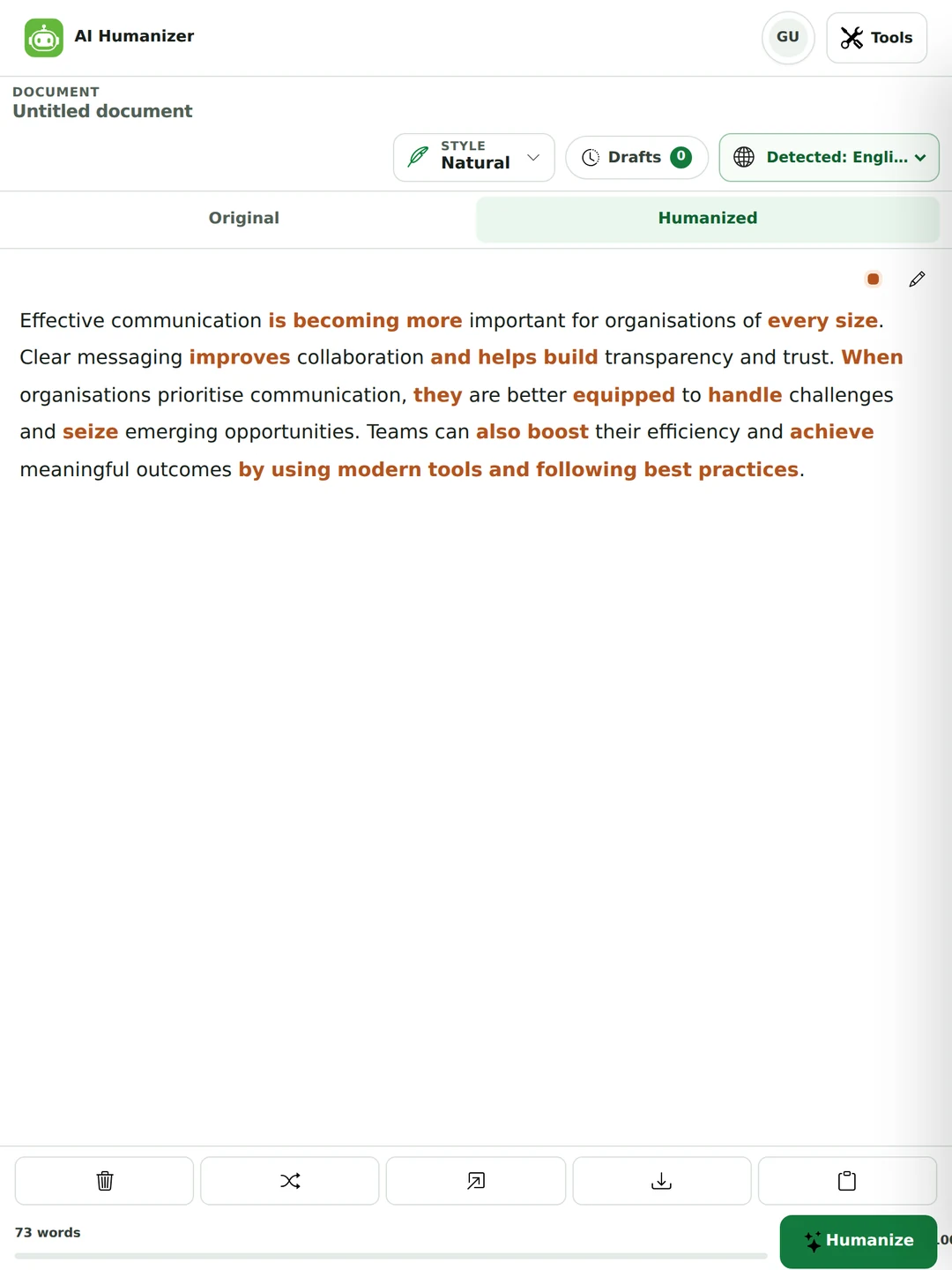
There’s no single “human” style. A humanizer with nothing to go on writes like an average of everybody, which is why so much humanized text sounds the same.
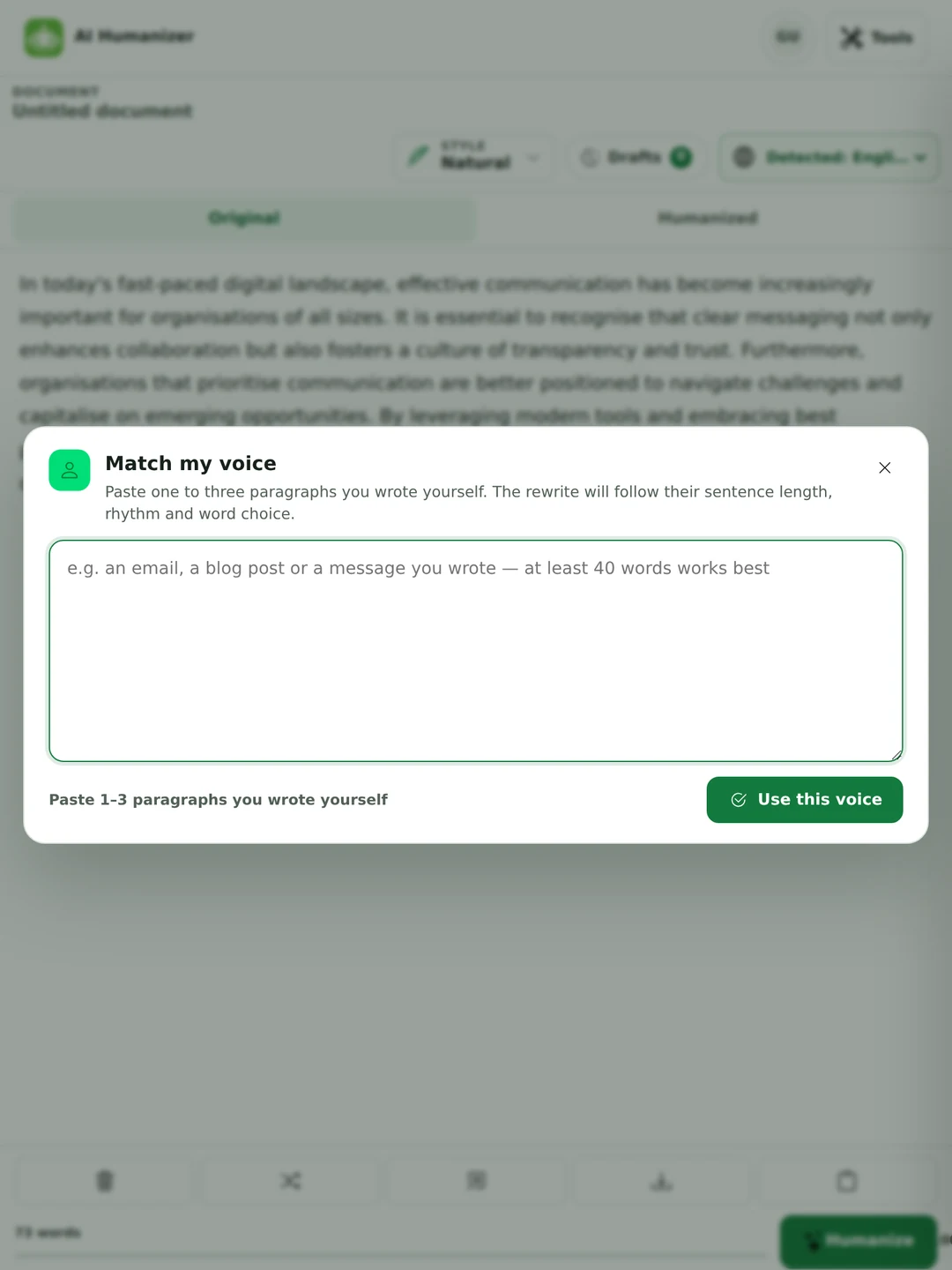
A real run, not edited. We wrote the original to be full of AI habits on purpose.
In today's fast-paced digital landscape, effective communication has become increasingly important for organisations of all sizes. It is essential to recognise that clear messaging not only enhances collaboration but also fosters a culture of transparency and trust. Furthermore, organisations that prioritise communication are better positioned to navigate challenges and capitalise on emerging opportunities. By leveraging modern tools and embracing best practices, teams can significantly improve their overall efficiency and drive meaningful outcomes.
Effective communication is becoming more important for organisations of every size. Clear messaging improves collaboration and helps build transparency and trust. When organisations prioritise communication, they are better equipped to handle challenges and seize emerging opportunities. Teams can also boost their efficiency and achieve meaningful outcomes by using modern tools and following best practices.
The rewrite is shorter, and that’s the point. In today’s fast-paced digital landscape, It is essential to recognise that, not only… but also, Furthermore, leveraging and significantly all went. None of them carried any meaning. Taking that padding out does more to make text sound human than adding anything clever.
There’s nothing mysterious about it. It comes down to a handful of habits, and once you can see them you can fix them yourself too.
This is the question most people have, so here’s what we know instead of a promise. On 28 September 2026 we ran 12 AI-written texts (six English, two Spanish, two German, one Urdu, one Hindi) through this humanizer and read every rewrite against its original.
Every number and name in the 12 texts came through unchanged, and a humanizer run took about 15 seconds on average. The rewrites read more naturally and kept the original meaning.
Twelve texts on one day is a small test. Detectors are updated all the time, and every detector reacts differently. No result like this is a promise about the next scan.
Academic writing. We changed the tool that same day to keep technical terms exact instead of simplifying them, even though plainer wording can look less AI-like. We chose accuracy over a lower score.
Outside research points the same way. A 2025 study presented at the GenAIDetect workshop tested 19 humanizer and paraphrasing tools: GPTZero caught 99.73% of AI-written academic essays but only 60.04% after humanizing, while detectors trained for the job still caught 95.74% to 98.26% of them (Masrour et al., 2025). Turnitin added detection aimed at humanizer tools in August 2025 (Turnitin). So any tool that guarantees “100% undetectable” text is describing one detector on one day.
They sound alike and do different jobs. Pick by what is wrong with your text.
| AI humanizer | Paraphraser | AI rewriter | |
|---|---|---|---|
| Fixes | Text that sounds machine-made | Wording you want said differently | Text that needs a new length, tone or format |
| Changes | Rhythm, filler and stiff word choice. Good wording stays. | Most of the wording. The meaning stays. | Whatever you ask for |
| Use it for | AI drafts, over-edited writing, stiff translations | Rewording a source you’ll credit, avoiding repetition | Shortening, simplifying, changing tone |
| Watch for | A result that loses your voice (use Match my voice) | Paraphrase isn’t a substitute for citing | Meaning drifting as the text changes shape |
Most “best AI humanizer” lists are written by a company that sells one, and this page is no different. So here are six checks you can run on any tool in a few minutes, ours included.
Run one paragraph you wrote and one an AI wrote. A good humanizer improves the second and leaves the first recognisably yours.
Compare names, figures, dates and quotes line by line. A rewrite that turns 14% into 40% has made your text worse, however natural it sounds.
If you can’t see what changed, you can’t check it. Prefer a tool that highlights every edit.
“100% undetectable” is a claim about one detector version on one day. Detectors change. The promise stays the same.
Drafts often hold unpublished work or client material. Find out whether your text is stored or used for training.
Free plans differ in words per run and per day, and some make you sign up before you see a result.
Anyone who drafts with AI and then has to put their name on the result.
Tidy an essay draft you wrote with AI help, where your course allows that, and learn the habits that make writing sound generated. Check your institution’s rules first. The next section has more on that.
Your English is fine. It just reads a little formal because of how you learned it. The humanizer loosens the register without changing what you said.
AI drafts sound like every other page in your niche. Humanized, fact-checked copy in your brand’s voice reads better, and Google has said it rewards helpful content “however it is produced” (Google Search Central).
Cover letters and LinkedIn posts written with AI all start the same way. Paste in an old email as your voice sample and the letter sounds like you.
Reports, proposals and client emails drafted with AI, made plain and direct without the corporate filler.
Sometimes it isn’t AI at all, just your own writing after six rounds of edits. The fix is the same.

A simple test: if you would be happy to tell your reader exactly how the text was made, you’re fine. If the tool is the reason you don’t have to say, that is your answer. More in our academic integrity guide.
It happens to people who did nothing wrong, and more often to people writing in a second language. Here is what is known, with sources.
A tool that rewrites AI-generated or stiff text so it reads like a person wrote it. It varies sentence length, cuts stock phrases and filler, and swaps formal words for everyday ones while keeping your meaning. This one can also follow a sample of your own writing so the result sounds like you.
It looks for the habits that make text read as machine-made, such as even sentence lengths, stock openers and inflated vocabulary, and rewrites those parts. This tool then checks numbers, names, dates and quotes against your original and scores how natural the result reads.
Paste your text into the box at the top of this page and press Humanize. There’s no sign-up. A per-run word allowance is shown next to the editor, and the pricing page lists what each plan includes.
Yes. It works on text from any AI writer, and on human writing that has gone flat. Paste it in as it is. You don’t need to say where it came from.
It makes text read more naturally and keeps your facts. Research shows purpose-built detectors can still catch a lot of humanized text, so no humanizer can promise a result against every detector. See the test.
We don’t promise that, and you should be careful with tools that do. Detectors change often, and Turnitin added detection aimed at humanizer tools in August 2025. What we can promise is text that reads naturally, keeps your facts and shows every change.
Sometimes. Turnitin added detection aimed at text run through humanizer and bypasser tools in August 2025, and like every detector it’s neither complete nor infallible. If you were allowed to use AI, say so. If you weren’t, a humanizer doesn’t change that.
It depends on what you claim about who wrote the text. Editing your own draft isn’t cheating. Using it so AI-written work passes as yours, where AI use is banned or must be disclosed, is. The rules are about authorship and disclosure. Which software you opened doesn’t matter.
The one that keeps your meaning, shows every change and doesn’t promise to beat detectors. Run the same paragraph through two or three tools and compare them against the checks in How to choose an AI humanizer. Many ranking lists are published by one of the tools being ranked.
Yes, this one. You can use it without an account. As a guest you can humanize up to 300 words a run and 600 a day. A free account raises that to 600 a run and 1,500 a day, and Pro allows 3,000 a run and 100,000 humanizer words a month.
Up to 300 words a run and 600 a day as a guest, 600 a run and 1,500 a day with a free account, and 3,000 a run on Pro, with 100,000 humanizer words a month. The counter next to the editor shows your allowance before you press Humanize. The pricing page has the current numbers for every plan.
More than 70, including Spanish, French, German, Portuguese, Arabic, Hindi, Urdu, Indonesian and Filipino (Tagalog). The language is detected automatically and the rewrite stays in it. English gets the most testing, so read results in other languages closely.
It shouldn’t. It measures how much of your meaning carried over and checks numbers, dates, names, links and quotes against your original after every run. Read the highlighted changes anyway. That’s what they’re there for.
Not for being AI-written. Google says its systems reward original, high-quality content however it’s produced, and that using AI mainly to manipulate rankings breaks its spam policies (Google Search Central, February 2023). Humanizing helps readability, but the content still has to be useful.
The humanizer rewrites what you give it. It doesn’t check sources. If your draft copied or closely followed someone else’s work, rewording it doesn’t fix that. Quote and cite the source instead. Our citation generator can help.
An AI rewriter changes the wording, length or tone of a text on request: shorter, more formal, simpler. A humanizer keeps the wording where it works and goes after the habits that make prose read as generated, such as even sentence lengths, stock openers and inflated vocabulary.
No. A paraphraser says the same thing in different words. A humanizer changes how the writing sounds, its rhythm, register and habits, and keeps the wording where it works.
A rating of how natural the rewrite reads, out of 100. When the tool writes several drafts it returns the best one and says so. It isn’t a detector prediction, and we won’t present it as one.
It’s sent to produce the rewrite and isn’t stored as text afterwards. A voice sample is used as a reference for that rewrite. It isn’t kept as training data. The privacy policy has the details.
Check a draft with our AI detector, humanize it here, then check it again. The detector gives a range and a confidence level rather than one bare number, because every detector, ours included, is a signal and not a verdict. One plan covers every tool.
The reasoning behind this tool, written out at length.
The same edits this humanizer makes, written out with before-and-after examples so you can make them by hand.
What a detector actually measures. It’s worth knowing before you decide how much a score should change your draft.
What to do when writing you wrote yourself gets flagged. Rewriting is rarely the right first move.
Everything else we’ve written is on the AI Writing Assistant blog.