
 Upgrade
 Drop your file to open it
Paste, type or upload
Write straight into the editor, paste from anywhere, or upload a file. One paragraph or a whole report goes in the same box. Checking starts on its own when you pause, with no button to hunt for and no sign-up.
Let’s write!
Start typing, paste your text, or upload a Word, PDF or text file. You can also drop a file here.
A grammar checker reads your writing and flags mistakes in grammar, spelling and punctuation, with a fix for each one. Paste or type above and this free AI grammar checker underlines every issue where it happens, says whether it’s a grammar, spelling, punctuation or style problem, and explains why. You don’t need an account.
Last updated 29 September 2026 by the AI Writing Assistant team.
Three steps, and the second one is the part most checkers skip.
Write straight into the editor, paste from anywhere, or upload a file. One paragraph or a whole report goes in the same box. Checking starts on its own when you pause, with no button to hunt for and no sign-up.
Each issue is underlined in place and appears as a card with the original struck through and the correction beside it. The card names the problem, such as “Use the right word” or “Correct the spelling”, so you see more than a recoloured word.
Take corrections one at a time, dismiss the ones you disagree with, or accept all of them in a single click. Undo and redo work throughout, and four scores show grammar, readability, clarity and vocabulary as you go.
Not just words that aren’t in the dictionary. Recomended is easy. The useful catches are the ones spell-check can’t see, because the word is spelled perfectly and is simply the wrong word.
Their for there, affect for effect, advice for advise, moral for morale. Every one of those is a correctly spelled English word, which is exactly why a spell checker walks straight past them.
Singular subjects with plural verbs, tenses that shift mid-paragraph, and the pronoun that no longer matches what it points back to.
Comma splices, run-on sentences, the apostrophe in its and it’s, and the missing comma that turns one clause into another.
Style flags are separate from errors on purpose. Long tangled clauses, heavy passive voice that hides who did what, and filler like due to the fact that are raised as suggestions. They aren’t counted as mistakes.
Including Spanish, French, German, Portuguese, Arabic, Urdu, Hindi and Chinese, across 73 regional variants. It detects the language automatically or you can set it.
Your text stays your text. Corrections are marked in place rather than silently applied, so nothing changes until you say so.
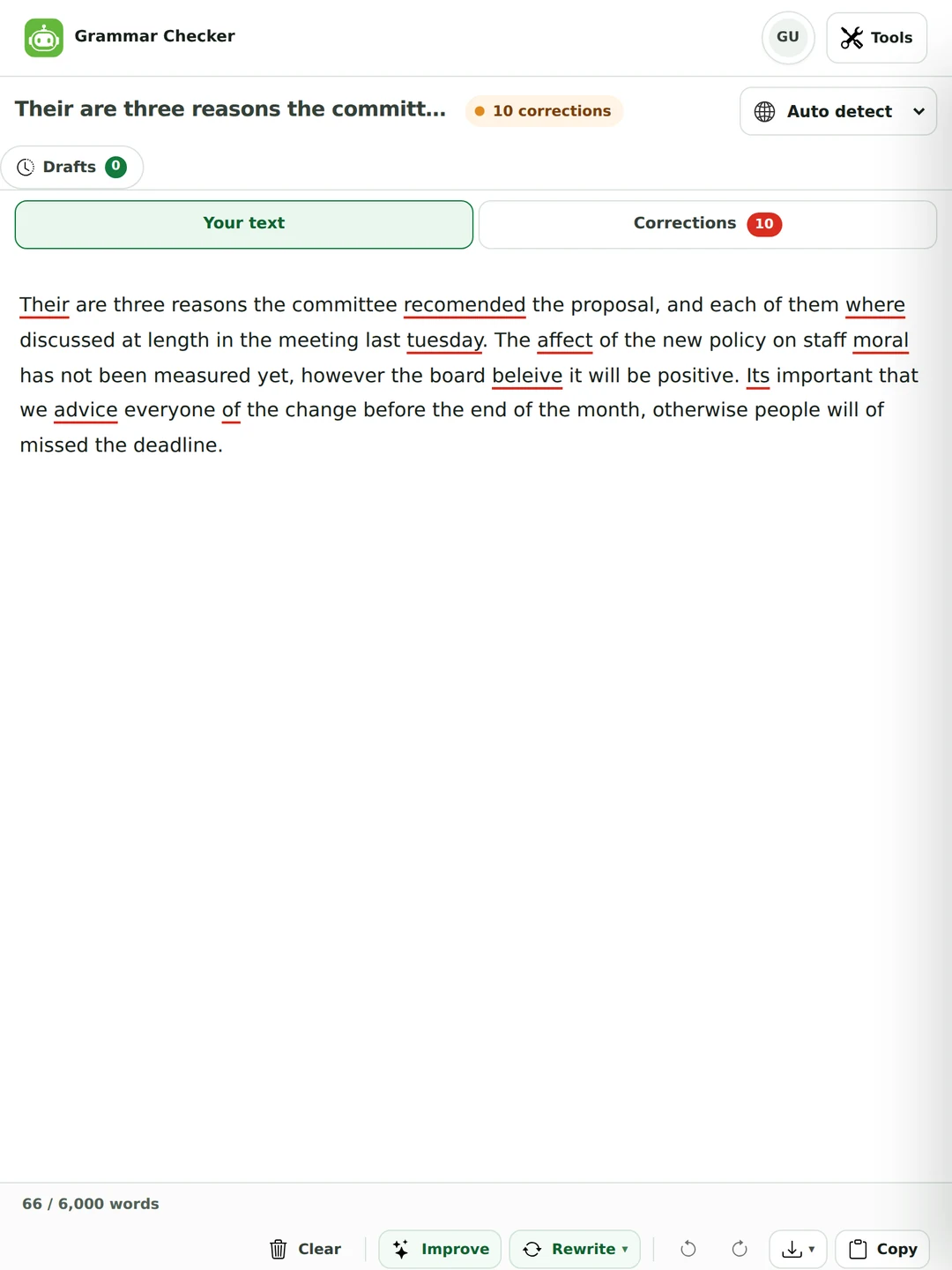
The review panel shows the original struck through and the replacement beside it, so you can see what would change before it changes.
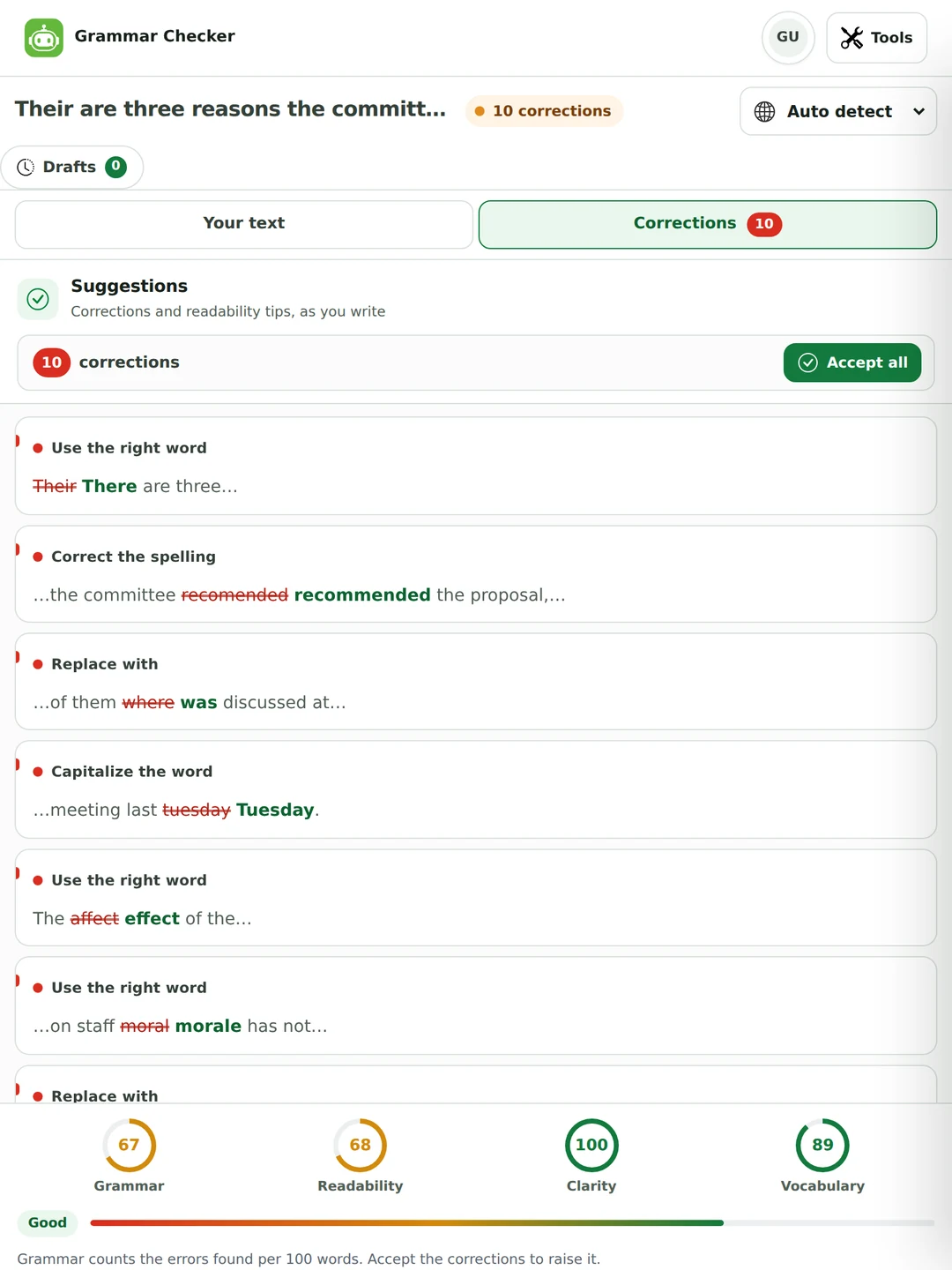
No checker catches everything, so here are our own test results, including the misses.
| Text | Errors in it | Pro | Free plan |
|---|---|---|---|
| A 66-word meeting note (below) | 12, including two comma splices | 12 of 12 fixed | 10 fixed, 1 half-fixed, 1 missed |
| A 95-word email to a landlord (in the punctuation section) | 10, six of them punctuation | 10 of 10 fixed | 10 of 10 fixed |
Their are three reasons the committee recomended the proposal, and each of them where discussed at length in the meeting last tuesday. The affect of the new policy on staff moral has not been measured yet, however the board beleive it will be positive. Its important that we advice everyone of the change before the end of the month, otherwise people will of missed the deadline.
There are three reasons the committee recommended the proposal, and each of them was discussed at length in the meeting last Tuesday. The effect of the new policy on staff morale has not been measured yet; however, the board believes it will be positive. It’s important that we advise everyone of the change before the end of the month; otherwise, people will have missed the deadline.
Only recomended and beleive are misspellings of the ordinary kind. Their, where, affect, moral, Its, advice and of are real English words in the wrong place, which is why a plain spell check walks past them. On the free plan the same text came back with each of them were discussed (still wrong: each takes was), and the second comma splice, before otherwise, wasn’t flagged. An earlier version of this page showed both comma splices slipping through, so the checker has improved since then, but free and Pro don’t see exactly the same things.
Each language page prints a real check on a text with six or seven planted errors. On the free plan, those tests caught 153 of 206 planted errors (74%). Seven languages, including English, German, Tagalog and Malay, were caught in full.
On the free plan, Japanese (0 of 6) and Arabic (2 of 7) were the weakest in those tests. Pro, which uses a stronger AI model and a second reader, caught all seven Arabic errors and four of the six Japanese ones. The language pages show exactly what each plan found.
Planted errors are easier to find than the ones you make yourself, and a few dozen texts is a small sample. Treat every flag as a suggestion to read.
Punctuation is flagged as its own category, so you can see at a glance whether a sentence has a grammar problem or a comma problem.
We wrote a 95-word email about a leaking tap and planted ten mistakes, six of them punctuation. Both the free plan and Pro fixed all ten. Pro joined the two comma splices with semicolons. The free plan split them with full stops. Either is correct.
| What was written | What it suggested | The rule |
|---|---|---|
| still leaking, I noticed it | still leaking; I noticed it | Comma splice: two full sentences joined by a comma. |
| Its been dripping | It’s been dripping | It’s means it is or it has. |
| My neighbours flat | My neighbour’s flat | A possessive needs its apostrophe. |
| before friday | before Friday | Days of the week take a capital. |
| every few minutes, I think | every few minutes; I think | A second comma splice. |
| I think it’s battery | I think its battery | Its is the possessive, with no apostrophe. |
| what suit’s you | what suits you | A verb never takes an apostrophe. |
| Thank’s, Priya | Thanks, Priya | A plain plural or sign-off needs no apostrophe. |
The other two flags in that email were grammar: the water have became has, and a hour became an hour.
Both, and here they run in the same pass. The difference matters because of what a spell checker can’t see.
Compares each word with a dictionary. It catches recomended and beleive. It passes their, affect and moral, because each is a real word spelled correctly.
Reads the whole sentence, so it can tell that their are should be there are and that staff moral means morale. In the meeting note above, eight of the ten word-level errors were of this kind.
Does both and labels which is which. A spelling card says Correct the spelling. A real-word card says Use the right word, so you know which kind of slip you tend to make.
Every checker lists “grammar, spelling, punctuation and style”. Almost none of them tell you which one a given underline is. That’s the only thing that decides whether you have to change it.
This tool labels every issue with its category, which is why the review panel is worth reading rather than just clicking through. Two of these four you must fix. One you should be consistent about. One is a matter of taste, and it’s yours.
The free checker isn’t a demo. These are the actual limits, taken from the same settings the tool uses.
| Guest | Free account | Pro | |
|---|---|---|---|
| Words per check | 1,000 | 3,000 | 10,000 |
| Words per day | 2,500 | 6,000 | No daily cap (fair use) |
| Spelling, grammar, punctuation and style | Yes | Yes | Yes |
| Every correction shown in full | Some shown as locked previews | Some shown as locked previews | Yes |
| Checking model | Standard AI model | Standard AI model | Stronger AI model plus a second reader |
| Improve and Synonyms | Yes | Yes | Yes |
| Rewrite styles | Standard, Fluent | Standard, Fluent | All seven |
| Upload and download files | Yes | Yes | Yes |
| Ads | Yes | Yes | No |
Locked previews: when a free check finds three or more issues, most are shown in full and the rest appear as blurred cards that mark the spot and the category. Spelling fixes are shown first. Style suggestions are held back first, then punctuation and longer grammar rewrites. Pro is $7.99 a month or $47.99 a year, and one plan covers every tool on the site. The pricing page has the full comparison.
Correcting errors and rewriting sentences are separate jobs, so they are separate buttons. Nothing is rewritten unless you ask.
Rewrites the sentences that are hard to read: the long, tangled ones and the ones stuck in the passive. It works on a selection or on the whole text, and Ctrl+Z undoes it.
Standard and Fluent are free. Formal, Simple, Creative, Shorten (about a third shorter) and Expand are Pro. Select a sentence first to rewrite only that sentence.
Select a single word and the floating bar offers Synonyms instead of Rewrite, so you can swap one word without touching the sentence around it.
For a bigger change of voice, the paraphrasing tool and the tone changer go further than a grammar checker should.
A checker that is never wrong is a checker that isn’t looking hard enough. Here is when to click ignore.
Technical terms, product names, proper nouns and field-specific usage get flagged because they’re unfamiliar, even when they’re right. You know the field and the checker doesn’t.
“The samples were left at room temperature” is correct scientific writing when who left them is irrelevant. Passive voice is a style flag here for exactly this reason.
A deliberate fragment. A one-word sentence for emphasis. Starting with And. These are choices, and flattening them is how writing ends up sounding like everyone else’s.
A sentence can be perfectly formed and still be the wrong sentence in that position. No automated check reads for argument, and none of them will tell you that the point is in the wrong place.
“The study was published in 2019” passes every grammar rule there is, whether or not it was. A clean report doesn’t mean the document is correct.
A flawless sentence can still be too stiff for a colleague or too casual for a client. If that’s the problem, use the tone changer instead.
Ten of the tools in this category offer a variant dropdown. Almost none of them say what changes when you move it, so here it is.
| Convention | US | UK & most of the Commonwealth |
|---|---|---|
| Verb endings | organize, analyze, realize | organise, analyse, realise |
| -our / -or | color, honor, favor | colour, honour, favour |
| -er / -re | center, theater, meter | centre, theatre, metre |
| Doubled consonants | traveled, canceled, modeling | travelled, cancelled, modelling |
| Punctuation and quotes | “double”, comma inside the quote | ‘single’ is common, punctuation outside unless quoted |
| Titles | Mr. Smith, Dr. Patel | Mr Smith, Dr Patel |
| Collective nouns | the team is winning | the team are winning |
| Past participle | gotten | got |
Neither column is more correct. What matters is picking one and staying with it. A document that says organise in the first paragraph and color in the third looks careless in either country. Set the language variant before you check.
Every page in this category talks about non-native speakers writing English. Almost none address the harder direction: you have to send something in Spanish, Arabic or Japanese, and you can’t tell whether the correction improved it. Thirty-three languages also have their own page, listed below, with a real test run and the rules that trip writers up in that language.
It can make text grammatical. It can’t tell you that grammatical text means what you intended, and in a language you don’t read, those two feel identical.
A Spanish grammar check is really two: Spanish (Spain) and Spanish (Latin America) differ in vocabulary and in the second person. Portuguese splits between Portugal and Brazil. Picking “Spanish” and hoping is how a formal letter ends up sounding regional.
Arabic, Hebrew, Persian and Urdu are supported. When you’re proofreading Arabic text in particular, watch how numbers, Latin-script names and punctuation sit inside the line after any edit. Direction problems survive a clean grammar report.
Run the corrected text back through the translator into a language you do read. If it comes back saying what you meant, the correction held. It’s crude, and it catches real mistakes.
A grammar checker won’t tell you that you used tú where the situation wanted usted, or missed the register Japanese expects. Grammatical and appropriate are different tests.
For a contract, an application or anything with consequences in a language you can’t check, a native reader isn’t a luxury. Use the tool to get it close, then ask someone.
Grammarly does have a free plan, and so do QuillBot, LanguageTool and Scribbr. They differ in what the free plan actually lets you do, so these are the things worth checking.
| What to check | The question to ask | This grammar checker |
|---|---|---|
| Languages | Does it check the language you write in? The Grammarly website describes English plus more than 20 other languages. | 64 languages, 73 regional variants. |
| Sign-up | Do you need an account or a browser extension before the first check? | None. Guests get 1,000 words per check. |
| Words per check | How much text does the free plan take at once? | 1,000 as a guest, 3,000 with a free account. |
| Why a word was flagged | Does it tell you the rule, or only recolour the word? | Every card says what the problem is. |
| Advanced fixes on free | Which corrections are held back for the paid plan? | Most are shown; some appear as locked previews. |
| Files | Can you upload a document and download the result? | .docx, PDF and TXT in, and .docx, PDF and TXT out. |
What we don’t offer: there’s no browser extension and no Word or Google Docs add-in. You paste or upload here, then copy or download the result. If you want corrections inside every text box you type into, an extension-based tool will suit you better. If you want a free check in a language other than English, or a reason on every correction, this one is built for that.
The words get used interchangeably in tool marketing. They mean different things, and knowing which one you need saves a lot of wasted passes.
A proof reader and editor are different roles for a reason. If your draft is finished and you want it clean, proofreading is the pass you want and an automated check will get you most of the way. If you aren’t sure the argument holds, no amount of proofreading will fix that.

If you’re unsure, the safe version is simple: correct errors, keep your own sentences, and say what you used if you’re asked.
Clean an essay before you hand it in, and learn the rule while you’re there. Every card says what the problem was as well as what to click.
Check the email, the report and the proposal before they go out. Ten seconds against the cost of sending “advice” when you meant “advise” to a client.

It catches the article and preposition slips that are invisible when you’re concentrating on the meaning. As an English grammar corrector it explains each one, so the next draft needs fewer.

Half the time the question is “is this one sentence right?” rather than “check my document”. A sentence grammar check runs exactly the same way. Paste the line on its own. Grammar and sentence correction behave identically whether you give it ten words or ten pages.
A fragment checked out of context invites false flags. Asking it to correct sentence fragments is the one case where it guesses. Paste from capital letter to full stop instead.
If the problem is a pronoun or a tense, the sentence before is what decides the answer. Sentence-level correction works better on two sentences than on one.
A single sentence gives auto-detection very little to go on, and it’s the case where picking US or UK English yourself is worth the extra second.
For one sentence you have time to. Ask it to correct this sentence grammatically once while reading why it was wrong, and you stop making that mistake. That’s how a tool turns into a habit.
Paste or type your text into the editor at the top of this page, or upload a file. The check runs by itself when you pause, underlines each issue where it happens and lists the corrections beside your text. There’s nothing to install and no account to create.
Yes. As a guest you can check up to 1,000 words at a time and 2,500 words a day. A free account raises that to 3,000 words per check and 6,000 a day. Pro allows 10,000 words per check with no daily cap, removes ads and shows every correction in full.
On two English test texts checked on 29 September 2026, Pro fixed all 22 errors and the free plan fixed 20, half-fixed one and missed one comma splice. Across 33 languages, the free plan caught 153 of 206 planted errors (74%). The results, including the misses, are in the accuracy section of this page.
Yes. Punctuation is its own category: comma splices, run-on sentences, apostrophes (its and it’s, possessives, stray apostrophes in plurals), missing commas after words like however, and capital letters. Each card gives the reason.
Yes, spelling and grammar are checked in the same pass. It also catches real words used wrongly, like their for there or affect for effect, which a dictionary-based spell check can’t see.
It’s a checker that uses an AI language model to read whole sentences rather than matching words against a list of rules. That lets it catch agreement, tense and word-choice errors in context. This one then compares the corrected sentence with yours, so each change becomes a separate card you can accept or ignore.
Pro checks up to 10,000 words at once, has no daily cap, uses a stronger AI model with a second reader, shows every correction in full, unlocks all seven rewrite styles and removes ads. The free plan checks the same four categories, and when it finds three or more issues it shows some of the advanced ones as locked previews.
Grammarly has a free plan with paid upgrades. This checker is a free alternative if you want to check text without signing up, in a language other than English, or with the reason for every correction shown. It has no browser extension, so it won’t correct text inside other websites as you type.
64 languages and 73 regional variants, from English, Spanish, French and German to Tagalog, Urdu, Hindi, Arabic, Japanese and Swahili. The language is detected automatically, or you can pick it, which is worth doing for short text. Thirty-three languages have their own page with a test run.
Yes. English comes in US, UK, Canadian, Australian and Indian variants. The variant changes spelling, quotation marks and a few agreement rules, so set it before you check rather than after.
Yes. Upload a .docx, PDF or TXT file up to 25 MB, or drop it onto the editor. When you’re done, download the corrected text as a Word document, a PDF or plain text, or copy it.
Yes, but only when you ask. Improve rewrites hard-to-read sentences. Rewrite offers seven styles: Standard and Fluent are free, while Formal, Simple, Creative, Shorten and Expand are Pro. Select one word to get Synonyms instead.
Ignore it. Technical terms, names, a deliberate fragment and a deliberate passive are all cases where you know more than the checker does. Style flags in particular are suggestions, and declining them is normal.
Facts, tone, and whether a sentence belongs where it is. It can also miss a real word used wrongly when the sentence around it makes it plausible. A clean result means the surface is clean. The document can still be wrong.
For nearly all coursework, no. Correcting your own spelling and punctuation is proofreading, which you’re expected to do. The line is between correcting errors and having a tool rewrite your argument. Check your department’s policy on assessed language work, where the errors may be what is being marked.
Accepting spelling, punctuation and agreement corrections leaves your sentences your own, which is what detectors look at. Wholesale rewriting is different. If your school runs a detector, fix the errors and leave the style suggestions and rewrites alone.
For a clean surface pass on everyday writing, it does most of what a proofreader would. For a contract, a submission or anything in a language you can’t read yourself, it gets you close and a person should finish it.
It’s sent to run the check and isn’t stored by us as text afterwards. Your draft is saved in your own browser so you can come back to it. The privacy policy has the details.
No. It runs in any modern browser, on a phone as well as a computer. Open the page, paste the text and read the corrections.
Once the grammar is right, the tone changer shifts the register, the paraphraser rewrites a passage that won’t sit properly, and the summarizer cuts it down. One plan covers all of them.
Each page opens the checker with that language already selected and explains what it looks for in it. The picker above the editor covers more than seventy languages in all.