
 Upgrade
Paste your text or fetch a page
Paste a draft, upload a .txt, .md or Word file, or switch to Page URL and fetch a published page — yours or a competitor’s. The keyword analysis appears as you type, with no button to press.
Paste at least a paragraph, or fetch a page. You get the keywords the text already uses, on-page checks, and — when you ask — AI suggestions you can weave straight back in.
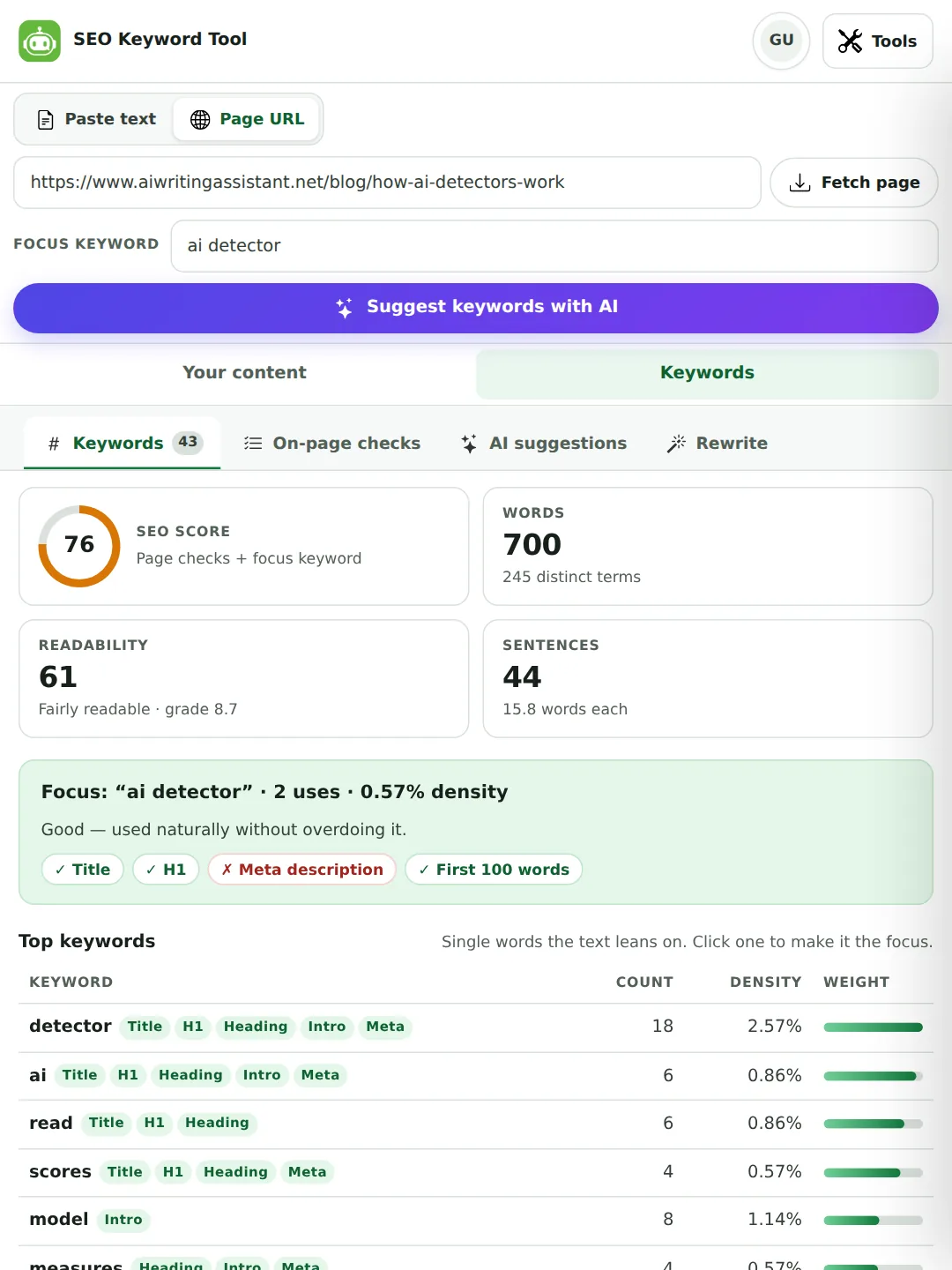
Paste a draft or a page address. The keyword extractor lists every word and every two- and three-word phrase with its count, its density and where it appears — title, headings, first paragraph — then checks the page the way an SEO would. No sign-up, and the counting happens in your browser.
Last updated 30 September 2026 by the AI Writing Assistant team.
Three steps. The first two are free on every plan and never send your text anywhere.
Paste a draft, upload a .txt, .md or Word file, or switch to Page URL and fetch a published page — yours or a competitor’s. The keyword analysis appears as you type, with no button to press.
Type the phrase you want to rank for, or click any keyword in the results to make it the focus. You get a placement report — is it in the title, the first hundred words, a heading — and the SEO score judges the text against it.
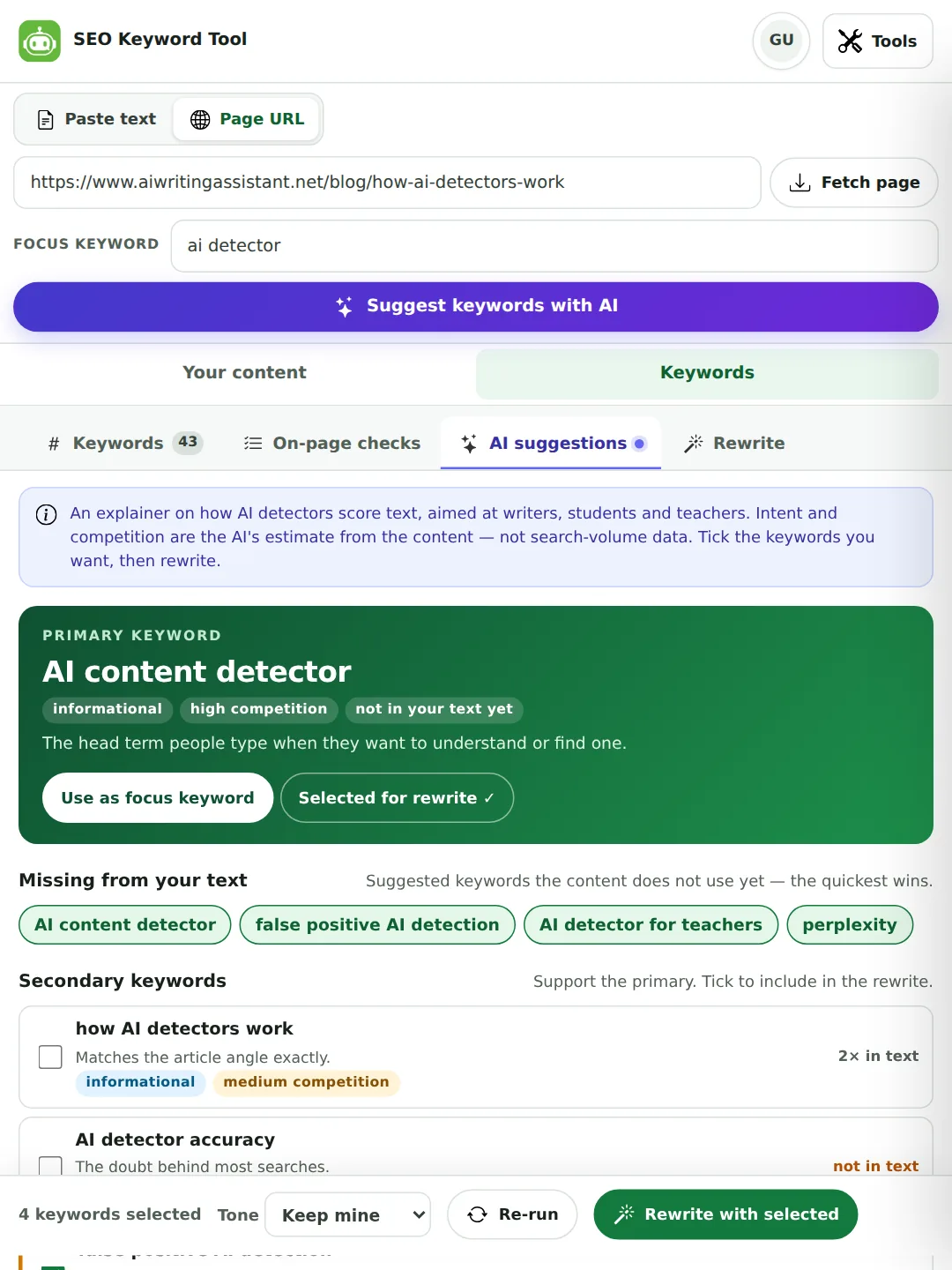
Press Suggest keywords with AI for the plan. Tick the keywords worth adding — the first five missing ones are pre-selected — and press Rewrite with selected. Every placed keyword is highlighted in the result so you can check it before you publish.
Both were run on the live tool on 30 September 2026. The numbers are copied from the result, unedited.
A short how-to, titled “How to store sourdough bread so it stays fresh”. Result: SEO score 94 (88 on the first run, before the stuffing fix below), readability 86 (grade 5.1), 7 sentences of 15.7 words, and the focus keyword used once (0.91%) in the first line — “Good”.
| Keyword | Count | Density | Appears in |
|---|---|---|---|
| bread | 4 | 3.64% | Title, intro |
| sourdough | 3 | 2.73% | Title, intro |
| day | 3 | 2.73% | Intro |
| bag | 3 | 2.73% | Intro |
| slices | 3 | 2.73% | Intro |
| sourdough bread (phrase) | 3 | 2.73% | Title, intro |
The checks flagged one thing: “Only 110 words”. Four uses of “bread” is 3.64% of this draft, above the 3% line, but it is not called keyword stuffing: the tool now also needs a word to repeat at least five times (a phrase four times) before it says so. When this run was first made, earlier on 30 September, it did flag “bread”, which was wrong for a how-to this short, and we changed the rule the same day. The real fix for this draft is more content, not fewer mentions.
Page URL mode on /blog/can-turnitin-detect-chatgpt (our page, so judge the audit result with that in mind). The fetch found 1,497 words and 402 distinct terms, readability 54 (grade 10.1), and the page audit came back 15 passed, 0 to improve, 0 to fix, with the structured data read as BlogPosting and BreadcrumbList.
| Keyword or phrase | Count | Density | Appears in |
|---|---|---|---|
| turnitin | 24 | 1.60% | Title, H1, heading, intro, meta |
| ai | 30 | 2.00% | Heading, intro, meta |
| writing | 21 | 1.40% | Heading, intro |
| detector | 15 | 1.00% | Heading, intro |
| ai writing (phrase) | 10 | 0.67% | Intro |
| ai detectors (phrase) | 7 | 0.47% | Heading |
| false positive (phrase) | 3 | 0.20% | Heading, meta |
“Turnitin” and “Turnitin’s” are counted together, 24 times in all. The first run on 30 September listed them as two words (19 and 5); possessives now count with the base word, and web and email addresses on a page are no longer read as keywords.
The Keywords tab is arithmetic on your text, so it is instant, free and the same every time.
Anything above roughly 3% for a word or 2% for a phrase is flagged as possible keyword stuffing, once it is repeated at least five times (four for a phrase). That is not a rule Google publishes — it publishes no number — but it is the level at which text starts to read like it was written for a machine, and readers notice before the algorithm does.
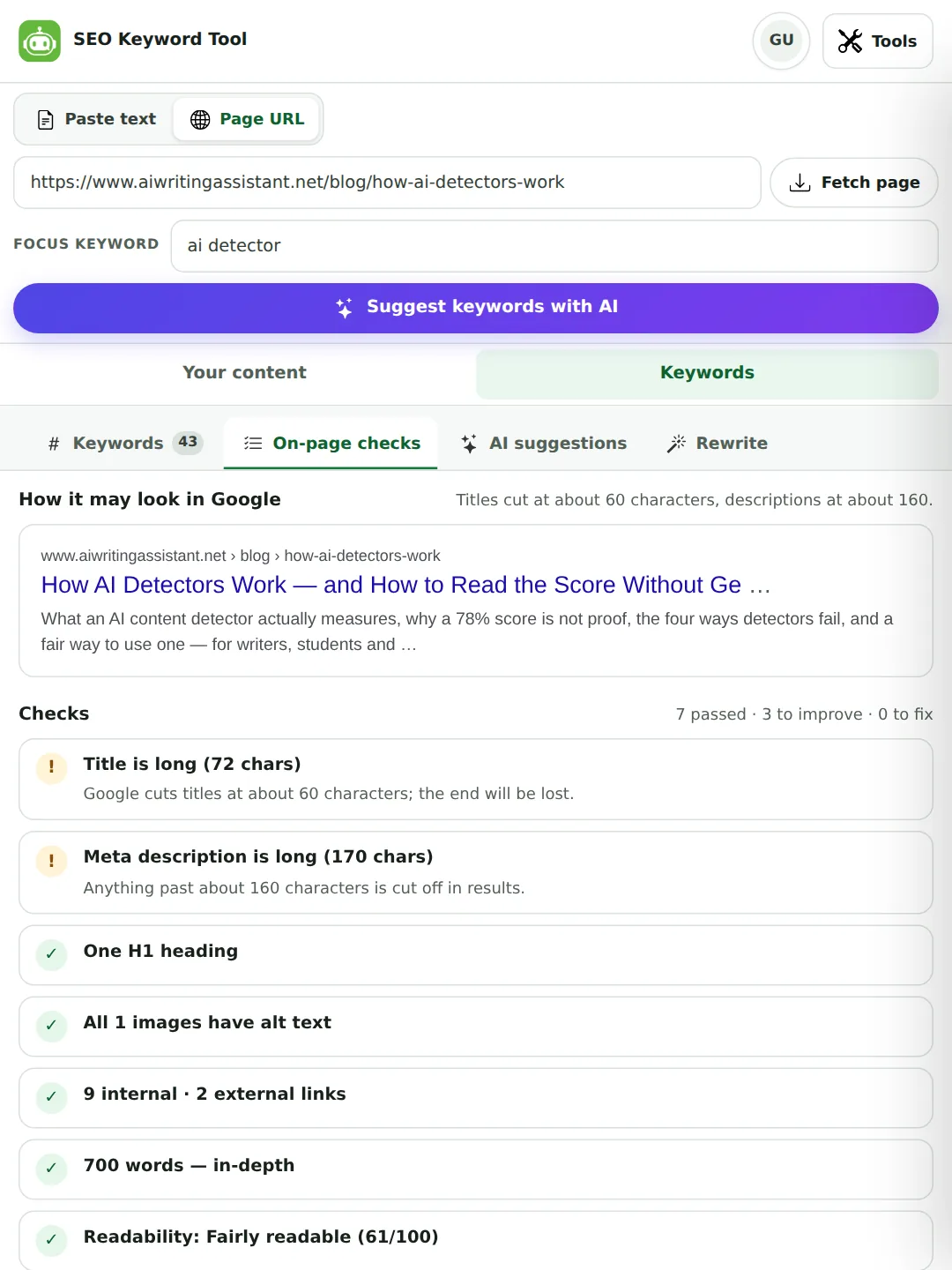
Around forty checks, grouped the way an SEO reviews a page — every one measured from the page itself, nothing estimated.
noindex or meta-refresh by accident, structured data types found, favicon, hreflang, and the shape of the address itself: length, capital letters, underscores, parameters.Fetching works on any public page, including competitors’. It reads the HTML the server sends — if a site only shows its content after JavaScript runs, the tool tells you so rather than reporting an empty page as a bad one. Nothing fetched is stored: the page text is analysed and discarded.
Some sites block every automated reader, ours included. For those, the Blocked site? button next to Fetch page gives you a one-click bookmarklet: open the page in your own browser, click the bookmark, and your browser reads the title, meta tags, headings, links and text itself and opens the full audit here. Nothing passes through any server, and we do not work around a site’s wishes on its behalf — you read the page you are allowed to see.
Counting tells you what a text says. A strategist tells you what people search for. The AI does the second part.
One thing this tool will not do is show you search volumes. Every figure here is measured from your own text or page; the tools that print volumes are estimating, and we would rather show fewer numbers you can trust than a column of guesses. The competition label is the AI’s judgement from the content, marked as an estimate wherever it appears.
The rewrite keeps your meaning, facts and length. It changes how the paragraph is phrased so the keywords you picked appear naturally.
Our software checks your writing and points out mistakes. It works in the browser, so there is nothing to install, and it handles long documents without slowing down. Most people use it for essays and work emails.
Our free grammar checker reads your writing and points out every mistake. You can check grammar online with nothing to install, and the proofreading tool handles long documents without slowing down. Most people use it for essays and work emails.
Three keywords, three sentences, thirty-seven words before and forty after. Nothing was invented and nothing was cut — software became free grammar checker, works in the browser became check grammar online, and it handles became the proofreading tool handles. That is the whole job: the same paragraph, now findable.
The same three tabs, used for quite different jobs.
Paste the draft before you publish. Set the focus keyword, see whether it made the title and the first paragraph, and pick up the long-tail phrases and questions the piece could answer in one more heading.
Fetch your own service page and fix what the checks flag — a missing meta description is the most common finding, and the cheapest fix in SEO. Then fetch the competitor who outranks you and see which phrases they use that you do not.
Not for search rankings — for finding out what a long text is actually about. The keyword table of a 5,000-word report is a fair summary of its subject, and the density check catches a term you repeated far more than you realised.
Paste a script or a caption. The shareable angles and the question list are written for exactly this — the hook that makes a topic feel current, and the search phrasing a description should carry.
The extraction works on any language that separates words with spaces, and the AI plan is returned in the language of the content. The stopword list is strongest in English, Spanish, French and German.
Run the draft and the brief’s target keyword through the focus report. “Used twice, not in the title, not in the first hundred words” is feedback the writer can act on in five minutes.
A fair account of where each one earns its place.
| Tool | What it is built for | Where this one is different |
|---|---|---|
| Google Keyword Planner | Search-volume ranges and bid estimates for advertisers, from Google data. | Planner tells you how often a phrase is searched; it does not read your page. This reads your page and says which of those phrases you use, and rewrites the text to use more. Use both. |
| Ahrefs, Semrush, Moz | Full SEO suites: rank tracking, backlinks, competitor keyword gaps, site audits, on paid plans. | Those are research platforms with their own databases. This is a writing-desk tool: free for the analysis, and the only one of the four that puts the keywords into your draft for you. |
| Yoast / Rank Math | On-page checks inside WordPress while you write, against a focus keyphrase. | Similar checks — focus keyword in title, first paragraph, headings, density — but for any text or any URL, not only pages on your own WordPress site, and with AI suggestions attached. |
| Browser word-cloud and density checkers | Count words on a page and draw a cloud. | The counting here is comparable but stems plurals, weights placement, scores phrases as well as words, and adds the on-page checks, snippet preview, intent labels and rewrite that a density counter does not have. |
None of these is wrong. A keyword research platform tells you what to aim at; this tool tells you whether the text in front of you hits it, and helps you fix it when it does not.
A number that is easy to chase and easy to misread.

Straight answers to the things people ask before they trust a keyword tool.
Paste the text into the box (or upload a .txt, .md, .html or Word file). The Keywords tab fills in as you type: the single words the text leans on, then the two- and three-word phrases, each with its count, density and where it appears. Type the phrase you want to rank for in the focus box to see whether it is in the first line, the first 100 words and the headings.
Not in the search-volume sense. It tells you which keywords a text or page actually uses and suggests related ones with their likely intent, but it has no search-volume or difficulty data and shows none. For volumes, use Google Keyword Planner; then come back here to check that your page really uses the phrases you chose.
When a word takes up more than about 3% of the text and is used at least five times, or a phrase takes more than about 2% and is used at least four times. Both conditions matter: four uses of “bread” in a 110-word how-to is 3.6% but reads naturally, while the same word five times in a 70-word pitch is genuine repetition. In a short text, add substance rather than deleting the keyword.
Switch to Page URL, paste the address and press Fetch page. The tool reads the page and lists every keyword and phrase it uses, ranked by how often they appear and where — title, first paragraph, headings. The On-page tab shows the title tag, meta description, heading outline, images and links at the same time. It works on your own pages and on anyone else's public page.
Yes. Keyword extraction, density, the focus-keyword report and the page audit are free on every plan, including as a guest, with no daily limit — they run in your browser. The two AI buttons (Suggest keywords with AI and Rewrite with selected) take up to 500 words of content per request as a guest, 1,500 with a free account and 4,000 on Pro.
Around forty measurable things, grouped as an SEO would review them. Content: title and meta description length, a single H1, heading levels in order, subheadings on long pages, paragraph length, sentence length, readability, images with alt text. Technical: HTTPS, mobile viewport, character set, language attribute, canonical tag (and whether it points at another site), noindex, meta refresh, structured data, favicon, hreflang, and the URL itself. Links: internal and external counts, too many links, generic "click here" anchors, links without text. Social: Open Graph and Twitter card tags. Practices and ethics: hidden text, keyword stuffing, repeated or shouting titles, descriptions that copy the title. Every check is measured from the fetched page; nothing is estimated or pulled from a third party.
No, on purpose. Every number on this page is measured from your own text or page — counts, density, placement, readability, the on-page audit — and the AI's keyword plan is labelled as its judgement, never as data. Search-volume figures from third-party services are estimates of estimates; we would rather show you fewer numbers you can trust than a column of guesses. If you need volumes, Google Keyword Planner is the primary source.
Density is how much of the text one keyword takes up: a phrase used 5 times in a 500-word article has a density of about 1%. Google does not publish a target, and modern ranking is not driven by density. As a rule of thumb, a focus keyword around 0.5–1.5% reads naturally; above about 3% for a word or 2% for a phrase, repeated at least five times (four for a phrase), the tool flags possible keyword stuffing, because at that level readers notice the repetition.
A longer, more specific search phrase — usually three to six words — such as “free grammar checker for students” rather than “grammar checker”. Fewer people search each one, but they know exactly what they want, so the traffic converts better and the competition is lighter. The AI plan lists long-tail keywords with the intent behind each.
Why someone typed the phrase. Informational — they want to learn (“how do AI detectors work”). Commercial — they are comparing options (“best free grammar checker”). Transactional — they are ready to act (“grammar checker pro annual plan”). Navigational — they want a specific site. Matching the page to the intent matters more than matching the exact words.
You tick the keywords to include, and the AI rewrites your text so each appears at least once in a natural sentence — never as a list, at most a few times each — while keeping your facts, names, numbers, structure and roughly the length — more keywords need more room, so the text may grow by up to a third, or tick Keep my length to hold it within about 10% at the cost of placing fewer keywords. The result is checked: any keyword the AI could not place naturally is shown in red rather than forced in. Every placed keyword is highlighted so you can read each sentence before you use it, and Compare with original opens both versions in our Text Compare tool.
The focus keyword is the one phrase you want the page to rank for. Everything is judged against it: whether it is in the title, the first hundred words and a heading, how often it appears, and whether that is too little or too much. Secondary and long-tail keywords support it — they cover the related ways people search for the same thing.
Yes. Fetch their URL and you see the keywords they lean on, their heading structure, and their title and meta description — then fetch your own page and compare. Anything public can be fetched; pages that need a login or that only render with JavaScript cannot be read, and the tool says so rather than guessing.
Three usual reasons: the site only shows its content after JavaScript runs in a browser, so the HTML the server sends has almost no text; the site blocks automated readers; or the address needs a login. For a page you can open yourself, use the Blocked site? bookmarklet next to Fetch page: your own browser reads the page and hands the full audit to the tool, with nothing passing through any server. Otherwise copy the visible text and paste it in — the keyword analysis is the same, you just lose the title and meta checks.
The extraction and checks run in your browser and send nothing. A URL fetch asks our server to read a public page, which is analysed and discarded — neither the address nor the page text is kept. The two AI buttons send your text to the model for that one request; we record a word count for your daily allowance and no text. Your draft is remembered in your own browser between visits so a refresh does not lose it; Clear removes it. The privacy policy has the full detail.
The extraction works for any language that separates words with spaces, and Chinese, Japanese and Korean text is segmented into words as well. The AI plan comes back in the language of your content. Common-word filtering is strongest in English, Spanish, French and German, so in other languages a few function words may appear in the keyword list; the readability score is only shown for Latin-script text. Set a focus keyword and the placement report works in any language.
The SEO Keyword Tool sits alongside thirteen other tools. Everything free stays free.