
 Upgrade

Paste your text
Type it, paste it or upload a file. One sentence is fine, and so are a few paragraphs.
Let’s rewrite!
Start typing, paste your text, or upload a Word, PDF or text file. Select any word to freeze it.
Paste your text, pick a mode and press Paraphrase. You get the same meaning back in new words, and every word that changed is highlighted, so you can see exactly what the tool did. Names, numbers and dates stay the way you wrote them. It’s free and you don’t need an account.
Last updated 30 September 2026.
Type it, paste it or upload a file. One sentence is fine, and so are a few paragraphs.
Standard works for most jobs. Choose Simple for plainer words, Formal for work, or Shorten and Expand to change the length.
Changed words are highlighted. Click one to see other options, freeze words you want to keep, or run it again for a new version. Then copy or download it.
We ran this through the tool as a guest on 30 September 2026, in Standard mode at Balanced. Nothing below was changed.
I have been working in customer support for three years, and in that time I have learned that most angry customers just want to be heard. When I answer a complaint, I try to repeat the problem back to them before I offer a fix. This small step has cut down the number of follow-up emails I get, because people feel that someone actually read their message.
Over the past three years in customer support, I've discovered that most upset customers simply want to be listened to. When I respond to a complaint, I first restate the issue before suggesting a solution. This brief practice has reduced the amount of follow-up emails I receive, as people feel their messages have truly been read.
The result comes back with changed words highlighted against your original. Anything that isn’t highlighted is exactly as you wrote it.
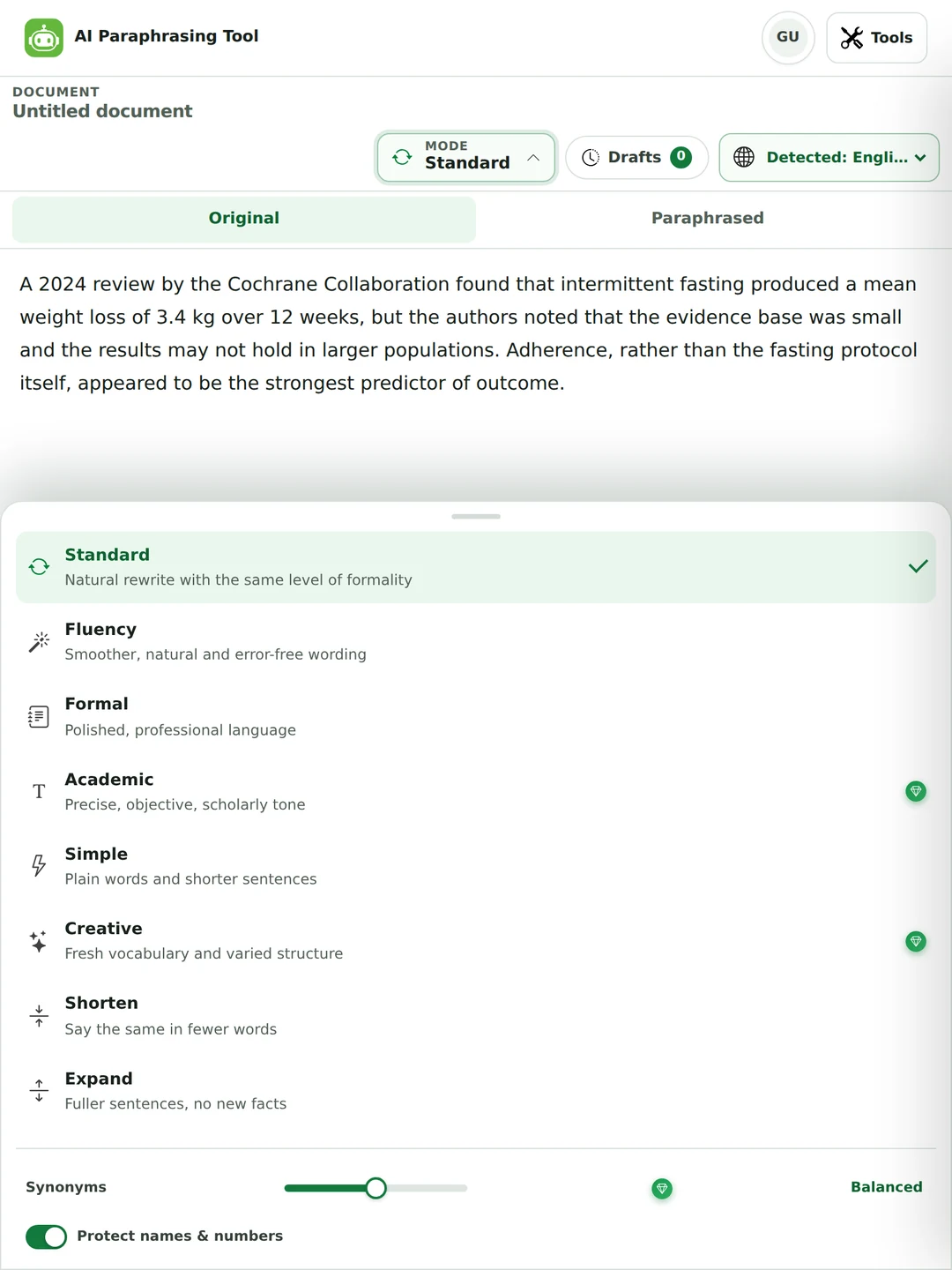
Making a sentence plainer and making it more formal are opposite jobs, so each has its own mode. Six are free and three come with Pro.
Rewords the text and keeps the same level of formality. Start here.
Smooths out awkward wording. Good for a draft written in your second language. Fluency mode page
Turns a casual message into something you’d send to a manager or a client. Formal mode page
Precise and neutral, for essays and reports. It won’t add evidence or citations.
Swaps jargon for everyday words and splits long sentences. Text simplifier page
Moves furthest from your wording, with fresh vocabulary and new sentence shapes.
Cuts words and keeps every point. Sentence shortener page
Turns short notes into full sentences without adding facts. Sentence expander page
Write your own instruction, like “keep it under 40 words and drop the jargon”.
Three settings decide what you get back. The defaults are fine for a first run.
Guest runs from 30 September 2026, all at Balanced, printed as they came back.
Please be advised that, pursuant to the updated policy, employees are required to submit reimbursement requests no later than 30 days following the date on which the expense was incurred. Requests received after this period will not be processed.
Please note that, according to the new policy, employees must submit reimbursement requests within 30 days of the expense date. Any requests submitted after that will not be processed.
“Pursuant to the updated policy” became “according to the new policy”, and “no later than 30 days following” became “within 30 days of”. The rule and the 30 days didn’t change. More on Simple mode.
I wanted to reach out to you today in order to let you know that, due to the fact that our supplier has experienced some unexpected delays in their shipping schedule, we are unfortunately not going to be able to deliver your order on the date that we had originally promised, which was Friday, 3 October. We now expect it to arrive on Tuesday, 7 October instead.
I’m writing to inform you that our supplier’s unexpected shipping delays mean we can’t meet the promised delivery date of Friday, 3 October. We now expect your order on Tuesday, 7 October.
67 words down to 32. Both dates came through. It did cut “unfortunately”, so add a sorry back if the customer needs one. More on Shorten mode.
Meeting moved to Tuesday 10am. Room B not available, we'll use Zoom. Please bring the Q3 sales numbers.
The meeting has been rescheduled for Tuesday at 10 a.m. Since Room B will not be available, we will hold the session via Zoom. Please remember to bring the Q3 sales numbers.
It wrote the notes out as full sentences and joined them up (“Since Room B will not be available”). It didn’t invent an agenda or a meeting link. More on Expand mode.
Pick the language from the menu or leave it on Auto detect. Here’s a Tagalog paragraph run with Filipino / Tagalog selected.
Maraming estudyante ang nahihirapang magsulat ng sanaysay dahil hindi nila alam kung paano sisimulan ang unang talata. Mas madali kung isusulat muna ang pangunahing ideya sa isang pangungusap bago magdagdag ng mga detalye. Sa ganitong paraan, hindi naliligaw ang mambabasa at malinaw ang takbo ng argumento.
Maraming estudyante ang nahihirapang gumawa ng sanaysay dahil hindi nila alam kung paano uumpisahan ang unang talata. Mas magiging madali ito kung ilalahad muna ang pangunahing ideya sa isang pangungusap bago idagdag ang mga detalye. Sa ganitong paraan, hindi malilito ang mambabasa at mananatiling malinaw ang daloy ng argumento.
It swapped words (“sisimulan” to “uumpisahan”, “takbo” to “daloy”) and reshaped the second sentence, and the meaning stayed the same. The Tagalog paraphrasing tool page has more, including a Taglish example.
Paraphrasing means saying something again in your own words while keeping what it means. Here’s how to do it by hand, which is also the best way to check a tool’s work.
Adherence, rather than the fasting protocol itself, appeared to be the strongest predictor of outcome.
What mattered most seemed to be whether people stuck to the plan, not which fasting plan they followed.
The order of the ideas changed, the wording is new, and “appeared to be” is still a hedge (“seemed to be”). The source sentence comes from a research summary we wrote for testing.
It depends whose words you start with.
Rewriting your own draft is just editing. There’s no one to credit, so use any mode you like. If English is your second language, polishing your own writing is fine too. The ideas were yours to begin with.
You still need to cite it, even if you changed every word, because the idea is still theirs. That’s the rule people get wrong most often. And if the exact wording matters, like a definition or a legal phrase, quote it instead.
A paraphrase rarely breaks loudly. More often it makes a claim a little stronger or weaker, and still reads fine.
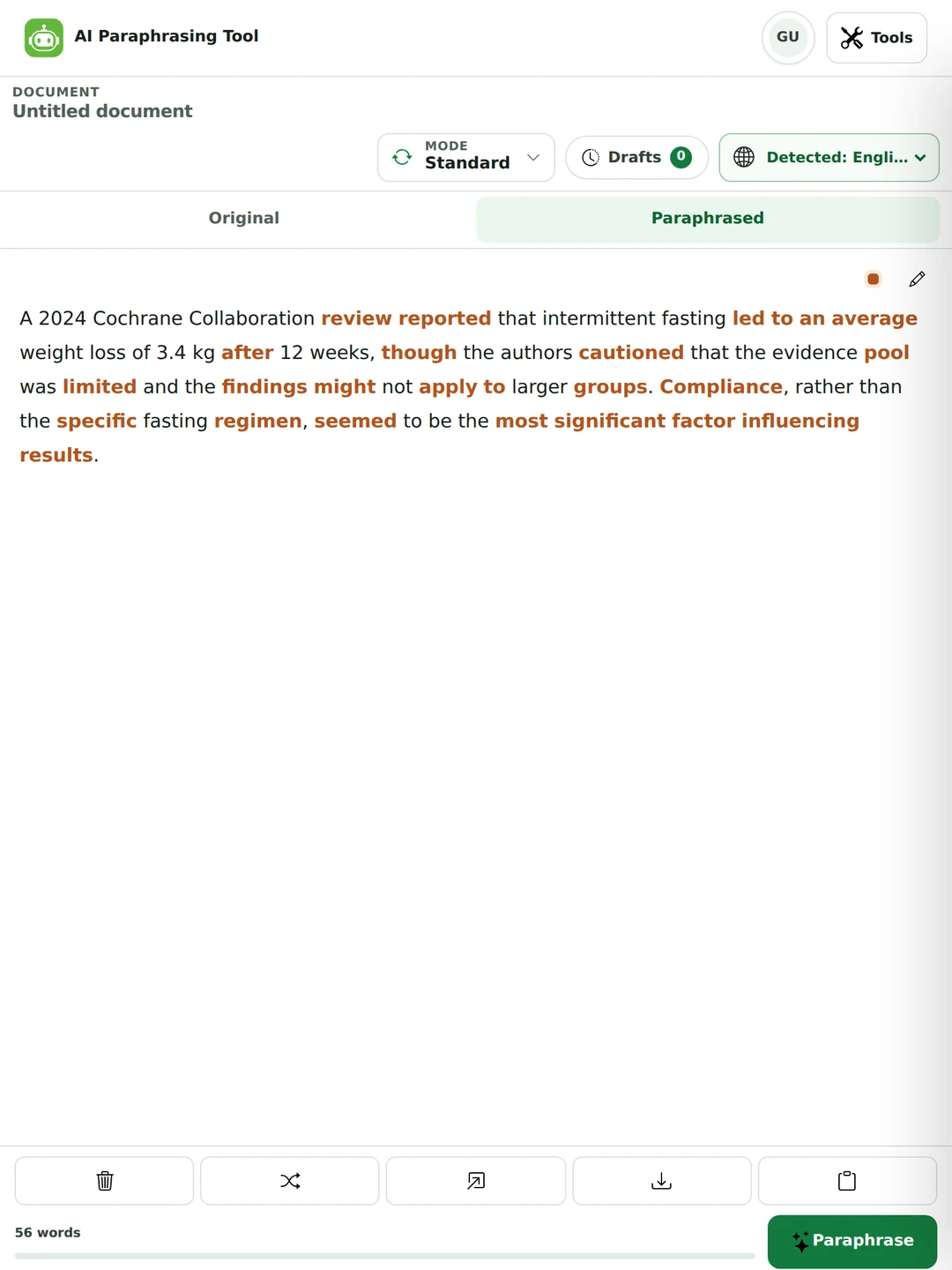
Compliance, rather than the specific fasting regimen, seemed to be the most significant factor influencing results.
Compliance, rather than the specific fasting regimen, emerged as the most significant factor influencing results.
Two real runs of the same sentence. “Seemed to be” is an impression. “Emerged as” sounds like a finding. Before you keep a paraphrase of a source, check words like may, appeared, suggests and tends to.

If you need one of these in your work, quote it and cite it.
If you’re typing “rewrite my sentence” into a search box, try these first.
A sentence that fights you is often two sentences. Break it at the comma and try again.
“Carried out an assessment of” is just “assessed”. Put the action back in the verb.
Then type what you said. Spoken sentences are usually clearer than written ones.
Paste the sentence in and run Simple mode. It unpacks a tangled line instead of dressing it up.
Put a source into your own words for a literature review, then cite it. The highlights make it easy to check you changed the structure and not just the words.
Make a technical paragraph readable for a client, tidy up a rushed message, or cut a report that runs long.
Say what you meant to say. Polishing your own English draft is editing, and the ideas stay yours.

A tool that rewrites text in different words while keeping the meaning. You paste a sentence or a paragraph and get a new version back. This one also highlights what changed, so you can check it.
Yes, and you can use it without an account. Six of the nine modes and two of the three synonym levels are free. Academic, Creative, Custom and the Extensive level come with Pro. The pricing page has the details.
Up to 300 words a run as a guest, 600 with a free account and 3,000 on Pro. For a longer essay, do it a few paragraphs at a time.
Read it until you understand it, write the idea from memory, change the sentence structure, keep the key terms, check it against the source and cite it. The steps above go through each one.
Not if you cite the source and really rewrite it. It is plagiarism if you reword someone else’s work and don’t credit them, or if you only swap synonyms into their sentences.
Using one on your own draft is editing. Using one on someone else’s work without citing them is plagiarism, the same as if you reworded it by hand. Some courses also limit AI tools, so check your school’s rules.
Yes. The citation credits the idea, not the wording.
Keeping the author’s sentence structure and order of ideas and only swapping in synonyms. Most schools treat it as plagiarism. A real paraphrase changes the structure too.
A paraphrase keeps all the detail and is about the same length. A summary keeps only the main points and is much shorter. For a summary, use the summarizer.
Not with Protect names & numbers on, and it’s on by default. You can also freeze any word. Still, read the dates and figures once before you use the result.
Yes, in 64 languages. Pick yours from the menu or leave Auto detect on. For Tagalog and Taglish, see the Tagalog paraphrasing tool page.
Yes, in parts. Paste a few paragraphs at a time within your word limit, or upload the file. Read each part before you move on.
Yes. Rephraser, rewording tool, sentence rewriter and paraphraser all mean the same thing: saying it again in different words.
Standard for most things. Simple to make it easier to read, Formal for work, Fluency to smooth your own second-language draft, and Shorten or Expand to change the length.
Please don’t. Rewording text just to avoid a similarity report is misconduct in its own right. Paraphrase properly and cite the source instead.
You can reword it, but it’s still their article. The research and the ideas are theirs, and a reworded copy gives readers nothing new. Use the tool on your own drafts.
It’s sent to make the rewrite and isn’t stored afterwards. Your draft is saved in your own browser so you can come back to it. The privacy policy has the details.
Summarize when you only need the main point, check the grammar of your rewrite, or change its tone. One plan covers all of them.
Pick a page for what you’re rewriting, like a sentence, an essay or an email, for how far you want it to change, or for the language you write in. Every page runs this same rewriter and shows a real before and after. Standard is the default everywhere. Academic, Creative and Custom come with Pro and are in the mode menu above. The AI rewriter is the same tool under another name.
What you are rewriting
How far to move it
In another language