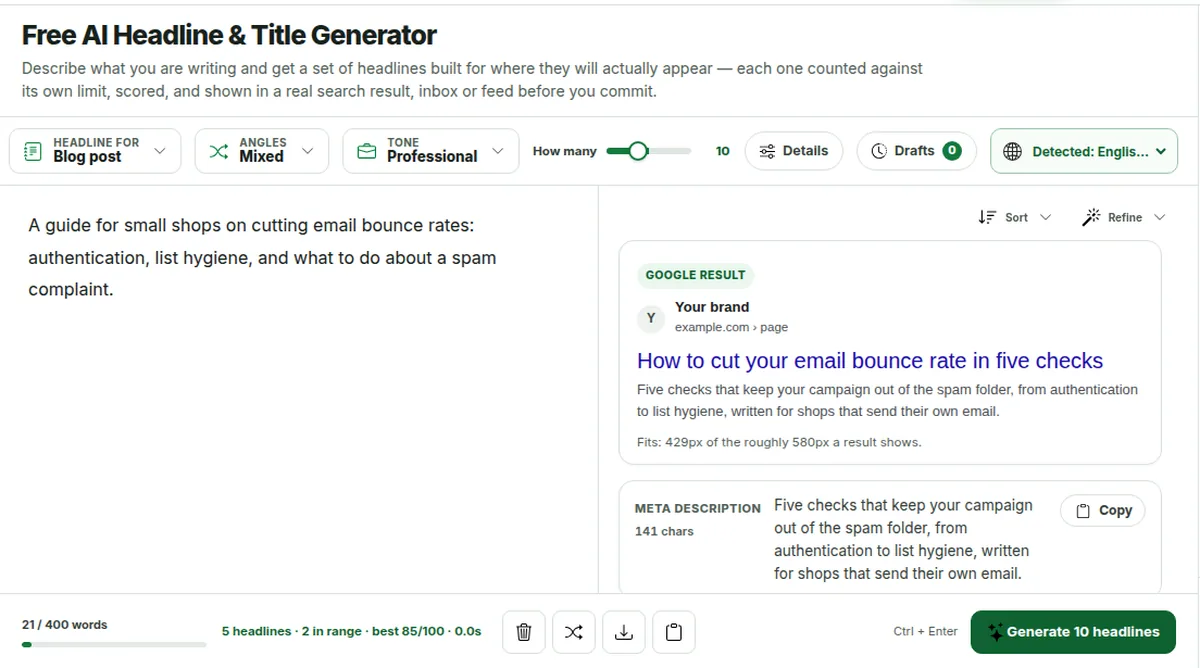
50–60 characters · keyword early · Each purpose has its own length range, its own rules and its own preview. The score is measured against whichever one you pick.
Leave it on Mixed and the set spreads across every angle, which is usually how you find the one that is obviously better. Pick up to six to narrow it.
How many10
Let’s name it!
Describe the piece, or paste it in full. Set a primary keyword under Details and every headline will carry it — and the score will start measuring where it sits.
Drop your file herePDF, DOCX or TXT
Generated headlines
Your headlines will appear herePick what the headline is for, say what the piece is about, then press Generate. Every headline comes back editable, counted against its own limit, scored, and previewed where it will appear.
Checking your limit...
Ctrl + Enter
Guest access
Free AI headline generator
Free Headline Generator and AI Title Generator
A headline generator turns a short description of your piece into headlines you can use. Say what it’s about and where the headline will appear, and this free AI title generator writes five to twenty of them to that surface’s own length, counts each one, scores it out of 100 and shows it in a Google result, a phone inbox or a video list. You don’t need an account.
PriceFree on every plan, with no feature held back. Your brief can be up to 400 words as a guest, 1,000 with a free account and 3,000 on Pro.
PurposesThirteen: blog post, SEO title tag, YouTube video, email subject, newsletter, ad, social hook, product, landing page, press release, essay, podcast episode and book.
Per requestFive, ten, fifteen or twenty headlines, in twelve angles or a mixed set, eight tones, sentence or title case.
Also writtenA meta description for blog, SEO, product and news titles, preheader text for emails, and a subtitle for landing pages, essays and books.
ChecksA live character, word and pixel count, a score you can open, and a preview of where the line gets cut.
PrivacyYour brief is sent once to write the headlines and isn’t stored by us afterwards. The score is worked out in your browser.
Last updated 29 September 2026 by the AI Writing Assistant team.
How the AI headline generator works
Three steps. The third one is what a general chatbot can’t do for you.
1
Say what it’s about
Two or three lines is enough, like “a guide to cutting email bounce rates for small shops, aimed at owners who send their own campaigns”. Or paste the finished article, email or product page and let it be titled from that. Names, numbers, prices and dates carry through exactly as typed, and nothing that isn’t in your brief is invented.
2
Pick where it will appear
Thirteen purposes, each with its own length range and its own rules: 50–60 characters for a blog title, under 60 for a title tag, 30 for a Google ad headline, 28–50 for an email subject. Add a primary keyword, a tone, the angles you want, and how many headlines to see: five, ten, fifteen or twenty.
3
Compare, edit, and see it in place
Every headline arrives with a character count against its range, a score out of 100 you can open and read, and the angle it takes. Edit any of them in place and the count, the score and the preview update as you type. Sort by score, copy one, or download the set.
A blog title and an ad headline are different jobs. A tool that writes one line for both gets neither right. Each purpose here carries its surface’s real limit, the point at which it gets cut, and the shape that surface rewards.
Headline for
Written to
Cut at about
Also returned
Blog post or article
50–60 characters
60 characters in a search result
Meta description, Google preview
SEO page title
50–60 characters, hard stop at 70
About 580 pixels, measured by the tool
Meta description, pixel width
YouTube video
45–60 characters
60 in search, suggestions and mobile
Video-list preview
Email subject line
28–50 characters
About 38 on a phone
Preheader text, inbox preview
Newsletter issue
30–55 characters
About 38 on a phone
Preheader text, inbox preview
Ad headline
20–30 characters
30 is a hard limit in Google Ads
None
Social post hook
40–80 characters
100–210 depending on the platform
None
Product title
50–70 characters
About 70 in search and shopping feeds
Meta description, result preview
Landing page headline
30–60 characters, under 12 words
Not cut. Read at a glance
Supporting subheading
News or press release
55–80 characters
About 80 in a wire listing
Meta description, result preview
Essay or research paper
50–90 characters, 6–16 words
Not cut. Read in full
Scope subtitle
Podcast episode
40–60 characters
About 60 in Apple and Spotify lists
Episode-list preview
Book or chapter
15–50 characters
Not cut. Said out loud
Subtitle
Limits are the platforms’ own published or documented values as of September 2026. A headline that comes back over a hard limit is rewritten before you see it rather than trimmed mid-word, and the counter on each card turns amber past the range and red past the limit.
Every headline counted where it will be cut
The preview isn’t decoration. It draws the surface the headline is written for and shows you the exact point at which that surface stops showing it.
A blog or SEO title is drawn as a Google result and measured in pixels, because Google truncates at width rather than at a character count.
An email subject is drawn as a phone inbox row, with everything past the ~38 characters a phone shows greyed out rather than guessed at.
A YouTube or podcast title is drawn in a list. A landing page, ad, essay or book title is drawn on the page itself.
The meta description comes with the set for blog, SEO, product and news titles, and is editable in the same place.
The Google preview, measured in pixels. The numbers are the tool’s own.
A score you can open and argue with
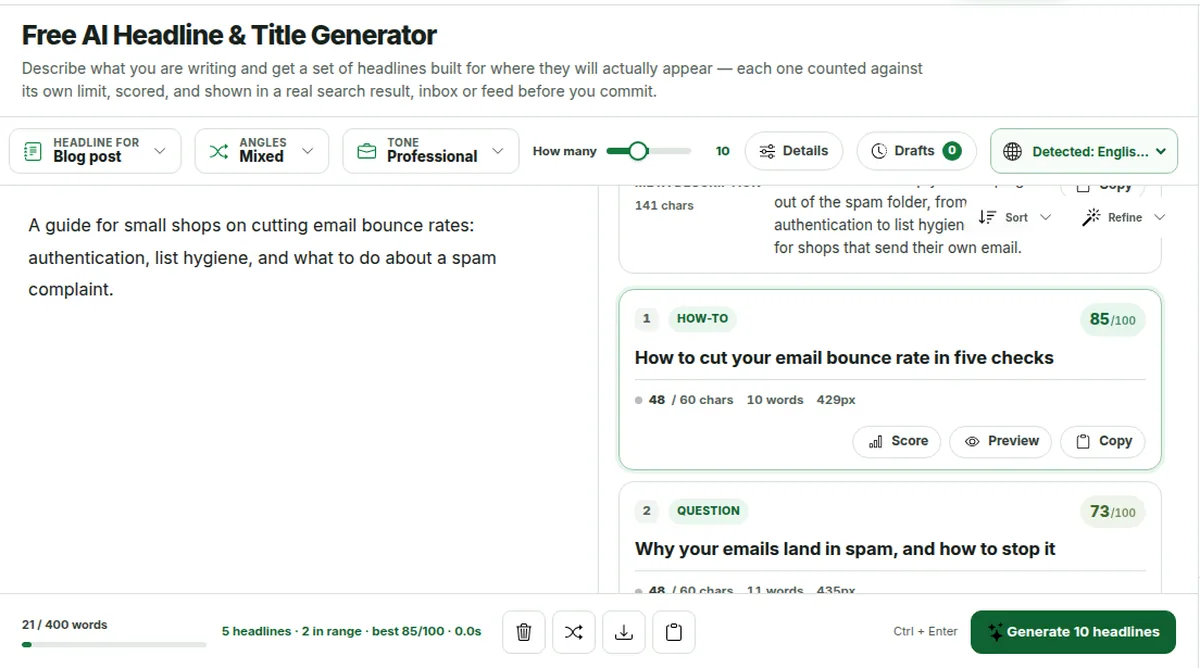
Each card carries a number out of 100, the angle it takes, and its length against the range for the purpose you picked. Press Score and it shows its working.
The dot beside the count is grey when the headline is short, green in range, amber past it and red past the hard limit.
Every headline is editable in place, and the count, the pixel width, the score and the preview all move as you type.
Sort the set by score to see which lines the measurements like, then ignore it where you disagree. It measures shape. Taste is yours.
The whole calculation runs in your browser, in assets/js/aiwa-headline.js, where anyone can read it.
Two cards from the same set, with their angles, counts and scores.
A real run: ten blog titles for one brief
Generated on 29 September 2026 with the Blog post purpose and a mixed set, and printed as it came back, including the lines we would throw away.
The brief: How to write a cover letter for your first job after university: what to include when you have little experience, how long it should be, and how to tailor it to each application in about 20 minutes.
Nine blog titles returned for one brief, with angle, length and score
Angle
Headline
Characters
Score
Our note
How-to
Write a cover letter for your first job in 20 minutes
53
90
Question
Can a brief cover letter still impress employers?
49
75
One character short of the range
Benefit
Boost your interview chances with a tailored cover letter
57
76
Curiosity
Why most new graduates over-explain their cover letters
55
75
Contrarian
Skip the fluff: a contrarian take on cover letter length
56
88
Names its own angle; cut “a contrarian take on”
Announcement
New graduate cover letter checklist released today
50
76
Invents news the brief never gave: delete
Comparison
Cover letter vs résumé: which matters more for entry-level roles?
65
69
Over 60, so Google may cut it
Mistake
Avoid this common mistake in your first cover letter
52
83
Story
How I landed my first job with a 20-minute cover letter
55
90
A first-person story the brief did not supply
Ten were asked for and nine arrived: the tool drops a line that breaks its rules rather than show it to you. Seven of the nine sit inside the 50 to 60 characters a blog title should use. The meta description came back at 165 characters, a little over the 158 we aim for, so it needs one word trimmed before it goes live.
The highest score is not automatically the best headline. The Story line scored 90, but the brief never said anyone landed a job, so publishing it would be a claim you cannot back. Read the set as a shortlist: here we would keep the How-to, Curiosity and Mistake lines, and fix the Contrarian one by hand.
The score, and what it actually measures
Every headline carries a number out of 100. It’s worth explaining plainly what that number is, because most headline scores on the internet don’t explain theirs.
Length: 25 points
Measured against the range for the purpose you picked rather than a generic ideal, with the word count as a second check. A 78-character title tag loses here even though it reads well, because Google will cut it.
Word balance: 20 points
What share of the words carry meaning rather than scaffolding, and whether at least one strong verb or feeling word is doing work. A headline built entirely from the hundred commonest words in English says very little.
Clarity: 20 points
Punctuation load, filler, and how much of the line is everyday scaffolding. Three commas, a semicolon and two dashes each cost something, because each one is a pause the reader has to spend.
Keyword: 20 points
Only when you set a primary keyword: is it there, and is it in the first half. Set no keyword and this band disappears and its points are shared out, so nothing is penalised for a setting you didn’t use.
Specificity: 15 points
Is there a number, a name, something concrete? And is there any hype wording, a shouted word or stacked punctuation pulling the other way? This is the band that separates a real headline from a template.
What it isn’t
It isn’t a prediction of clicks, and we won’t pretend otherwise. Nobody can score a headline for performance without your audience and your data. This measures shape, which is the part that can be known. It runs in your browser, so you can read the whole method in the page source.
Check a headline you already wrote
There’s no separate headline analyzer here, and it doesn’t need one. Every card is editable, so the same score works on your own line.
1
Generate a set for the right purpose
Pick where the headline will appear, since the length rules and the preview come from that choice. A two-line brief is enough.
2
Type your headline over any card
The character count, the pixel width, the score and the preview all update as you type, so your own title is measured exactly like a generated one.
3
Open the score
It lists the five bands with the reason for each: length for that purpose, word balance, clarity, keyword position and specificity. It measures shape. It can’t tell you how many people will click.
Headline generators for every job you have
Each of these is the same tool with the right rules already selected, and its own page explaining what that surface rewards.
First lines that buy the second one, under the 80 characters every feed shows.
Who uses a title generator, and for what
Bloggers and content writers
Twenty blog title ideas from the post you just finished, sorted by score, with the meta description written to match. The whole title-and-description job is done in one pass instead of an hour of staring.
SEO and marketing teams
Title tags measured in pixels rather than guessed, ad headlines that can’t exceed 30 characters, landing page headlines with their subheadings, and email subject lines you can see in an inbox before the send.
Students and researchers
Essay and paper titles that name the subject, the material and the method the way a database search will find them. They describe rather than persuade, and they’re yours to edit.
Creators and podcasters
Video and episode titles written to the sixty characters an app list actually shows, so the promise is never the part that gets cut.
Shops and sellers
Product titles in the shape marketplaces reward, with the attributes that decide the purchase in front. Nothing is invented, because an invented specification is a returned order.
Anyone with one line to write
A press release headline, a book chapter, a newsletter subject, the first line of a post. Thirteen purposes, no account, no credit card, no watermark.
Headline generator FAQs
What is an AI headline generator?
A tool that turns a short description of what you’re writing into a set of finished headlines. Unlike a general chatbot, a dedicated headline generator knows the length each surface allows, where that surface cuts a line, and what shape it rewards. So a title tag comes back under 60 characters, a Google ad headline under 30, and an email subject with its preheader. Every headline is returned counted, scored and editable.
Is the headline and title generator free?
Yes. Every purpose, angle, tone and count is available without an account, within a per-request word allowance shown next to the brief. Signing in raises the allowance, and Pro removes the guest limits and the ads. There’s no watermark, no trial and no feature held back. The pricing page lists exactly what each plan includes.
How many headlines does it generate at once?
Five, ten, fifteen or twenty, and the whole set is one billed request however many you ask for. Ten is enough to see the range of angles. Twenty is where an obviously better one usually appears. Every headline in a set is written to a different structure rather than reworded, and duplicates are removed before the set reaches you.
What is the score out of 100, and can I trust it?
It measures the shape of the headline in five bands: length against the range for your purpose (25), how much of the wording carries meaning (20), clarity (20), keyword placement when you set one (20), and specificity (15). Open the Score button on any card and it shows each band with the reason. It doesn’t predict clicks, because nobody can without your audience. It runs in your browser, so the whole method is readable in the page source.
Does it check the length against Google, YouTube and email limits?
Yes, and in the units each one actually uses. Title tags are measured in rendered pixels, because Google truncates at roughly 580 pixels and a title of wide capitals is cut sooner than a narrow one. Email subjects are counted against the roughly 38 characters a phone shows. Google ad headlines are held to a hard 30. The preview draws each one in its surface so you can see where it cuts.
Can I make every headline contain my keyword?
Yes. Put it in Details as the primary keyword and every headline will contain it word for word, placed in the first half wherever the sentence allows. A set that comes back without it is rejected and rewritten before you see it. Setting a keyword also switches on the keyword band of the score, which tells you which headlines put it early and which bury it.
Will it invent statistics or facts I didn’t give it?
No. Anything the brief doesn’t state is treated as unavailable, and a headline containing a figure that couldn’t have come from your brief is rejected automatically rather than shown to you. Names, numbers, prices and dates you do supply are preserved exactly. Placeholders such as [Topic] or “Your Company” are rejected too.
What are angles, and should I pick them?
An angle is the approach a headline takes: how-to, list, question, benefit, curiosity, contrarian, announcement, comparison, mistake, story, command, or data. Left on Mixed, the set spreads across all of them, which is the fastest way to find out which approach suits the piece. Pick up to six when you already know, say all questions for an FAQ page, or data and comparison for a report.
Can I edit the headlines it gives me?
Every headline, subtitle, preview line and meta description on the page is editable in place. Click into one and type: the character count, the pixel width, the score and the preview all update as you go, so you can push a headline into its range and watch the number move. The best use of the tool is usually a generated line with two of your own words swapped in.
Does it write headlines in other languages?
Yes, in 64 languages across 73 regional variants, or it detects the language of your brief. The character limits are the same in every language, but scripts such as Japanese, Chinese or Arabic carry more meaning per character, so the same brief usually comes back shorter. That’s worth knowing before you judge a short-looking set.
Can I use these headlines commercially?
Yes. What the tool returns is yours to publish, sell or advertise with, on every plan including the free one. Titles aren’t protected by copyright in most jurisdictions, but it’s still worth searching a title before you commit to it: one shared with a well-known book, film or article is legal and will cost you every search result.
What happens to what I type?
The brief and your details are sent once in order to write the headlines, and aren’t stored as text afterwards. The headlines, your settings and your details are kept in your own browser so they are there when you come back, and the score is calculated there too. It never leaves the page. See the privacy policy for the detail.
Can I check a headline I already wrote?
Yes. Generate any set for the purpose you need, then type your own headline over one of the cards. Its character count, pixel width, score and preview update as you type, so it’s measured the same way as the generated ones. Open Score to see the reason behind each band.
How long should a headline be?
It depends on where it appears. A blog title or SEO title tag reads best at 50 to 60 characters, because Google cuts titles at about 580 pixels. An email subject is safest at 28 to 50, since a phone shows about 38. A Google ad headline has a hard limit of 30. The table of thirteen purposes on this page gives the range for each one.
How do I write a catchy headline without clickbait?
Promise one concrete thing the piece really delivers, and say it early: a number, a name, a result or a clear question. Cut filler and stacked punctuation, and never promise what the article doesn’t contain. The generator refuses phrases such as “you won’t believe” and any figure your brief didn’t give, and the score’s specificity band rewards concrete words over hype.
One page per kind of headline
Each page opens the generator with that purpose already selected, and explains what that surface rewards, where it cuts a line, and what a headline written for it has to carry. They are all on the picker above as well.

 Upgrade
 Blog post or article
 SEO page title
 YouTube video
 Email subject line
 Newsletter issue
 Ad headline
 Social post hook
 Product title
 Landing page headline
 News or press release
 Essay or research paper
 Podcast episode
 Book or chapter