Type a few lines about what you need to say, or paste your notes. Replying to someone? Open Details above and paste their email.
Drop your file herePDF, DOCX or TXT
Email draft
Subject
Your email will appear herePick a purpose and tone, describe what to say, then press Generate email. The draft is fully editable.
Checking your limit...
Ctrl + Enter
Guest access
Free AI email writer
Free AI Email Writer and Email Generator: Write and Reply to Emails
Say what the email has to do, in a sentence, and press Generate email. This free AI email writer returns a subject line with two alternatives, a greeting, the body and a sign-off, already in position. Paste an email you received and it writes the reply, answering each point in the order it was asked. A chatbot gives you prose; an email needs a shape.
PriceFree, with no sign-up. Briefs of up to 400 words as a guest, 1,000 with a free account and 3,000 on Pro. The limit counts what you type, not the email written back.
Email types16 purposes, including reply, request, follow-up, reminder, apology, meeting, complaint, job application and resignation.
Tone and lengthProfessional, Friendly, Concise, Confident, Empathetic, Persuasive, Formal or Casual; Short, Standard or Detailed.
RefineOne tap on the finished draft: Shorter, Longer, Friendlier, More formal, More direct or More polite. Regenerate for a fresh version.
DetailsRecipient, your name, and the email you are replying to, so the greeting, sign-off and answers are right the first time.
Files and languagesUpload a PDF, DOCX or TXT as the brief. Copy the draft, open it in your mail app, or download it as Word, PDF or plain text. Auto-detect or 64 languages.
Last updated 30 September 2026 by the AI Writing Assistant team.
How the AI Email Writer turns a one-line brief into a draft
Three steps, and the third one is the one that matters.
1
Say what the email has to do
Most people arrive at an AI email generator with a sentence, not a specification — “tell the supplier the invoice is wrong and we need it reissued” is enough. Names, dates, prices and links carry through exactly as you typed them.
2
Set the purpose, tone and length
Sixteen purposes cover the emails people actually send. Eight tones set the register, from concise to formal. Three lengths decide whether the answer is three lines or three paragraphs.
3
Read it, change it, send it
You get a subject line with two alternatives and a body you can edit in place. Six one-tap refinements make it shorter, warmer or more direct without rewriting the brief.
A subject line, a greeting, the ask, a sign-off. A general chatbot hands you prose and leaves you to cut it into an email.
It answers what was actually asked
Paste the message you received and the reply works through its points in order, instead of writing around them.
The register is a setting, not a rewrite
Formal for an admissions office, concise for a colleague. Change your mind after the draft and it re-registers in one tap.
It writes in the language you need
Sixty-four languages across seventy-three regional variants, or it detects the one your brief was written in.
Nothing is retyped
The purpose, tone and length stay set between emails, so the tenth message of the morning takes as long as the first did to send.
The draft is a document, not a message
Subject and body are both editable in the page, with a live word count and reading time under them.
From a rough brief to a send-ready email
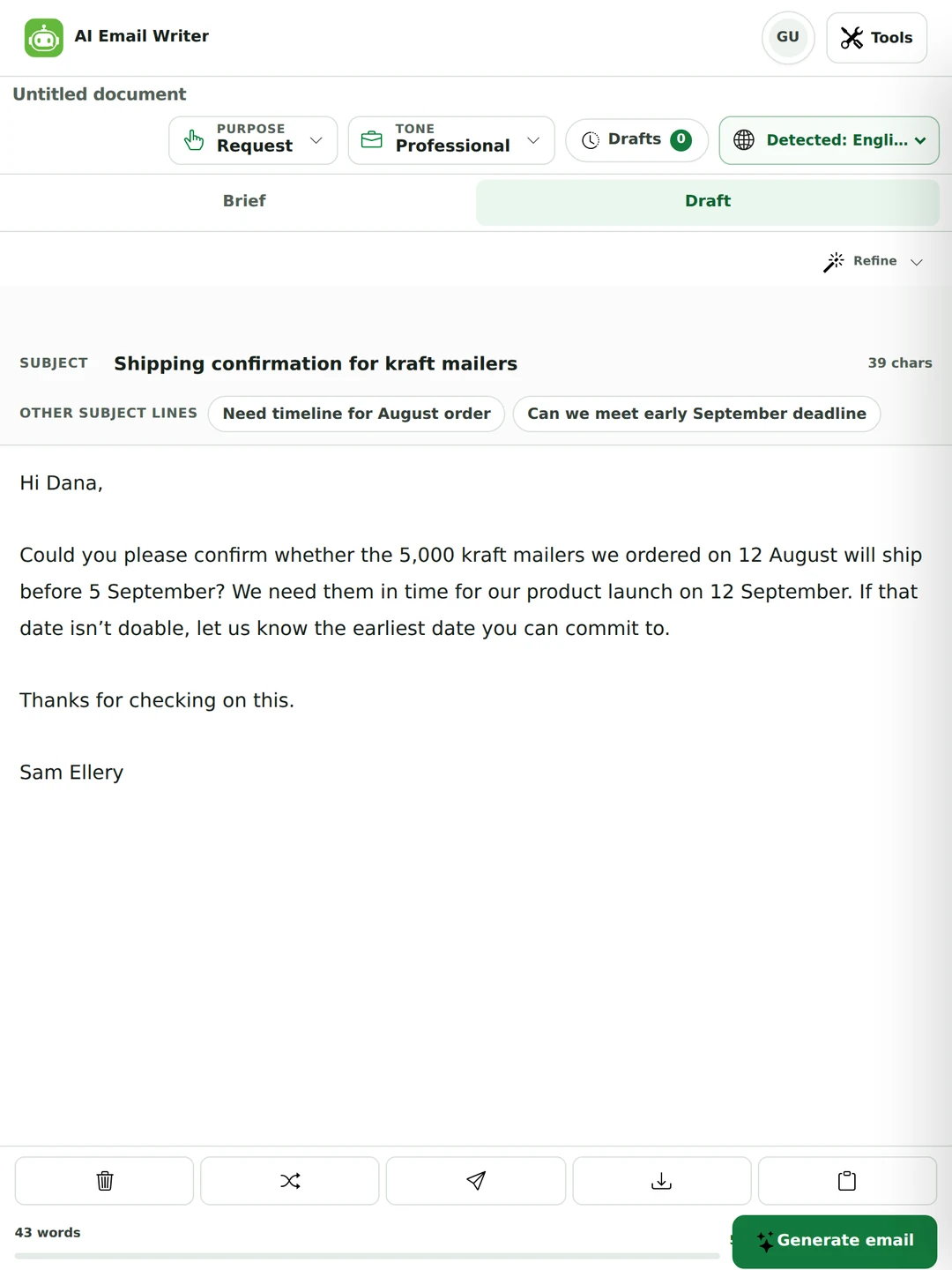
You write the situation. The email writer returns a subject line and a body, with every fact from your brief still in place.
The subject line comes with a character count and two alternatives you can swap in with one click.
The body is editable in the page — fix a word, cut a line, keep the rest.
A word count and reading time sit under the draft, so you can see how long it really is.
Copy it, open it in your mail app, or download it as Word, PDF or plain text.
A real request, unedited. Every date and quantity came from the brief.
Replies that answer what was actually asked
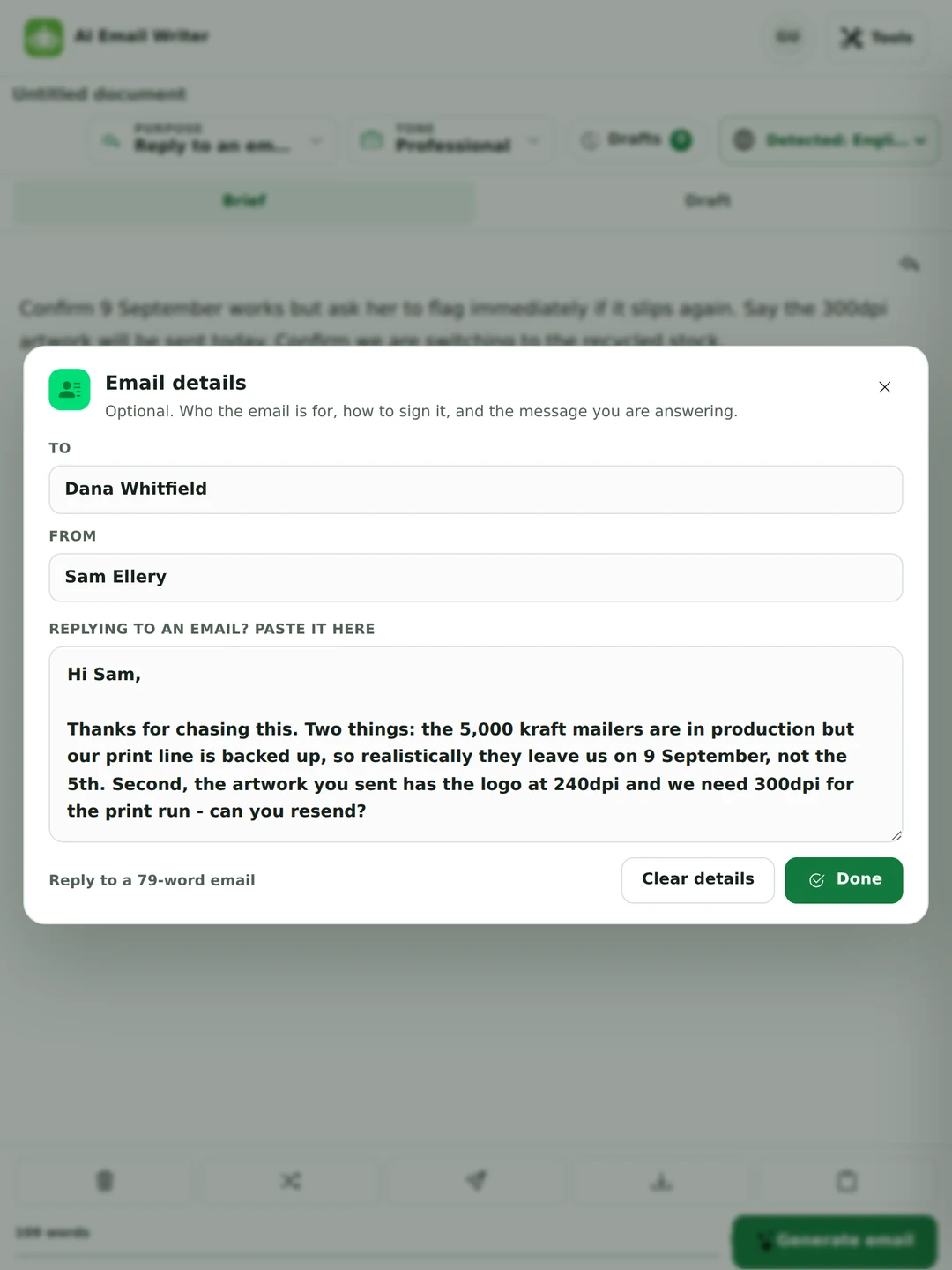
Paste the email you received. The reply works through its questions in order instead of writing around them.
Paste the incoming message and the tool tells you how long it is before you start.
Say only what you want to happen — agree, push back, ask for a date — and the rest comes from the thread.
Add who it is for and how to sign it, so the greeting and sign-off are right the first time.
If the sender asked three things, the reply answers three things.
The pasted email is read in your browser as part of the brief.
Rewrite an email you already wrote, or reply to one
Two things people use an email generator for that a template cannot do. Both runs below were made on 30 September 2026 and are printed unedited.
Your brief · Request, Professional, Short
Rewrite this so it sounds professional: hey can u send me the invoice for august asap, we need it for the audit on friday. thx
Draft returned
Request for August Invoice
Hi Maria,
Could you please send me the August invoice at your earliest convenience? Our audit is scheduled for Friday, and we need the document beforehand.
Thank you for your prompt attention.
Best regards, Sam
Paste your own draft as the brief and say what you want changed: it works as an email rewriter. One thing to check: “asap” became “at your earliest convenience”, which sounds less urgent. Friday still carries the deadline, but if it is urgent, say so. Subject alternatives offered: “August Invoice Needed for Audit” and “Please Provide August Invoice”.
Email received · pasted into Details
Hi Sam,
Thanks for the proposal. Two quick questions: could we do a call on Thursday at 3pm to go through it, and is there any flexibility on the budget if we sign for 12 months instead of 6?
Best, Daniel
Your brief: Say yes to the call on Thursday at 3pm, but the budget question needs our finance lead, so I will get back on that by Monday.
Reply returned · Reply, Professional, Standard
Call confirmed for Thursday
Hi Daniel,
I can confirm the call on Thursday at 3 pm to review the proposal. Regarding the budget flexibility for a 12-month commitment, I’ll need to consult our finance lead and will get back to you with a definitive answer by Monday.
Please let me know if there’s anything you’d like to add to the agenda for Thursday.
Best regards, Sam
Both of Daniel’s questions are answered, in his order, and the Monday date survived. Subject alternatives offered: “Thursday call scheduled” and “Re: Thursday meeting and budget”. One thing to watch: in an earlier run of the same brief, the reply added “I’ll send a calendar invite shortly”, which the brief never said. A reply generator can commit you to things, so read for promises you did not make before you press send.
A sales follow-up email sample, generated from one line
The hardest email to get right is the second one. Here is a sales follow up email sample the tool produced from a brief that said little more than “quote sent Tuesday, no reply”.
Your brief
Follow up on the quote I sent Tuesday for the 5,000 kraft mailers. No reply yet. Their launch is 12 September so the timing is tight. Offer to jump on a 10-minute call. Do not sound pushy.
Draft returned
Quick follow-up on your kraft mailer quote
Hi Rachel,
Just wanted to touch base about the quote I sent on Tuesday for the 5,000 kraft mailers. I know your launch is set for 12 September, so I understand the timing is tight. If it helps, I’m happy to hop on a quick 10‑minute call to go over any questions or details.
Let me know if you’d like to schedule a time that works for you, or feel free to reply with any thoughts you have.
Thanks, Sam Ellery
Note what it did not do: no “just circling back”, no second apology, no guilt. A follow-up works when it gives the other person a cheap way to respond — here, a ten-minute call — and stops.
What changes when you ask for a formal email
Formality is not longer words. It is a full salutation, one sentence saying why you are writing, and no throat-clearing before the ask.
Your brief
Ask the admissions office to confirm whether my transcript, sent by post on 3 August, has been received, and whether anything else is outstanding before the 30 September deadline. Formal.
Draft returned
Transcript receipt confirmation needed
Hi Dr Helena Marsh, Admissions Office,
Could you let me know if the transcript I mailed on 3 August has arrived? I’d also appreciate a quick heads‑up on any other documents you might still need from me before the 30 September deadline.
Thanks for checking on this. I want to make sure everything’s in order well before the deadline.
Best regards, Sam Ellery
And here is the honest part: the greeting came back as “Hi Dr Helena Marsh, Admissions Office”, because that is exactly what was typed into the recipient field. A formal email wants “Dear Dr Marsh”. That is a two-second fix, and it is the sort of line worth reading for before you send anything a tool wrote.
Sixteen kinds of email, not one
The purpose changes the shape of the email, not just its wording. A request opens differently from an apology, and a follow-up is not a reminder.
General message
Any everyday email that does not fit a pattern.
Reply
Answer a message you were sent, point by point.
Request
Ask for something clearly enough to get a yes or a no.
Follow-up
Chase a quote, a decision or an unanswered message.
Reminder
A nudge about a date or a task, without nagging.
Thank you
Say thank you in a way that names what they did.
Apology
Own a mistake and say what happens next.
Introduction / outreach
Reach someone who has never heard from you.
Meeting
Propose, confirm or move a time.
Invitation
Invite people and tell them what to expect.
Announcement
Share news with a group in one pass.
Customer support reply
Help someone with a problem and close the loop.
Complaint
Raise a problem firmly and fairly.
Feedback
Give feedback that can be acted on.
Job application
Apply for a role without repeating your CV.
Resignation
Resign in a way you can stand behind later.
Email subject lines: what gets an email opened
Most tools in this category send you to a separate page for this. It belongs next to the email.
Say the thing, do not tease it“Shipping confirmation for kraft mailers” tells the reader what is inside. “Quick question” makes them open it to find out, and they will resent it.
Front-load the words that matterPhone inboxes cut the subject at roughly 35–40 characters, which is why the writer shows you a live character count. Whatever identifies the email has to be in that first half.
A date or a number does the work of a sentence“9 September confirmed” is a status update on its own. The reader knows the outcome before opening.
Do not put the ask in the subject and nowhere elseSubjects get truncated, forwarded and skimmed. If the request only exists up there, it does not exist.
Leave the subject alone when you are replyingChanging it mid-thread splits the conversation in most mail clients, and the person you are answering loses the history.
The tool returns three subject lines for this reason — one in place and two alternatives — because the right one depends on the inbox it lands in, and you know that better than a model does.
How to write a professional email: the conventions that matter
Most of what makes an email land is restraint. These are the rules the draft is written to, and the ones worth checking before you send.
Trim the quoted chain
Keep the part you are answering and cut the rest. A reply dragging twelve messages behind it makes the reader scroll to find out whether anything changed.
Answer in the sender’s order
If they asked three things, answer the first thing first. Re-ordering their questions to suit your answer reads as evasion even when it is not.
Match their formality, not your mood
Someone who wrote “Hi Sam” does not want “Dear Mr Ellery” back, and three formal paragraphs deserve more than a one-line reply.
Reply-all is a decision
Ask whether every name on the thread needs the answer. If two of them do, move those two to a new message rather than making nine people read it.
Say no in the first line
A refusal buried under two paragraphs of warm-up is read as a yes until the reader hits it. Lead with the answer, then explain.
Do not send it angry
A generated reply will happily be firm on your behalf, which is exactly why it is worth rereading an hour later. The tool has no stake in the relationship. You do.
Tone, length and the six changes you will actually want
Set them before you write, or change your mind afterwards.
Control
What it does
Options
Tone
Sets the register of the whole email, including the greeting and the sign-off.
Decides whether the answer is three lines or three paragraphs.
Short, Standard, Detailed
Refine
One tap on the finished draft, without rewriting the brief.
Shorter, Longer, Friendlier, More formal, More direct, More polite
Details
Who it is for, how to sign it, and the message you are answering.
Recipient, your name, pasted incoming email
Language
Writes in the language you choose, or the one it detects from your brief.
Auto-detect, or 64 languages across 73 regional variants
Some emails you should write yourself
Anything where the point is that you sat down and wrote it — condolences, a real apology, thanking someone who went out of their way.
Anything with legal or financial exposure. A generated sentence can commit you to a date or a number you did not intend to offer.
Anything containing what should not be typed into any tool — credentials, someone else’s personal records, figures under NDA. Describe those and fill in the real values yourself.
Anything where the recipient would feel differently if they knew. That instinct is worth listening to.
Research on AI-written email is not flattering: people told a message was AI-drafted tend to rate the sender as less trustworthy. That is a good argument for using this on the twelve routine emails a day and writing the thirteenth yourself.
Who the AI Email Writer is for
Professionals
Clear the twelve routine messages so there is time for the one that matters.
Students
Write to a lecturer, a landlord or an admissions office without agonising over the wording.
Personal use
Send the message you have been putting off — a complaint, a refund, a difficult thank-you.
AI email writer FAQs
What is an AI email writer?
A tool that turns a short description of a situation into a complete email. Unlike a general chatbot, an email AI writer returns the parts an email actually needs — a subject line, a greeting, the ask and a sign-off — already in position, with controls for purpose, tone and length.
Is the AI email writer free?
Yes. You can write emails without an account: briefs of up to 400 words as a guest, 1,000 with a free account and 3,000 on Pro, which also removes the ads. The limit counts the brief and any email you paste in, never the draft written back. All 16 purposes, all eight tones, Refine and the downloads are on every plan.
Can I use the AI email generator without creating an account?
Yes. It works straight away, and your drafts are saved in your own browser so you can come back to them. An account raises the limits and lets your drafts follow you between devices.
How do I get the best results from an email writing AI?
Tell it the outcome you want rather than the words you would use. “Get them to confirm Friday without sounding pushy” produces a better draft than a list of adjectives. Include the facts that must appear — dates, amounts, names — and leave the phrasing to the tool.
Can it reply to an email I received?
Yes. Choose the Reply purpose and paste the message into the details panel. The draft answers the sender’s points in the order they asked them rather than writing around them.
Can it rewrite an email I already wrote?
Yes. Paste your draft into the brief and say what you want, for example “Rewrite this so it sounds professional”, and pick the purpose and tone. It returns a new subject line and body with your facts kept. Check the urgency afterwards: in our test, “asap” came back as “at your earliest convenience”. To change only the tone of an email without redrafting it, the tone changer is the better tool.
How do I write a professional email?
Put the point in the first sentence, then the reason. Use a subject line that says what the email is about, one request per email, a date instead of “asap”, and a greeting and sign-off that match how the other person wrote to you. The section above on professional email conventions covers the rest.
Does it write the subject line too?
Yes. Every draft comes with a subject line and two alternatives you can swap in with one click, plus a live character count, because phone inboxes cut subjects at around 35 to 40 characters.
How is this different from using a general AI chatbot?
A chatbot hands you prose in a chat window. A dedicated email AI writer hands you a subject line with alternatives, an editable body, a live word count, and one-tap changes like “more direct” or “shorter” — and it keeps the purpose, tone and length you set instead of you retyping them each time.
How do I write a formal email?
Use a full salutation, say why you are writing in the first sentence, put the request in its own line, and close with a conventional sign-off. Formality is structure, not longer words. Choose the Formal tone and the draft follows that shape — then check the greeting, which is the line most worth fixing by hand.
How do I write a professional email subject line?
Say what the email is about rather than hinting at it, put the identifying words in the first 35 to 40 characters because phones cut it there, and leave the subject alone when you are replying inside an existing thread. The tool shows a live character count and offers two alternatives.
Which purposes work for sales follow-ups and cold outreach?
Follow-up handles chasing a quote or a decision, and Introduction / outreach handles a first approach. Both work best when the brief says what the other person gets out of replying. Sending the same generated email to hundreds of people is a different activity, and not one this tool is built for.
Will emails written with AI land in spam?
Spam filters score sending reputation, links and formatting far more heavily than phrasing, so an ordinary one-to-one email is not at risk. Mass identical outreach is a different matter, which is a good reason not to send one generated email to five hundred addresses.
Is it unprofessional to use AI to write emails?
It depends on the email. For routine factual messages nobody minds and nobody notices. For anything where the point is personal effort — condolences, a real apology, thanking someone properly — studies suggest recipients who learn a message was AI-written trust the sender less. Use it for the routine ones.
Can I write emails in other languages?
Yes, in 64 languages across 73 regional variants, or let it detect the language of your brief. Bear in mind that formality works differently in different languages — a German business email expects the formal register, and a literal translation of a casual English opening can read as rude.
Will the email sound like me?
Closer than a general chatbot, because tone, length and purpose are set explicitly — but not exactly. The draft is meant to be edited, and changing two or three words is usually the difference between an email that sounds like a template and one that sounds like you.
What happens to what I type?
The brief and any pasted email are sent in order to write the draft, and are not stored as text afterwards. Drafts are kept in your own browser. See the privacy policy for the detail.
The rest of the toolkit
Every tool here runs on the same AI powered writing assistant, so the tone you choose for an email behaves the same way in the paraphraser or the summarizer. One plan covers all of them, including the ones we have not built yet.
Each page opens the writer with that purpose already selected, shows a real draft the tool returned from a one-line brief, and explains what that kind of email has to do. The purpose menu above the brief covers all sixteen.

 Upgrade