
 Upgrade
Paste or upload, and it detects the language
Type, paste or drop in a document. The source language is detected automatically, or set it yourself when the text is short enough to be ambiguous.
Let’s translate!
Type, paste or upload a document. The source language is detected automatically. Select a name or term and tap Keep to leave it untranslated.
This free AI translator turns text or a document into any of 114 languages. Paste or upload, pick the language, and press Translate: the source language is detected for you. Two controls beside the language picker are what set it apart. A register setting decides whether the result speaks to the reader formally or informally, and a Keep button stops a name or a term from being translated at all. Those are the two places where most machine translation goes wrong. The vocabulary is rarely the problem.
Last updated 29 September 2026 by the AI Writing Assistant team.
Three steps, and the third is the one this page is really about.
Type, paste or drop in a document. The source language is detected automatically, or set it yourself when the text is short enough to be ambiguous.
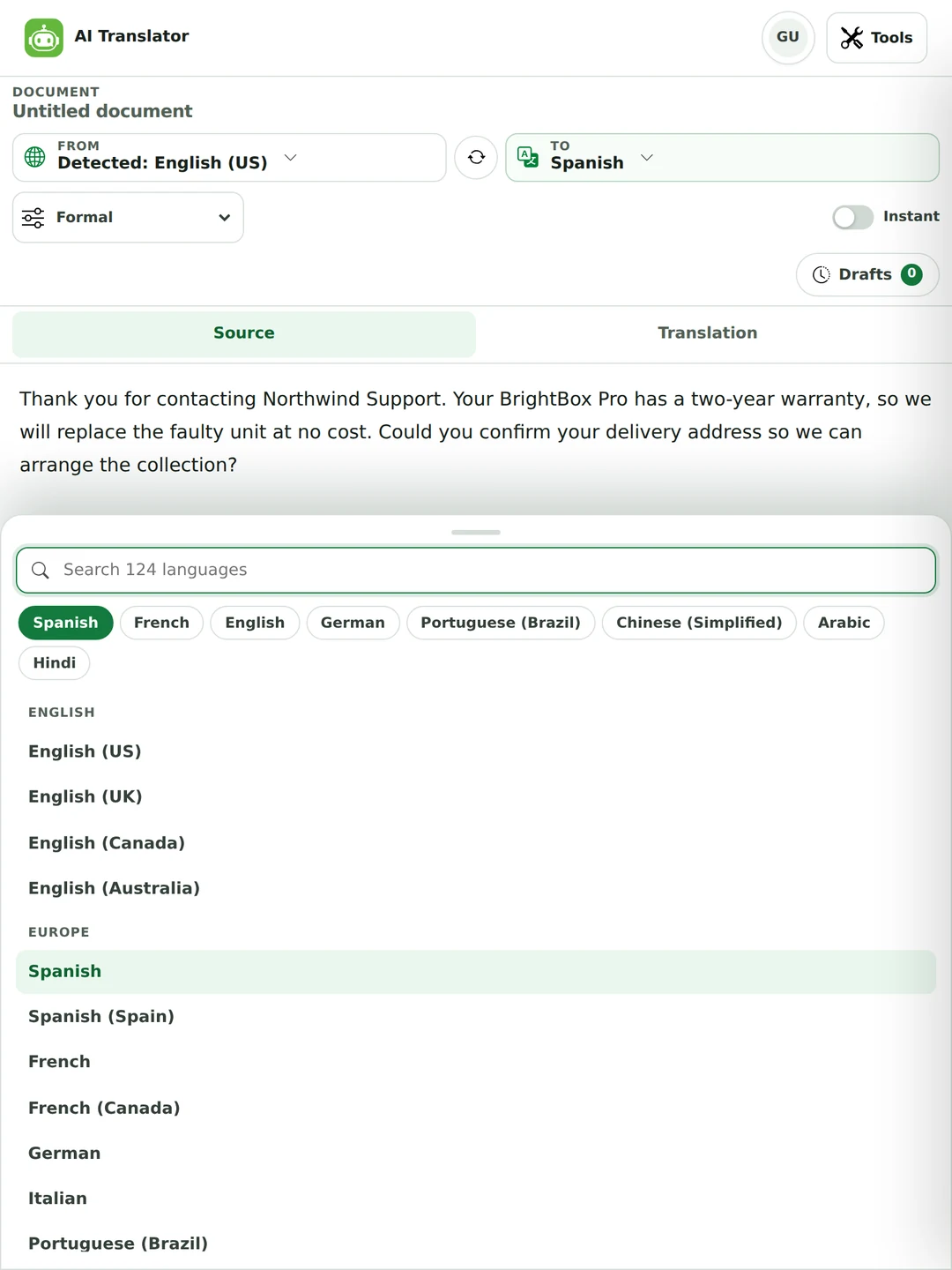
Pick from 114 languages across 124 regional variants, with the variants where they matter: Spanish and Spanish (Spain), Portuguese (Brazil), and English in four variants. Then decide whether the translation should be formal, informal, or match the tone of your source.
Listen to either side, translate as you type with Instant, or keep a name exactly as written. If you don’t read the target language, the section below on checking a translation is the part worth your time.
Formal, informal, or match the source. In Spanish that’s the difference between usted and tú. In German it’s Sie or du. It changes verb forms and pronouns all the way through, so it does much more than make the text polite.
Select a word and press Keep. Brand names, product names, defined terms and anything with a legal meaning stay exactly as you wrote them instead of being helpfully turned into something else.
Spanish and Spanish (Spain) are different. So are Portuguese (Brazil) and Portuguese, French and French (Canada), and the four Englishes. Picking the variant isn’t pedantry.
Hear the source or the translation read aloud. For a language you’re learning, or a name you’re about to say out loud on a call, this is more useful than it sounds.
Translate as you type for short pieces, like a message, a phrase or a line you need right now. You don’t have to press anything.
Upload a file and translate what is inside it rather than copying it out first.
A translation can be grammatically perfect and socially wrong. The register selector sits next to the language picker because it’s the same size of decision.
Search rather than scroll. The list separates the regional variants that genuinely behave differently instead of collapsing them into one entry.
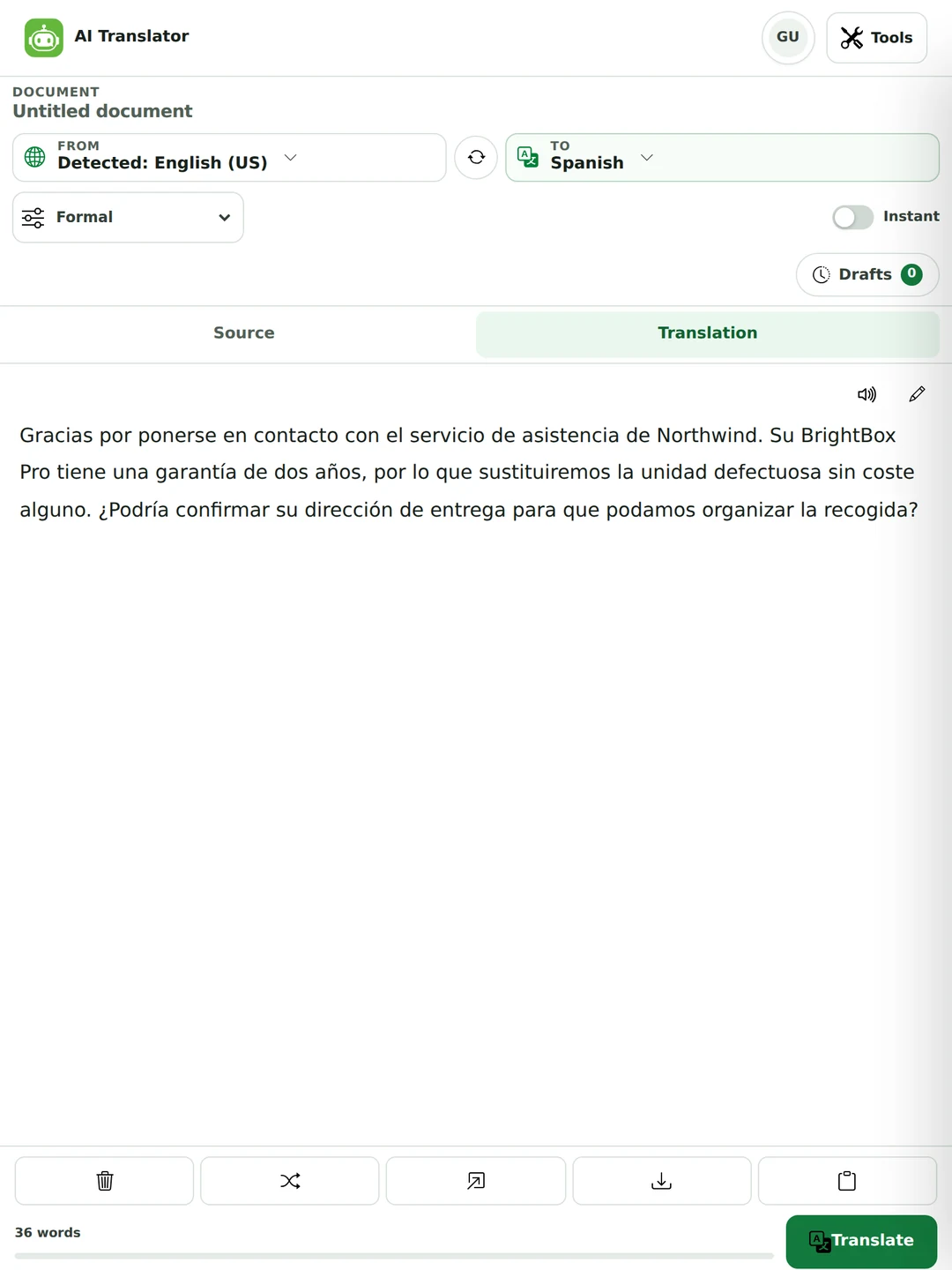
Two real runs of one English support email into Spanish. Only the register changed.
Gracias por ponerse en contacto con el servicio de asistencia de Northwind. Su BrightBox Pro tiene una garantía de dos años, por lo que sustituiremos la unidad defectuosa sin coste alguno. ¿Podría confirmar su dirección de entrega para que podamos organizar la recogida?
Gracias por ponerte en contacto con el servicio de asistencia de Northwind. Tu BrightBox Pro tiene una garantía de dos años, así que sustituiremos la unidad defectuosa sin coste alguno. ¿Podrías confirmar tu dirección de entrega para que podamos organizar la recogida?
Four things changed: ponerse to ponerte, Su to Tu, ¿Podría to ¿Podrías, su dirección to tu dirección. Both are correct Spanish. Sending the informal one to a customer you have never met would read as presumptuous in most of the Spanish-speaking world. A general translator wouldn’t have told you that, because it never asked.
A translation is usually right except for one line that sounds stiff or says slightly the wrong thing. You don’t have to translate the whole text again to fix it.
Hover over any sentence in the translation and the sentence it came from is highlighted in your original, so you can see exactly which words produced it.
Up to three other wordings appear. They are written with the surrounding paragraph in view, so a replacement still fits the sentences around it.
Click an alternative and it replaces that sentence while the rest stays as it was. Retranslate redoes the whole text with different wording, and you can also edit the result by hand.
English lost its second-person distinction centuries ago, so English speakers don’t notice they are making this choice. Most of the world’s languages force it on every sentence.
| Language | Informal | Formal | Getting it wrong reads as |
|---|---|---|---|
| Spanish | tú | usted | Over-familiar with a customer, cold with a friend |
| German | du | Sie | A serious breach in business. German keeps the line firmly |
| French | tu | vous | Presumptuous. Vous is the safe default with strangers |
| Portuguese | tu / você | o senhor / a senhora | Varies by country as well as by register |
| Italian | tu | Lei | Too casual in any professional setting |
| Russian | ты | вы | Rude to an older person or a stranger |
| Japanese | plain form | keigo (敬語) | Plain form to a client reads as disrespect, which is worse than casual |
| Korean | 반말 | 해요체 / 합뽼체 | Speech level is tied to age and status as well as closeness |
A translator with no register control makes this choice for you and doesn’t mention it. That’s why the selector here defaults to Match source tone rather than to either extreme. It’s also why it’s worth setting yourself whenever the reader is a customer, a professor or anyone senior to you.
The classic machine translation failure isn’t a mistranslated sentence. It’s a proper noun that got helpfully converted into a word.
If your product is called Bright Box, a translator may decide those are two ordinary English words and render them as such. Select the name and press Keep before you translate.
Surnames that are also common nouns are the usual casualty, and place names are worse. A town whose name looks like a word will sometimes come out the other side as that word.
In a contract or a policy, a term defined once and capitalised thereafter has a specific meaning. Translating it breaks the definition, even when the translation is a perfectly good synonym.
Model numbers, reference codes and anything a system will match on. These look like noise to a translator and occasionally get reformatted.
If you’re writing instructions for software whose interface is in English, translating the button names leaves the reader hunting for a button that doesn’t exist.
Dates, decimal separators and measurements follow local convention, so check them after translating. 1,500 means one and a half in some places and fifteen hundred in others.
This is the question people actually have, and right now it’s answered mostly by forum threads. Here is the working method.
Arabic, Hebrew, Persian, Urdu and Kurdish are all supported here. The translation is rarely the problem. How it sits on the page often is.
Digits stay left-to-right inside right-to-left text. That’s correct and it looks wrong to an unfamiliar eye, so resist the urge to fix it.
A brand name in the Latin alphabet inside an Arabic sentence creates a direction change mid-line. Where the surrounding punctuation lands is the thing to check.
Arabic uses its own comma (،) and question mark (؟), and they sit at the opposite end of the sentence from where you expect.
Text that renders correctly here can break when pasted into a system that doesn’t handle direction. Check it in the place it will actually be read.
If it looks backwards, it’s almost certainly right and your editor is displaying it correctly. Manually reordering characters is how genuinely broken text gets created.
They share the script and differ in letters, vocabulary and grammar. Pick the actual language rather than the one whose alphabet you recognise.
Most AI translation tools advertise a number of languages and imply they all work the same way. They don’t, and the reason is simply how much text existed to learn from.
None of this is a reason to avoid the less-supported pairs. It’s a reason to spend more of your checking effort on them, and to get a person to read the result when the stakes are real.
Three different jobs, sold interchangeably. Asking for the wrong one is why a perfectly accurate translation sometimes lands badly.
A useful test: if the source text was written to make someone feel something rather than know something, you want transcreation and a person. A translator of any kind won’t do.

Everything else is exactly what this is for, and it’s very good at it. That covers the email, the message, the document you need to understand and the page you want the gist of.
Answer a supplier in Spanish, read a report in German, send an update your whole team can follow. Set the register once and the tone stays right.
Read a source that was never published in your language, or check your own writing in one you’re still learning. Listen to the result to hear how it should sound.

Write to family, a landlord, a shop or an office abroad. Use informal for people you know and formal for people you don’t. English lets you ignore that choice. Most languages don’t.

Yes. You can translate without an account: up to 800 words per translation as a guest, 1,500 with a free account and 5,000 on Pro, which also removes the ads. Every language, the register setting, Keep, alternatives and document upload are on every plan.
114 languages across 124 regional variants, listed separately where they behave differently. That covers Spanish and Spanish (Spain), Portuguese (Brazil), French (Canada), and English in US, UK, Canadian and Australian forms. The source language is detected automatically unless you set it.
Use the register selector next to the language picker. Formal produces usted in Spanish, Sie in German, vous in French and keigo in Japanese. Informal produces tú, du, tu and plain form. Match source tone is the default and follows your original.
Select the word in your source text and press Keep. It will be reproduced exactly rather than translated. Worth doing for product names, defined terms in contracts, interface labels and any surname that’s also an ordinary word.
Using AI for translation is now good enough on common pairs, such as English with Spanish, French, German or Portuguese, that most edits are about style. For structurally distant pairs the meaning usually survives but the phrasing needs more work. For less-supported languages, treat it as a strong first draft. Anyone claiming uniform accuracy across a hundred languages is describing a marketing line.
Back-translate it. Put the result back through into your own language and read what comes out. It catches reversals, dropped negatives and confused pronouns. Then check the numbers, names and dates by eye, and count the sentences. For anything that matters, a native speaker is the final step.
No, not on its own. Many legal contexts require a certified human translation before a document is accepted, regardless of how accurate the text is. For medical and safety information the cost of a near-miss is too high. Use it to understand such a document. Don’t use it to produce one.
Translation carries the same meaning into another language. Localisation also adapts dates, currency, units, formats and legal requirements. Transcreation re-creates the effect of slogans, puns and headlines, often producing something that shares no words with the original. Only the first is a machine job.
Yes, including right-to-left text. Two things to check after translating: numbers stay left-to-right inside right-to-left text, which is correct even though it looks odd, and Latin-script names inside the line can move the punctuation around. Check the result where it will actually be read.
Because there’s far more parallel text between English and Spanish than between English and, say, Burmese. Quality follows the material available. The length of the language list says nothing about it. Translating between two non-English languages is often routed through English, giving two chances to lose something rather than one.
Idiom first, then humour, wordplay and cultural reference. Deliberate ambiguity as well. A source that was vague on purpose usually comes back specific. And register, unless you set it, which is why the selector is there.
Yes. Upload a .docx, .pdf or .txt file up to 25 MB and the text is read out of it and translated. Old .doc files need to be saved as .docx first. Download the result as a Word document, a PDF or plain text. The layout of the original file isn’t rebuilt, and translated text often runs longer or shorter than the original, so check headings and tables afterwards.
Yes, on both sides. Useful for a name you’re about to say on a call, or for hearing how a phrase should sound in a language you’re learning.
Not quite. Older systems translated phrase by phrase against statistical tables. Artificial intelligence translation reads the whole passage before writing, which is why register, pronouns and sentence order come out far better. It also changed the failure mode: instead of obvious nonsense you now get fluent text that can be quietly wrong.
For anything published, signed or sent to someone who matters, yes. Professional practice is a machine draft plus a human edit. The editor checks meaning, register and terminology instead of retyping. That’s the sensible way to use this tool too.
Up to 800 words per translation as a guest, 1,500 with a free account and 5,000 on Pro. The counter under the editor shows how many words you have entered against your limit. For a longer document, translate it in parts, or upload the file and work through it section by section.
Yes. Click any sentence in the translation and up to three alternatives appear, written with the surrounding text in view. Click one to swap it in. The rest of the translation stays as it was. Retranslate redoes the whole text if you would rather start again.
For everyday text in a common language pair, most current AI translators produce usable results, so the differences are in the controls. Look for a formal or informal setting, a way to keep names untranslated, alternatives for a single sentence, and document upload. All four are here, free. For anything legal, medical or published under your name, the best translator is still a qualified person checking the machine draft.
It’s sent in order to produce the translation and isn’t stored as text afterwards. Your work is saved in your own browser. See the privacy policy for the detail.
Check the source before you translate it, summarise a long document in its own language first, or shift the register of your English draft before it goes anywhere. One plan covers all of them.
Each pair opens the translator with both languages already set. The register and the Keep button work the same on every one.