Paste a DOI, ISBN, PubMed or arXiv ID, a web address, or just a title. Your list is saved in this browser, so you can close the tab and come back to it.
Your bibliography will appear hereAdd a source on the left and it is formatted in the style you picked, with its in-text citation underneath.
Free Citation Generator for APA, MLA, Chicago and Harvard
A citation generator turns a source into a correctly formatted reference. You paste what you already have: a DOI, an ISBN, a PubMed or arXiv ID, a web address, or just a title. It finds the publisher’s own record, formats it in the style your department asks for, and gives you the in-text citation to go with it. The whole list downloads as a Word file with the hanging indent, spacing and alphabetical order already set.
It supports APA 7, MLA 9, Chicago, Harvard, IEEE, Vancouver and 10,855 more, across thirty-six kinds of source. It is free for everyone, with no sign-up and nothing held back for a paid plan, because the formatting runs in your browser rather than on our servers.
How to use the citation maker
Three steps, about twenty seconds a source.
1
Pick your style
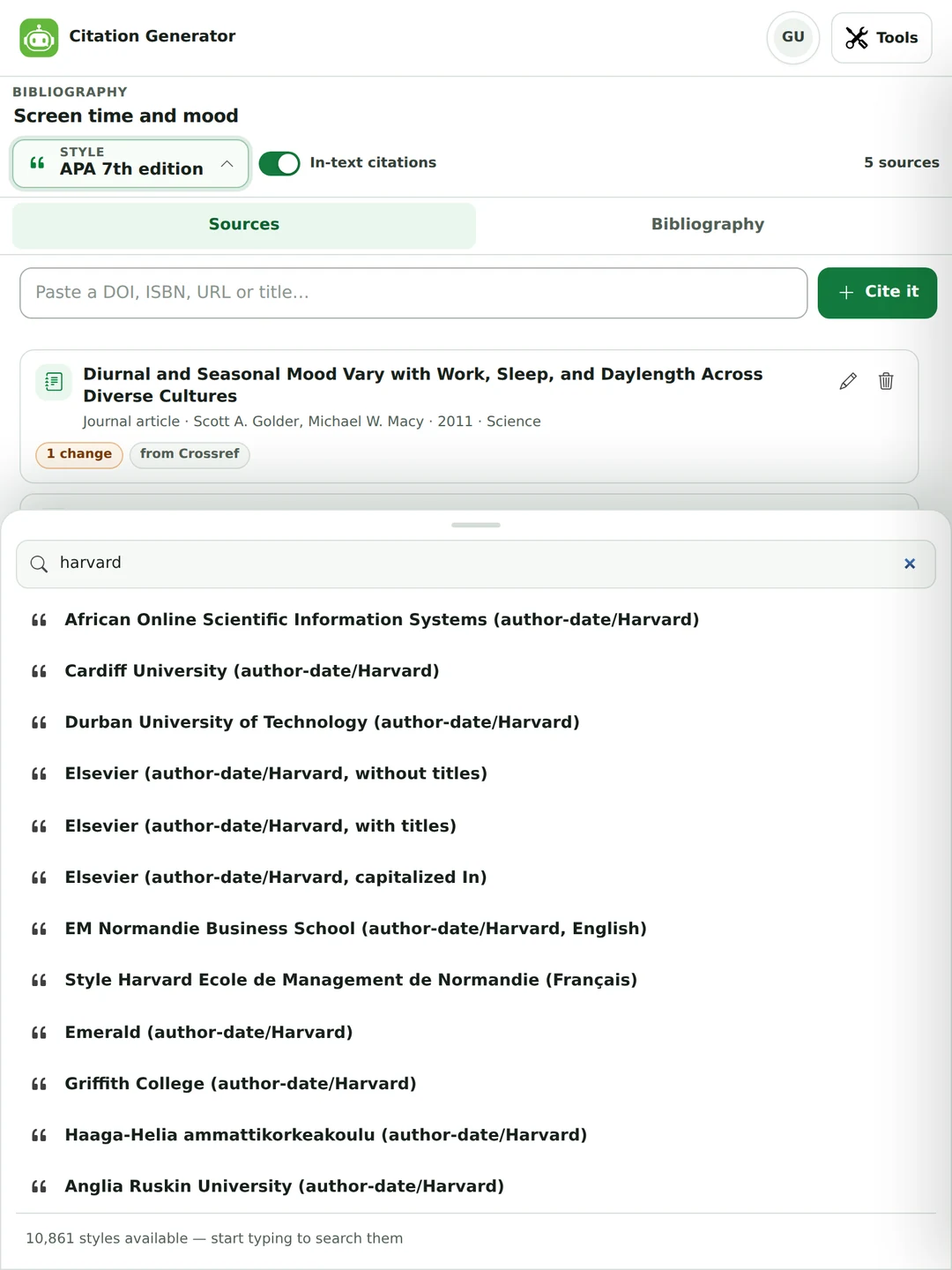
Eighteen styles sit one click away in the picker at the top. If your department or journal uses something else, search the full Citation Style Language repository. It has 10,861 styles, including most journals and many individual universities.
2
Paste whatever you have
A DOI, an ISBN, a PubMed ID, an arXiv ID, a link, or a title. The tool works out which one it is and asks the right catalogue: Crossref, OpenLibrary, PubMed, DataCite or Semantic Scholar. Nothing found? The manual form covers 36 source types.
3
Take the finished list
Copy it with its formatting and paste into Word or Google Docs, or download a .docx that already has the hanging indent, the spacing and the right heading. BibTeX and RIS are there too, for Zotero, Mendeley, EndNote and LaTeX.
There is no drop-down asking what you are about to paste. The tool reads it and decides, then labels the entry with the catalogue the details came from.
DOI, ISBN, PubMed ID, PubMed Central ID, arXiv ID or a web address. Or just search by title.
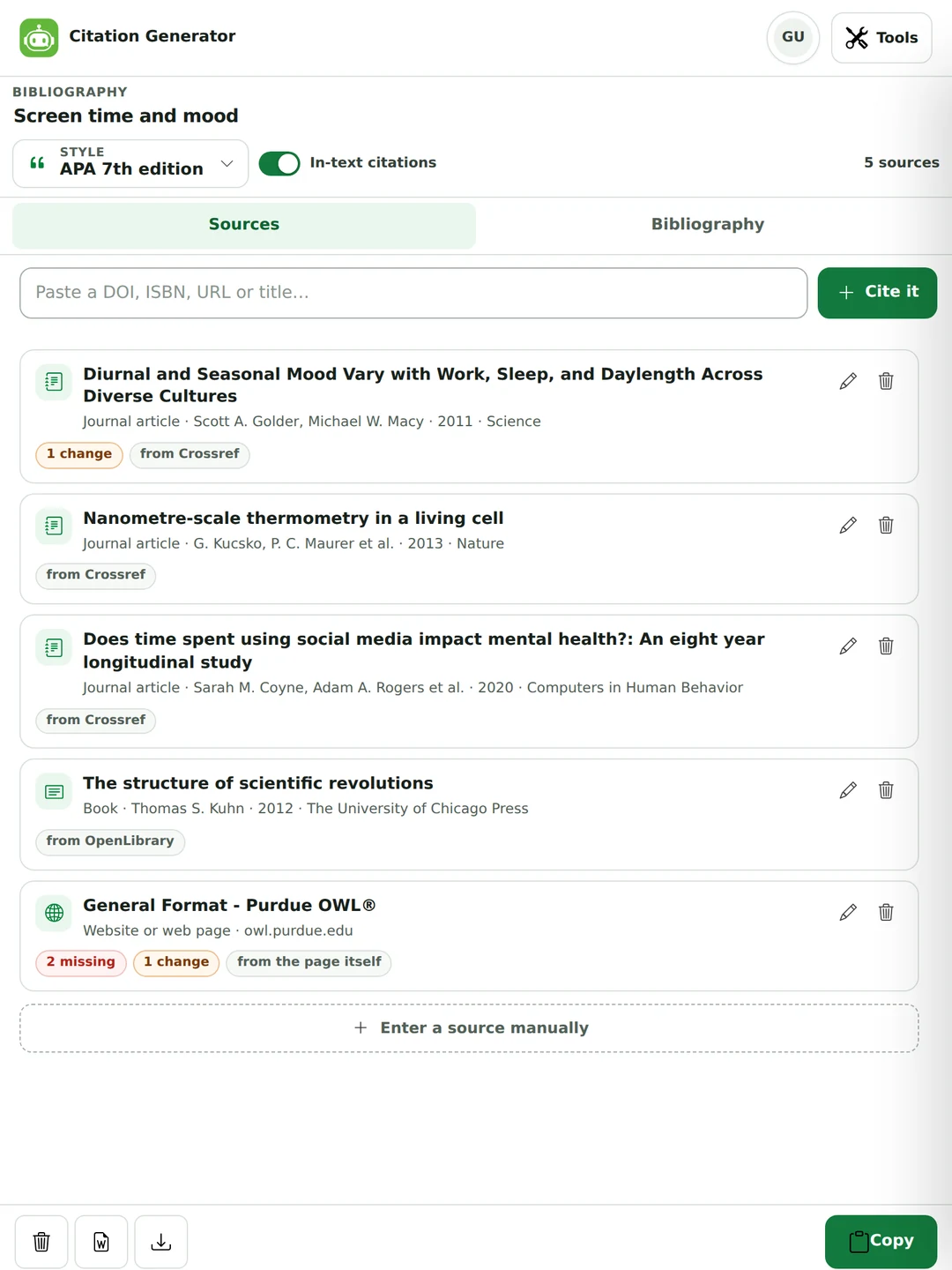
Each source becomes a card showing its type, its authors, its year and where its metadata came from.
A red badge counts the fields the style still needs; an amber one counts what we corrected.
Edit any entry afterwards, delete it, or undo the deletion from the message bar.
Five real lookups, unedited.
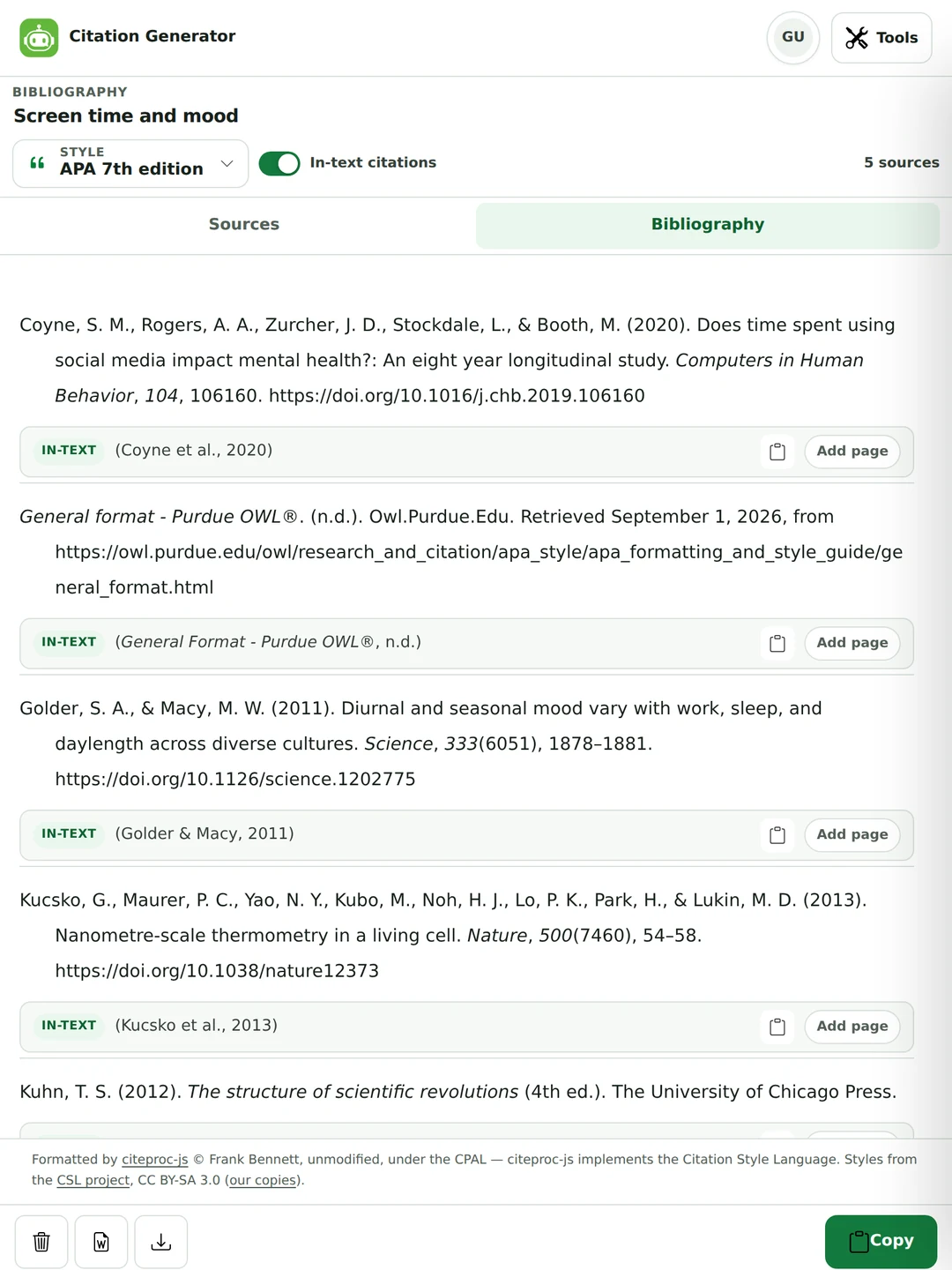
The reference and the in-text citation, together
Most free tools give you the reference list and leave you to work out the part you actually type into a sentence.
Every entry carries its in-text form underneath, with its own copy button.
Add a page number, or one of nine other locators: chapter, paragraph, section, figure, table, line, note or verse.
Tick author already named in my sentence and it switches to the narrative form.
In Chicago notes-and-bibliography and OSCOLA that line is the full first footnote, not a parenthetical.
Two papers by the same authors in the same year become 2020a and 2020b, in the list and in the citation.
The same five sources, formatted in APA 7.
The part nobody else fixes
Why citation generators get titles wrong
It is almost never the punctuation. It is the capital letters, and it is wrong on every journal article in the list.
APA, AMA, Vancouver and Harvard print article titles in sentence case: capitals only on the first word, the first word after a colon, and proper nouns.
Publishers, and the Crossref records almost every citation tool reads, store titles in title case.
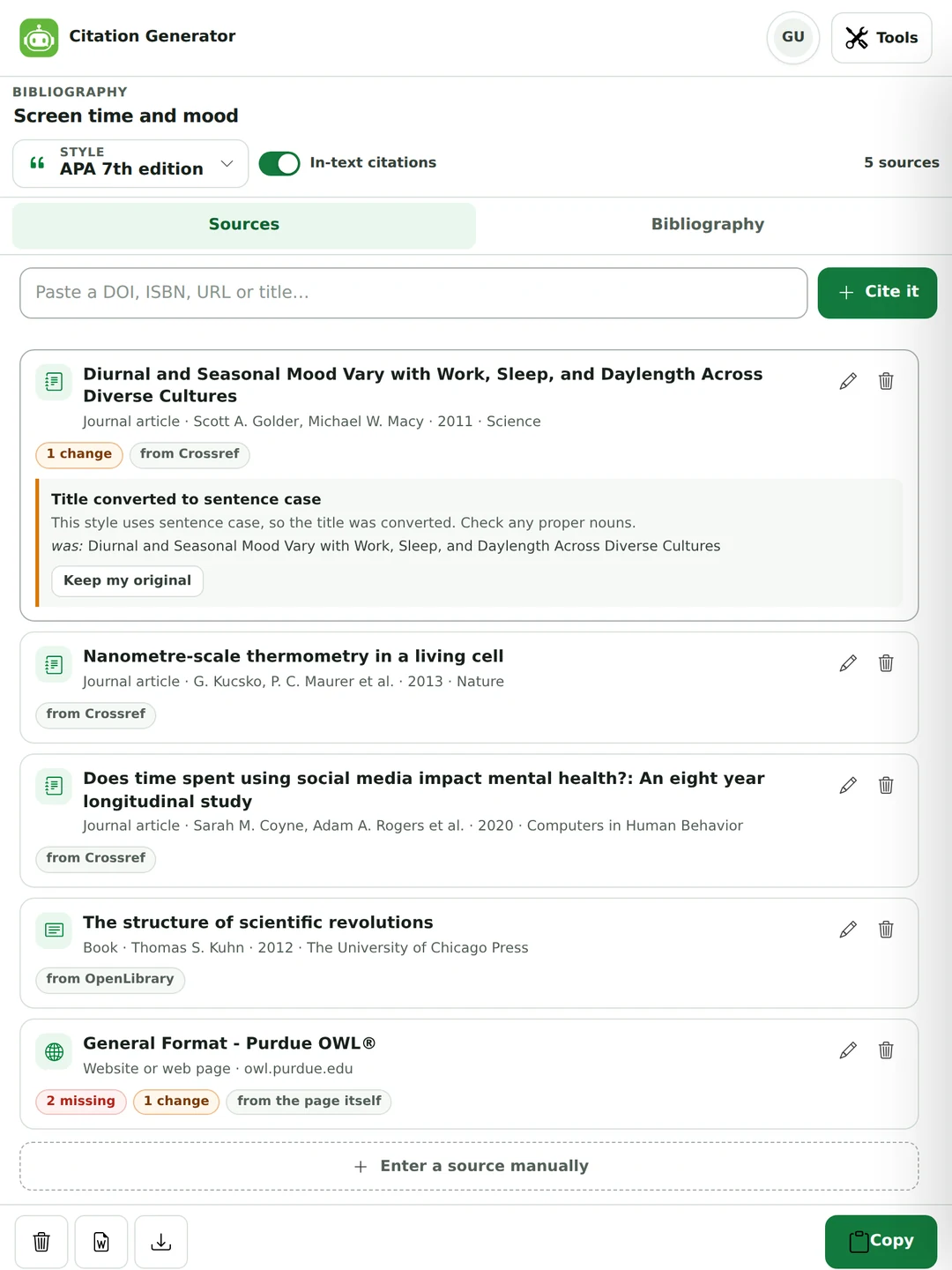
The Citation Style Language can raise a title to title case but has no way to lower one back down, because it cannot know which words are names. So a tool that simply passes the publisher's data to the formatter prints “Diurnal and Seasonal Mood Vary…” where APA wants “Diurnal and seasonal mood vary…”.
This tool converts the case when the style needs it, protects acronyms, brand names, hyphenated compounds and a list of institutions, journals and named methods. Then it tells you it did, with your original text and a button to put it back.
Every correction is shown, with an undo.
It still cannot know that War is part of a name in World War II and not in the war years. No software can. What it can do is stop pretending the problem does not exist.
10,861 styles, not four
Eighteen styles are pinned at the top of the picker. The rest of the Citation Style Language repository is a search box away, fetched only when you choose one.
Harvard is the awkward one: it has no single authority, and universities publish their own variants. Search for yours.
Journal house styles are in there too. If a submission asks for a named format, it’s usually a style file already.
Styles that only point at another style, such as Turabian, resolve to their parent automatically.
Switching style re-renders the whole list, re-sorts it, and re-numbers numeric styles, in one click.
The full Citation Style Language repository.
What you get that a basic citation machine does not
The difference between a citation string and a finished reference page.
Disambiguation that actually happens
Two papers by the same authors in the same year become 2020a and 2020b, in the list and in the in-text citation, exactly as APA requires. Numbered styles renumber themselves as you add and delete. This sounds obvious; several well-known tools get it wrong.
A Word file, not just text
The .docx download carries the hanging indent, the line spacing and the alphabetical order the style calls for, under the right heading. Copying keeps the italics when you paste into Word or Google Docs. Most free tools hand you a blob of text and leave the formatting to you.
It tells you where the data came from
Each entry is labelled Crossref, OpenLibrary, PubMed, DataCite, the page itself, or you. Metadata scraped from a page is marked as worth checking, because it usually is, and missing required fields are counted on the card rather than left for a marker to find.
Every correction is reversible
Sentence case, DOI form, page ranges, word editions such as “Fourth edition.” reduced to a plain number. Each fix is listed on the source it changed, with the original text and a one-click undo. Nothing is altered silently.
Nothing is taken away later
Your list stays readable, editable and exportable, free, for as long as you keep it, and it lives in your browser rather than on our servers. We are not going to put a citation you already made behind a paywall, which is the loudest complaint about several of the big names in this category.
It uses none of your allowance
There is no AI in this tool. It never touches the daily words, the per-request cap or the requests-per-minute limit that the AI tools share, so it behaves identically for a guest, a free account and a Pro subscriber.
Thirty-six source types
Each one mapped to the correct underlying type, so the style renders it the way it is meant to.
Academic
Journal article, thesis or dissertation, conference paper, preprint, unpublished manuscript.
Books
Book, book chapter and edited book, with editors, translators and editions handled separately.
Online
Website or web page, blog post, social media post, and generative AI tools such as ChatGPT.
Software or code and datasets, with version numbers and DOIs where they exist.
Reports
Report, government document and standard, each with its issuing body and number.
Spoken
Interview, speech or lecture, and personal communication, which APA cites in the text only.
Legal & reference
Legal case, statute, bill and patent, plus encyclopedia and dictionary entries.
Which citation style should you use?
Your department’s handbook is the authority. This is the usual shape of it.
Style
Usually used for
In text it looks like
APA 7
Psychology, education, nursing, business, most social sciences
(Smith & Doe, 2020, p. 23)
MLA 9
English, literature, languages, cultural studies
(Smith and Doe 23)
Chicago (notes)
History, art history, theology (footnotes)
A numbered footnote
Chicago (author–date)
Sciences and social sciences using Chicago
(Smith and Doe 2020, 23)
Harvard
Widely used across UK universities, with local variations
(Smith and Doe, 2020, p. 23)
Vancouver / NLM
Medicine, nursing, biomedical sciences
[4]
IEEE
Engineering, electronics, computer science
[4]
AMA 11
Medical journals following the AMA manual
A superscript number
OSCOLA
UK law
A numbered footnote
Not sure? Pick the one your handbook names, generate the list, and switch styles later. The sources are stored as data, so changing style reformats everything and you don’t start again.
One DOI in, a finished APA reference out
A real lookup, unedited, including the correction the tool made and reported.
What you paste
10.1126/science.1202775
Nothing else. No source type to choose, no fields to fill, no account. An ISBN, a PubMed ID, an arXiv ID, a link or a plain title goes in the same box and takes the same one step.
What you get
Reference
Golder, S. A., & Macy, M. W. (2011). Diurnal and seasonal mood vary with work, sleep, and daylength across diverse cultures. Science, 333(6051), 1878–1881. https://doi.org/10.1126/science.1202775
In text
(Golder & Macy, 2011)
Flagged on the card
Title converted to sentence case. Was: “Diurnal and Seasonal Mood Vary with Work, Sleep, and Daylength Across Diverse Cultures”.
How to cite a website, a YouTube video, a book and Wikipedia
Four real lookups from 1 October 2026, printed as the tool gave them. Each one needed one paste. The last line says what to check.
A website with no author
You paste: the page address, https://www.who.int/news-room/fact-sheets/detail/malaria
APA 7:Fact sheet about malaria. (n.d.). who.int. Retrieved October 2, 2026, from https://www.who.int/news-room/fact-sheets/detail/malaria
The page names no author and no date, so APA starts with the title and prints (n.d.). The card flags both as missing. If the page shows a date, add it, and add the organisation as the author if your teacher wants that. The site name comes out as who.int because the page doesn’t publish a nicer one, and you can change it to World Health Organization.
A YouTube video
You paste: the video link, https://www.youtube.com/watch?v=iG9CE55wbtY
APA 7: TED. (n.d.). Do schools kill creativity? | Sir Ken Robinson | TED [Video]. YouTube. Retrieved October 2, 2026, from https://www.youtube.com/watch?v=iG9CE55wbtY
MLA 9: TED. Do Schools Kill Creativity? | Sir Ken Robinson | TED. YouTube, https://www.youtube.com/watch?v=iG9CE55wbtY. Accessed 2 Oct. 2026, Video.
The channel (TED) becomes the author and APA adds [Video]. YouTube gave us the title and channel but not the upload date, so the card asks for it. Copy the date from under the video and the (n.d.) becomes that date.
A book
You paste: the ISBN, 9780143127741
APA 7: van der Kolk, B. (2015). The body keeps the score: Brain, mind, and body in the healing of trauma. Penguin Books.
MLA 9: van der Kolk, Bessel. The Body Keeps the Score: Brain, Mind, and Body in the Healing of Trauma. Penguin Books, 2015.
OpenLibrary supplied the author, year and publisher. APA wants book titles in sentence case, so the tool lowered the capitals and showed the change on the card with an undo. MLA keeps title case.
A Wikipedia article
You paste: the article address, https://en.wikipedia.org/wiki/Photosynthesis
APA 7:Photosynthesis. (2026, August 25). Wikipedia. https://en.wikipedia.org/wiki/Photosynthesis
MLA 9: “Photosynthesis.” Wikipedia, 25 Aug. 2026, https://en.wikipedia.org/wiki/Photosynthesis.
Wikipedia has no single author, so the title goes first. The date is the last time the article was edited, which is the version you read. Many teachers would rather you cite the sources Wikipedia lists, so check before you use it.
Honest limits
Four things this tool cannot do for you, said plainly.
It cannot check the factsIf a publisher’s record has the wrong page range or a mangled author name, the citation will be neatly formatted and wrong. We show where each field came from and which required ones are missing, but the final read-through is yours.
It cannot read a paywalled pageCiting a plain web address works by reading the page’s own published metadata. Pages behind a login, or built entirely in JavaScript, often publish nothing useful. When that happens the manual form takes about a minute and gives an identical result.
It cannot always spot a proper nounSentence-case conversion protects acronyms, brand names and a long list of institutions, journals and named methods, but not every name in the language. That is why every conversion is shown to you with an undo rather than applied quietly.
It does not sync across devicesYour list is stored in this browser and nowhere else, which is why we can promise it is never sent to us. Clearing your browsing data or switching device won’t carry it over, so export a copy if it matters.
Questions people ask
Is this citation generator free?
Yes, for everyone. There’s no sign-up, nothing held back for a paid plan, and no cap on how many sources you add. The formatting happens in your browser and costs us nothing to run, so there’s no reason to charge for it, or to lock a citation you’ve already made.
How do I cite a website?
Paste the page address into the box. The tool reads the title, author, date and site name the page publishes about itself and formats them in your style. Many pages leave out the author or the date, so check the card: it counts the fields the style still needs, and you can fill them in by hand. If a page redirects somewhere else, the tool says so.
Can I cite a YouTube video?
Yes. Paste the video link and you get the title, with the channel as the author, and APA adds [Video]. YouTube doesn’t give us the upload date, so add the date shown under the video before you use the reference.
Is this an AI citation generator?
No. Nothing here is written by an AI model, which is the point: an AI can invent a reference that looks right and doesn’t exist. The details come from catalogues such as Crossref and OpenLibrary, or from the page itself, and the formatting comes from the official style files.
Can I cite Wikipedia with it?
Yes. Paste the article address. Wikipedia has no single author, so the title goes first, and the date is the last time the article was edited. Many schools prefer that you cite the sources the article lists instead, so check your course rules.
Which citation styles does it support?
Eighteen are one click away: APA 7 and 6, MLA 9, Chicago 18 in both its author–date and notes-and-bibliography forms, Harvard (Cite Them Right 12), IEEE, Vancouver, AMA 11, ACS, CSE in two variants, ASA, APSA, ACM, OSCOLA, Nature and Elsevier Harvard. Behind those sits the whole Citation Style Language repository, with 10,861 styles you can search by name, including most journals and many individual universities.
What can I paste in?
A DOI, an ISBN, a PubMed ID, a PubMed Central ID, an arXiv ID, a web address, or just the title of an article or book. The tool works out which of those you gave it and asks the right catalogue. If nothing matches, the manual form is one click away and produces exactly the same result.
Where does the metadata come from?
Crossref for DOIs and article titles, OpenLibrary for ISBNs and books, PubMed for medical articles, DataCite for datasets and preprints, Semantic Scholar for arXiv papers, and a page's own published metadata for a plain web address. Every entry is labelled with the catalogue it came from, so you can see how much to trust it.
Does it give me the in-text citation as well as the reference?
Yes. Every entry shows its in-text form directly underneath, with its own copy button. You can add a page number or one of nine other locator types, and tick a box if you have already named the author in your sentence, which switches the citation to its narrative form. In footnote styles such as Chicago notes-and-bibliography and OSCOLA, that line is the full first footnote rather than a parenthetical.
Why did the tool change the capitals in my title?
Because the style requires it. APA, AMA, Vancouver, Harvard and several others print article titles in sentence case, while Crossref and most publishers store them in title case. Nothing in the citation software converts between the two, so we do it. Then we tell you, entry by entry, exactly what changed, with a button to put your wording back. Proper nouns are the one thing no machine can reliably spot, which is why the change is flagged rather than made quietly.
Are my sources saved if I close the tab?
Yes. Your list is kept in your own browser's storage, so a refresh, a crash or a closed tab will not lose it, and it is still there tomorrow. It never reaches our servers. The flip side is that it lives on that one browser: clearing your browsing data or moving to another device will not carry it across, so export anything you need to keep.
Can I download my reference list as a Word document?
Yes. The Word file comes out with the hanging indent, line spacing and alphabetical order the style calls for, headed References, Works Cited or Bibliography as appropriate, so it can go straight into your assignment. You can also copy the list with its formatting intact and paste it into Word or Google Docs, or export RTF, BibTeX, RIS, HTML, CSL-JSON or plain text.
What source types can I cite?
Thirty-six. Journal articles, books, book chapters and edited books; websites, blog posts, social media posts and generative AI tools; newspaper and magazine articles, online video, film, TV, podcasts, music, artwork, maps and reviews; software and datasets; theses, conference papers, preprints and unpublished manuscripts; reports, government documents and standards; encyclopedia and dictionary entries; interviews, lectures and personal communications; and legal cases, statutes, bills and patents.
Is my reading list sent anywhere?
No. The formatting engine runs inside your browser and your list stays in your browser's storage. The one exception is citing a plain web address: a browser is not allowed to fetch other people's pages, so that single request goes through our server, which reads the page's published metadata and returns it. We do not store the page, and we do not keep your list.
How accurate is it, and should I check the result?
The formatting comes from citeproc-js and the official Citation Style Language style files, the same engine and styles that Zotero and Mendeley use. So the shape of the entry is as correct as the style file itself. What no tool can guarantee is the data going in: a publisher record with a missing issue number or a mangled author name produces a tidy citation of the wrong facts. We show which fields are missing and where each field came from, but the last read-through is yours.
Does it use my daily word allowance?
No. There is no AI in this tool and no metering on it. It never touches the daily words, the per-request limit or the requests-per-minute limit that the AI tools share, on any plan. It behaves the same for a guest, a free account and a Pro subscriber.
Other writing tools
Cite your sources here, then work on the writing around them. Drafts you make in the AI tools are kept in your drafts.
Each page opens the generator with that style already selected, shows what the tool prints for six real sources, and explains the style's rules. The picker above the list reaches more than 10,000 styles in all.

 Upgrade