
Most of an email's work happens in the last three lines. That's where you ask for something, set the tone for the reply, and tell the reader who you are. Get it wrong and a clear email still ends on a shrug.
Here's how to end an email well, which sign-offs to use, what the data says about replies, and examples you can copy.
How do you end an email professionally?
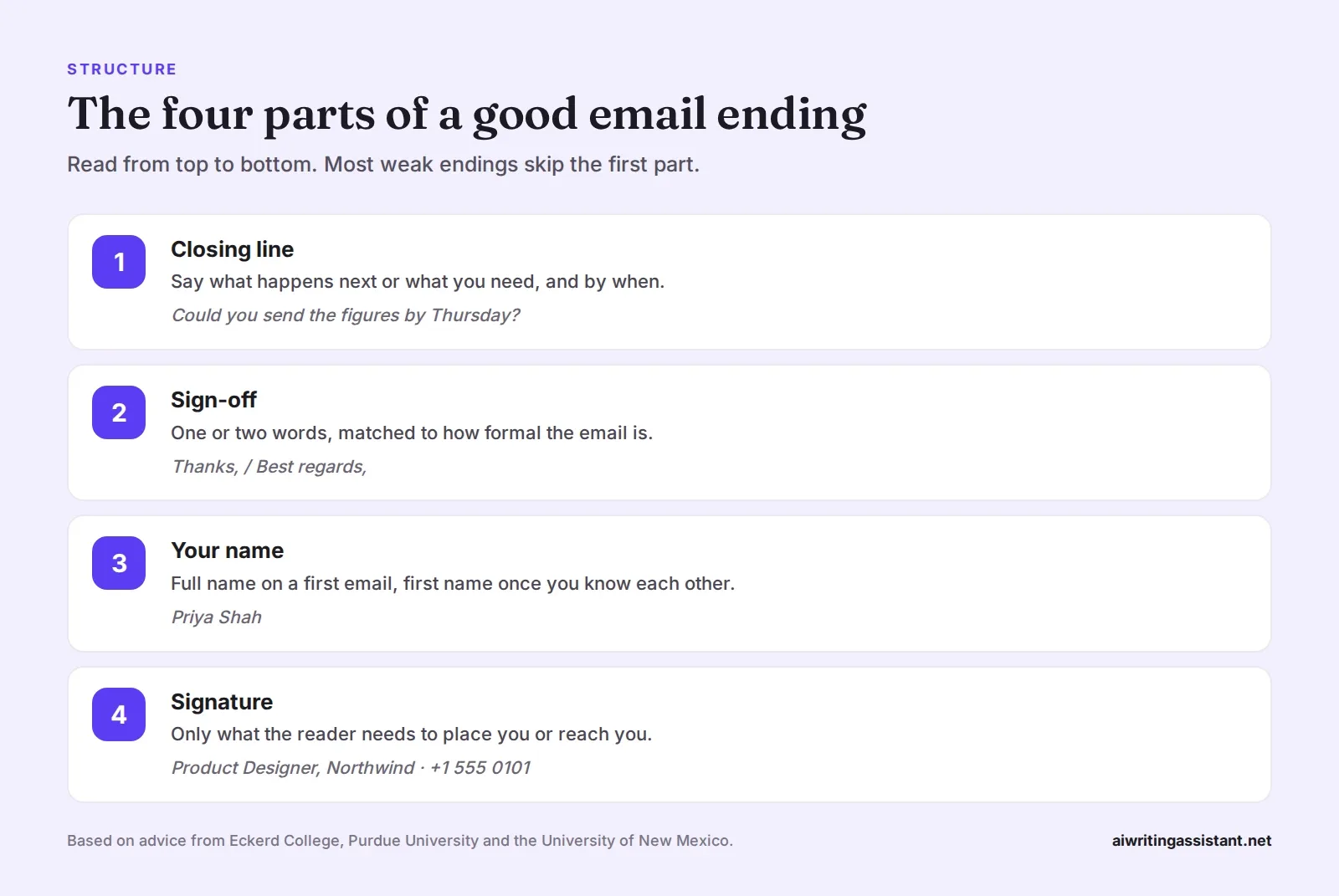
End with a closing line that states the next step, such as "Could you confirm by Friday?" Then add a short sign-off that fits the tone, like "Best regards" or "Thank you," followed by a comma and your name on the next line. For a first contact, add a simple signature with your role and how to reach you. Keep it brief and leave out anything the reader doesn't need.
1. Write a closing line that asks for something
Career advisers at Eckerd College put it simply. "End with a call to action and a professional sign-off." The call to action is the sentence before your sign-off, and it does more work than the sign-off itself.
| Instead of | Try |
|---|---|
| Let me know your thoughts. | Could you tell me by Wednesday if this works? |
| Hope this helps! | If anything in the attached plan looks off, reply and I'll fix it today. |
| Looking forward to hearing from you. | Are you free for 20 minutes on Tuesday or Thursday afternoon? |
| Any questions, just ask. | I'll call you Monday morning unless you'd prefer email. |
Specific closings get specific answers. Most real replies are short, too. A study of two million email users found the most likely reply length was "only five words." A clear question makes that five-word reply useful.
2. Pick a sign-off that fits the tone
There's no single right answer. The writing center at the Boston University College of Communication says there is "no 'right' way" to sign off, but it does suggest avoiding affectionate ones like "Love" in professional mail. University advising pages at Purdue and the University of New Mexico both suggest closings such as "Best regards" followed by your name.
| Situation | Good sign-offs | Avoid |
|---|---|---|
| Formal or first contact | Sincerely, Best regards, Kind regards, Respectfully | Cheers, Thx, no sign-off |
| Everyday work email | Best, Thanks, Thank you, Regards | Love, XOXO, Sent from my phone |
| Asking for help | Thanks so much, Thank you for your help, Thanks in advance | Hope to hear back ASAP |
| Friendly colleague | Cheers, Thanks!, Talk soon | Anything you wouldn't say out loud |
| Apology or bad news | With apologies, Thank you for understanding, Best regards | Cheers, exclamation marks |
Does your sign-off change how many replies you get?
Maybe a little. In 2017 the email app Boomerang looked at more than 350,000 email threads and compared reply rates by closing. "Thanks in advance" did best at 65.7%, against a baseline of 47.5% for all emails. Emails with any thankful closing got replies 62% of the time, compared with 46% for those without.
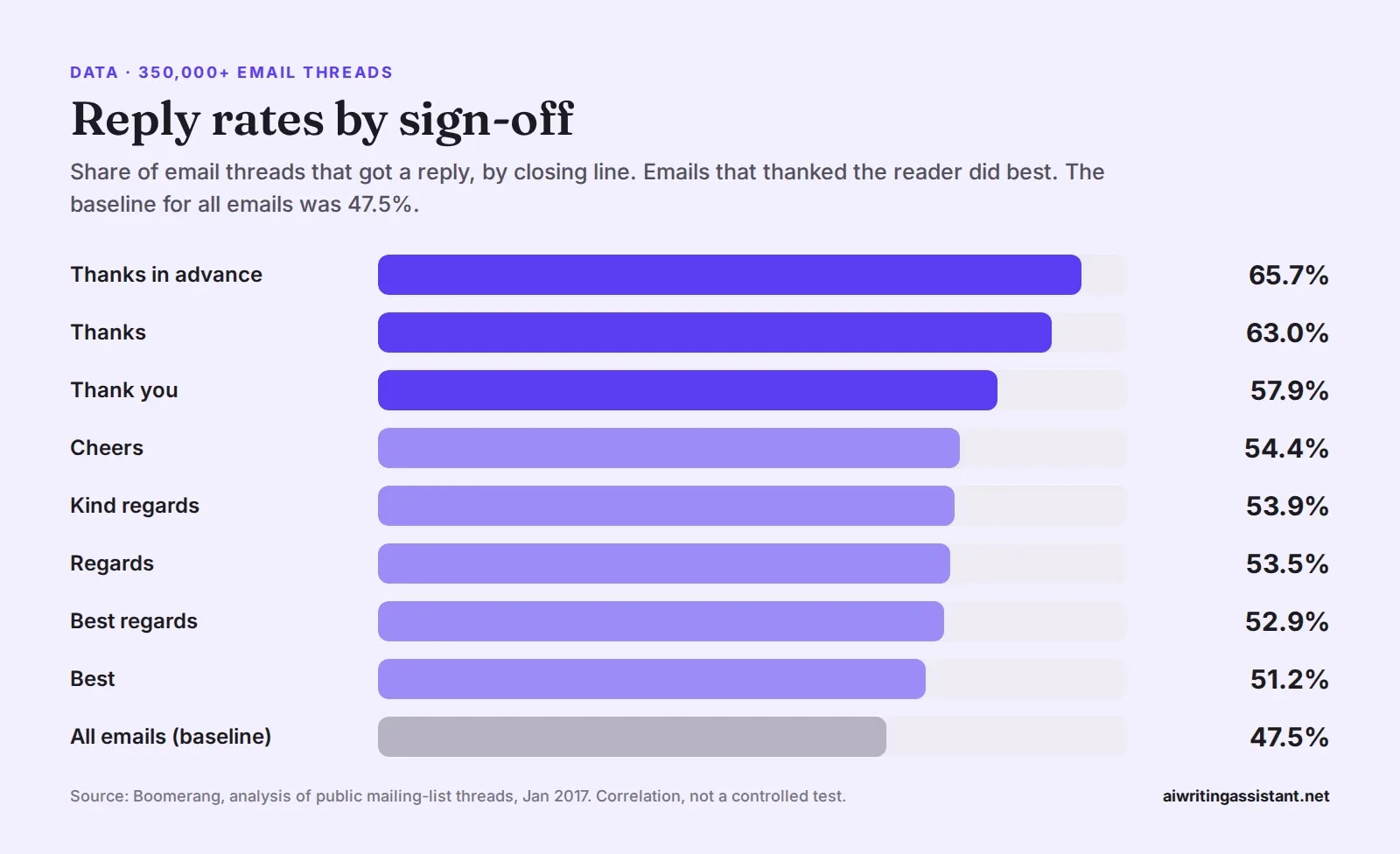
Treat those numbers with care. The emails came from public mailing lists, mostly open-source software forums, and Boomerang said it couldn't control for the relationship between sender and reader. It shows a pattern, not cause and effect.
There is stronger evidence that thanks itself helps. In a controlled experiment by Grant and Gino (2010), 66% of people who were thanked for their help agreed to help again, compared with 32% of people who weren't thanked. Thanking people for help they've already given makes them more willing to help again, which is worth remembering in long email threads.
3. Add your name, and a signature if it helps
On a first email, use your full name. After that, your first name is fine. A signature is useful when the reader needs context or a way to reach you. For students, the University of New Mexico suggests including your full name, major and intended graduation year.
Keep signatures short. A name, a role, an organization and one contact line is plenty. Legal notices and five social icons mostly make emails harder to read on a phone.
Email ending examples
| Type of email | Closing line and sign-off |
|---|---|
| Request to a manager | Could you approve the budget by Friday so I can book the venue? Thanks, Sam |
| Job application | Thank you for your time. I'd welcome the chance to talk about the role. Kind regards, Jordan Lee |
| Follow-up | I know it's a busy week. Is Thursday still a good day to decide? Best, Ana |
| Customer reply | If the refund hasn't arrived by the 12th, reply here and I'll chase it personally. Best regards, Omar, Support Team |
| Email to a professor | Would it be possible to meet during office hours on Tuesday? Thank you, Mia Chen, BIO 210 |
For full templates, see our guide on how to write a professional email.
Email endings to avoid
- No sign-off at all on a first or formal email. It can read as abrupt.
- "Let me know" with nothing to let you know about.
- Double sign-offs, like "Thanks! Best regards, Thanks again."
- Affectionate closings such as "Love" or "Hugs" at work.
- Long signatures with quotes, banners or multiple phone numbers.
- Apologizing at the end ("Sorry for the long email"). Cut the email instead.
Frequently asked questions
What is the best way to end a professional email?
End with a clear next step, then a sign-off such as "Best regards" or "Thank you," followed by your name.
Does "thanks in advance" get more replies?
In a 2017 Boomerang study of 350,000+ mailing-list threads, it had the highest reply rate at 65.7%. The data is correlational, so treat it as a pattern.
Is "Best" a rude sign-off?
No. It's neutral and common. In the same dataset it was slightly above the baseline reply rate.
Should there be a comma after the sign-off?
Yes, in most English business email. Write "Best regards," then your name on the next line.
What should go in an email signature?
Your name, role, organization and one way to reach you. Students can add their major and graduation year.
What sign-offs should I avoid at work?
Affectionate ones like "Love," jokey ones with people you don't know well, and none at all on a formal email.
How do you end an email asking for something?
State the request and the deadline in the last line, then thank the reader, for example "Could you confirm by Friday? Thank you."
 Grammar Checker
 Paraphraser
 Summarizer
 AI Writer
 AI Humanizer
 Text Compare