
McKinsey estimated that office workers spend about 28% of their workweek on email. That's a lot of reading, which is why the emails that get answered are the ones that respect the reader's time. Being professional doesn't mean being stiff. It means being clear, polite and easy to act on.
How do you write a professional email?
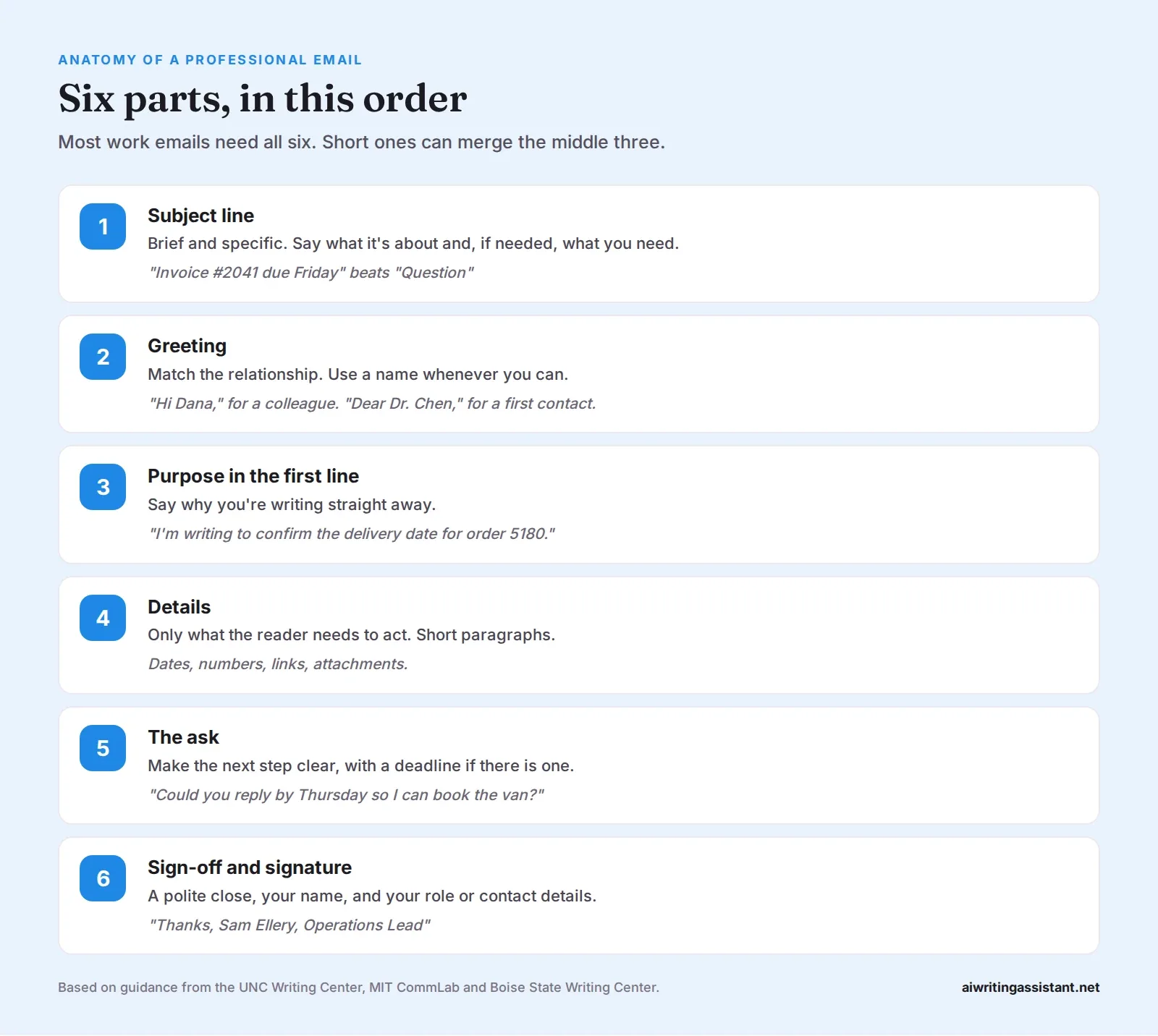
Start with a specific subject line. Greet the reader by name, then say why you're writing in the first sentence. Give only the details they need, in short paragraphs. End with a clear request or next step, including a deadline if there is one. Close with a polite sign-off and your name, role and contact details. Before sending, reread it for tone, names, dates and attachments.
1. Write a subject line that says something
The UNC Writing Center warns that "one-word subjects such as 'Hi,' 'Question,' or 'FYI' are not informative." Boise State recommends a "brief and specific subject line that includes keywords." In Boomerang's data, subject lines of three or four words got the most replies, and emails with no subject at all got just 14%.
| Vague | Specific |
|---|---|
| Question | Question about the Oct 12 delivery |
| Update | Website launch moved to Nov 3 |
| Hi | Intro: Leo Park, data analyst |
| Meeting | Can we meet Tues or Wed about the budget? |
2. Pick the right greeting
Match the greeting to the relationship. "Hi Dana," is fine for colleagues. "Dear Dr. Chen," suits a first contact or a formal request. MIT CommLab advises using "the most formal title that is appropriate" when you first write to someone. If you don't know a name, "Hello Support Team," works. Our guide to "To Whom It May Concern" covers when the old formal greeting still fits.
3. Say why you're writing in the first line
MIT CommLab's advice is to "front-load your key point." UNC says to "briefly state your purpose for writing in the very beginning." Skip "I hope this email finds you well" unless you really mean it. Your reader's first question is "what do you need from me?" Answer it.
4. Keep the body short
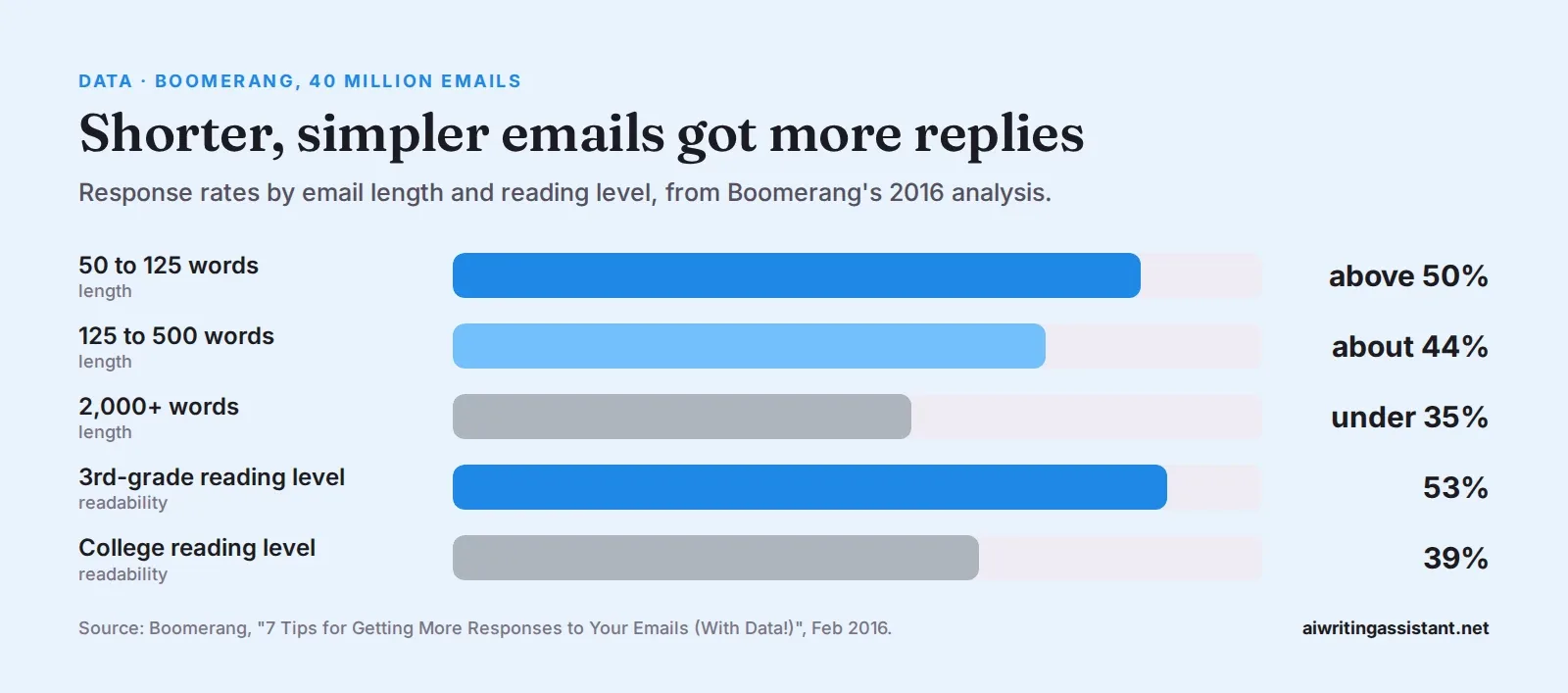
Give the facts the reader needs to act, and nothing more. Boise State notes that email paragraphs "will usually not exceed four to five sentences." Boomerang found that emails of 50 to 125 words got replies more than 50% of the time, while replies dropped to about 44% for 125 to 500 words and under 35% past 2,000.
Simple wording helps too. Emails written at a 3rd-grade reading level got 53% replies, against 39% for those written at a college level. That doesn't mean writing like a child. It means short sentences and plain words.
5. Make the ask impossible to miss
End the body with one clear request. "Could you send the figures by Friday?" is better than "Let me know your thoughts." Boomerang found that emails asking one to three questions were about 50% more likely to get a reply than emails asking none. More than that, and people start skipping some.
6. Sign off properly
"Best regards," "Kind regards," "Thanks," and "Best," are all safe. Add a signature with your full name, role and organization, and a phone number if the reader may need to call. Boise State recommends always including a signature block in professional email.
Getting the tone right
- Read it as the receiver. UNC points out that tone is easy to misread without a voice or face. A short reply can look cold.
- Use please and thank you, but skip long apologies.
- Avoid ALL CAPS and lots of exclamation marks. They read as shouting or panic.
- Don't write anything you wouldn't want forwarded. UNC puts it in capitals: "Email is NEVER private."
- Move hard conversations off email. Long, complicated, confidential or emotional topics go better in a call or meeting.
Professional email templates
Here are four common emails. Copy the structure, then swap in your own details.
Checklist before you hit send
- Is the subject line specific?
- Is the reader's name spelled correctly?
- Is your purpose in the first two lines?
- Is the ask clear, with a date if needed?
- Did you attach the attachment?
- Would you be fine if this were forwarded?
- Did you reread it once, out loud if possible?
Frequently asked questions
How do you write a professional email?
Write a specific subject line, greet the reader by name, state your purpose in the first sentence, give only the needed details, make a clear request, and close with a sign-off and signature.
How long should a professional email be?
As short as possible. Boomerang's data found emails of 50 to 125 words got the highest reply rates.
How do you start a professional email?
With a greeting that fits the relationship, such as "Hi Dana," or "Dear Dr. Chen," then one sentence saying why you're writing.
How do you end a professional email?
With a clear next step, then a sign-off like "Best regards" or "Thanks," and your name, role and contact details.
What is a good subject line for a professional email?
A short, specific one with keywords, such as "Invoice #2041 due Friday." Boomerang found three- to four-word subject lines got the most replies.
Is "I hope this email finds you well" professional?
It's polite but overused. Most writing guides suggest getting to your purpose in the first line instead.
Should I use "Dear" in an email?
For first contact or formal requests, yes. With colleagues you know, "Hi" plus their name is normal.
 Grammar Checker
 Paraphraser
 Summarizer
 AI Writer
 AI Humanizer
 Text Compare